CPU vs GPU Workloads on Bare Metal: When to Add GPUs and Why It Matters
As AI adoption accelerates and infrastructure costs come under sharper scrutiny, many teams find themselves asking the same question: do we actually need GPUs, or are CPUs still the right foundation for our workloads?
The answer is rarely obvious. GPUs promise dramatic performance gains for certain use cases, but they also introduce higher costs, tighter capacity planning, and new operational considerations. On bare metal, where hardware choices are explicit and utilization matters, the decision carries long-term implications for performance, budget predictability, and compliance.
Understanding how CPU and GPU workloads differ, and when GPUs truly add value, is essential for making infrastructure decisions that scale with the business rather than overshooting it.
What is the difference between CPU vs GPU workloads?
At a high level, CPUs and GPUs solve different kinds of problems, even though both are “compute.”
CPUs are optimized for:
- Low-latency, sequential processing
- Branch-heavy logic and mixed workloads
- Operating systems, databases, APIs, and transactional systems
GPUs are optimized for:
- Massive parallelism
- High-throughput math operations
- Repeating the same calculation across large data sets
A modern CPU might have 16-64 powerful cores designed to handle diverse tasks efficiently. A modern GPU may have thousands of simpler cores designed to execute the same instruction simultaneously across large matrices.
This architectural difference is why GPUs dominate AI training, blockchain environments, and scientific simulation, while CPUs still run most production infrastructure.
NVIDIA’s own architecture documentation breaks this down clearly, showing how GPUs trade flexibility for parallel scale in exchange for orders-of-magnitude throughput gains on the right workloads .
Why do most production workloads still run on CPUs?
Despite the attention GPUs receive, the majority of enterprise workloads remain CPU-bound for practical reasons.
Most business-critical systems involve:
- Databases with unpredictable access patterns
- APIs and microservices with bursty traffic
- ERP, CRM, and line-of-business applications
- Stateful services that prioritize latency over throughput
These workloads benefit from:
- High clock speeds
- Large caches
- Strong single-thread performance
- Predictable scheduling
Adding GPUs to these environments rarely improves performance and often increases cost and operational complexity. This is especially true on shared cloud platforms where GPU instances are scarce, expensive, and oversubscribed.
On bare metal, dedicated CPUs deliver consistent performance without noisy neighbor risk, which is why many teams repatriate steady-state workloads from public cloud once utilization stabilizes.
What types of workloads actually benefit from GPUs?
GPUs are most effective when performance depends on executing the same operation across large data sets at once, rather than on fast execution of individual threads.
Common GPU-accelerated workload categories include:
- Machine learning training: Neural networks rely on matrix multiplication and backpropagation, both of which scale efficiently across thousands of GPU cores.
- Inference at scale: Real-time or batch inference benefits from GPUs when throughput requirements are high and models are large.
- Computer vision and image processing: Tasks like object detection, video encoding, and medical imaging rely on parallel pixel-level computation.
- Scientific computing and simulation: Genomics, climate modeling, and physics simulations often show 10–100x acceleration on GPUs.
- Media rendering and transcoding: Video pipelines benefit from GPU acceleration when processing large volumes concurrently.
Frameworks like TensorFlow and PyTorch are explicitly optimized to offload tensor operations to GPUs, which is why GPU utilization often jumps from near-zero to near-saturation once properly configured.
When does adding GPUs on bare metal make financial sense?
This is where many teams misstep.
GPUs make sense when utilization is high and predictable. They rarely make sense for:
- Occasional experimentation
- Spiky, short-lived jobs
- Low-throughput inference
- General-purpose workloads
On bare metal, the cost model is straightforward:
- You pay for the hardware whether it’s used or not
- There is no per-minute abstraction to hide inefficiency
That clarity is a feature.
For teams running sustained AI training, continuous inference pipelines, or always-on data processing, bare metal GPUs often cost less over time than comparable hyperscaler instances once utilization exceeds roughly 40–50%, based on public cloud pricing comparisons.
GPU-heavy cloud pricing fluctuates with instance runtime, idle capacity, egress costs, and orchestration overhead. Bare metal provides a fixed, auditable cost structure that simplifies forecasting and budget control.
How do CPU-only and GPU-accelerated bare metal environments compare?
| Workload Characteristic | CPU-Only Bare Metal | GPU-Accelerated Bare Metal |
| Best for | Databases, APIs, ERP, steady services | AI/ML, simulation, rendering |
| Performance profile | Low latency, consistent | High throughput, parallel |
| Cost predictability | Very high | High with sustained use |
| Operational complexity | Low | Moderate |
| Compliance & isolation | Strong | Strong |
| Scaling model | Vertical or horizontal CPU | GPU count and memory bound |
This distinction matters because many environments benefit from both. A common pattern is CPU-dense clusters handling core services, paired with a smaller number of GPU servers dedicated to training or inference pipelines.
What are common mistakes teams make when adding GPUs?
Several patterns show up repeatedly in infrastructure audits:
Over-provisioning GPUs too early
Teams add GPUs before workloads are production-ready, leaving expensive hardware idle.
Underestimating data movement costs
GPU performance depends heavily on storage throughput and network locality.
Ignoring CPU-GPU balance
Starving GPUs with weak CPUs or insufficient RAM limits real-world gains.
Assuming GPUs fix latency problems
GPUs improve throughput, not request-level response time.
The most successful deployments start with CPU-only environments, profile workloads carefully, then introduce GPUs once bottlenecks are clearly identified.
How does bare metal improve GPU performance compared to shared cloud?
GPUs are sensitive to resource contention and topology inefficiencies.
In shared environments:
- Hardware topology and PCIe placement are abstracted and less controllable
- NUMA placement is opaque
- Network and storage paths vary per instance
- GPU scheduling introduces jitter
On dedicated bare metal:
- GPUs are physically isolated
- Memory bandwidth is consistent
- Network topology is predictable
- Storage can be tuned for throughput
For regulated industries or performance-sensitive AI workloads, this isolation simplifies compliance and removes performance variance that complicates benchmarking and capacity planning.
This is why many organizations train models on dedicated infrastructure even if inference later runs elsewhere.
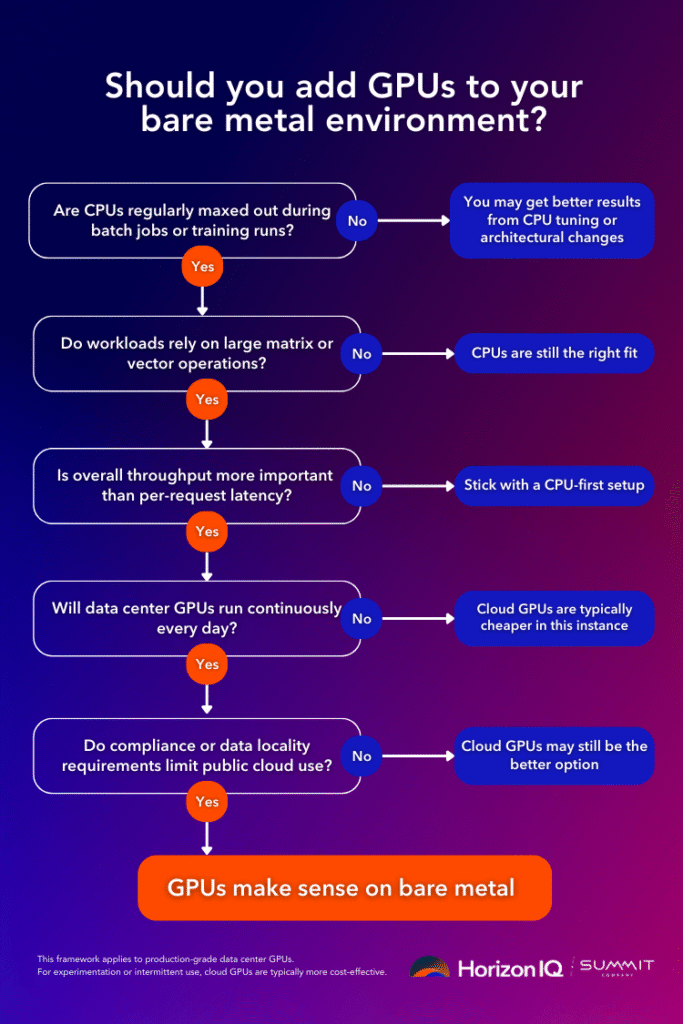
How should teams decide when to move from CPU to GPU infrastructure?
A practical decision framework looks like this:
- Are CPU cores consistently saturated during batch or training jobs?
- Do workloads involve large matrix or vector operations?
- Is throughput more important than per-request latency?
- Will GPUs be utilized for hours per day, not minutes?
- Does compliance or data locality restrict public cloud use?
If the answer is “yes” to most of these, GPUs are likely justified.
If the answers are mixed, CPU optimization, better parallelization, or architectural changes often deliver better ROI.
What does HorizonIQ recommend for GPU adoption on bare metal?
HorizonIQ typically sees the strongest outcomes when customers treat GPUs as purpose-built infrastructure, not general compute.
That means:
- Dedicated GPU nodes sized for sustained workloads
- CPU-only nodes for core services and control planes
- Fixed pricing that aligns cost with real utilization
- Direct access to hardware for tuning and optimization
This approach aligns with HorizonIQ’s broader bare metal philosophy: deliver raw performance, predictable cost, and full control without introducing unnecessary complexity.
For teams operating across multiple regions, dedicated GPU infrastructure also simplifies data residency and compliance requirements while maintaining consistent performance characteristics across environments.
When should you add GPUs to bare metal?
Add GPUs when parallelism is the constraint, utilization is sustained, and predictability matters more than elasticity.
Bare metal GPUs are most effective when they are actively used, sized to match real workload demand, integrated into day-to-day operations, and justified by sustained utilization rather than occasional experimentation.
For everything else, modern CPUs on dedicated infrastructure remain the most efficient and reliable foundation for production workloads.
If you’re evaluating whether GPUs belong in your environment, HorizonIQ’s bare metal specialists can help profile workloads, model costs, and design architectures that balance performance, control, and budget without overbuilding.