What is Proxmox Datacenter Manager?
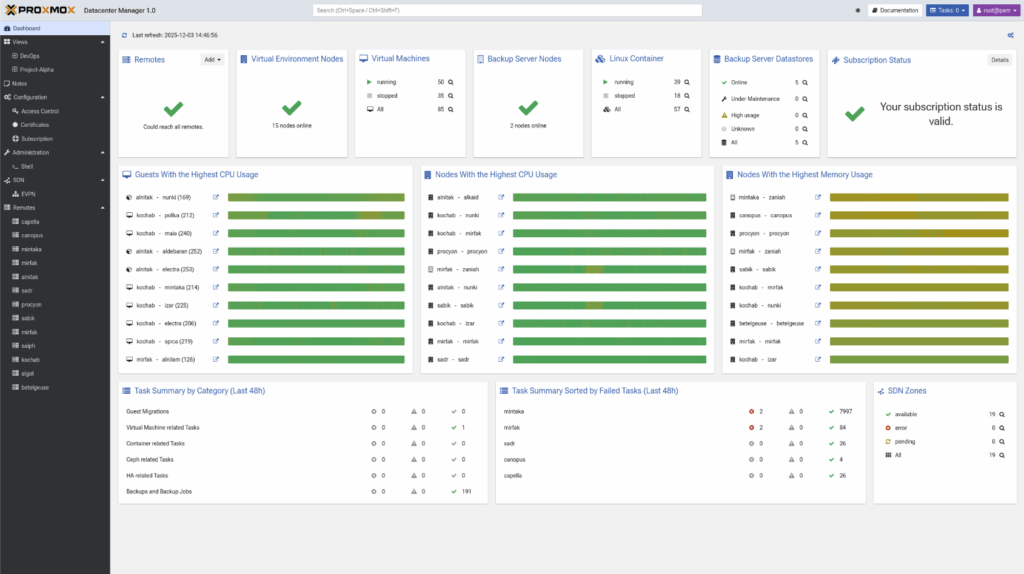
Proxmox Datacenter Manager is a centralized management platform for multi-node and multi-cluster Proxmox environments. It gives administrators a single place to monitor, manage, and scale large virtual infrastructures. Instead of logging into individual Proxmox VE hosts one by one, teams get a complete view of all clusters, all nodes, all VMs, all containers, and all Proxmox Backup Server instances in one interface.
The goal is simple: reduce complexity, increase visibility, and help teams run distributed environments with clarity instead of guesswork.
Why did Proxmox build a datacenter-level management tool?
As organizations adopt Proxmox VE at scale, distributed virtualization becomes harder to control. Workloads spread across sites, backup servers multiply, and new nodes appear in new regions. Without a centralized view, teams lose time switching between hosts or building makeshift workflows.
Proxmox Datacenter Manager solves this by linking everything through a single control plane. It brings structured, global oversight to operations that previously required manual effort. It also enables capabilities that are difficult or impossible when clusters are managed in isolation.
What is new in Proxmox Datacenter Manager 1.0?
Version 1.0 introduces several enterprise-grade capabilities:
- Global metrics aggregation
- Local caching for offline visibility
- A powerful Elasticsearch-style search
- Centralized update management
- Unified logs and task histories
- Secure shell access to all remotes
- A UI built with Rust/Yew for high responsiveness
The software runs on Debian 13.2 with Linux kernel 6.17 and ZFS 2.3. It is free, open source, and available as an ISO installer. Enterprises can subscribe to the Proxmox support program for stable repositories and technical assistance.
Why does this matter for VMware users searching for alternatives?
VMware customers are facing price increases, product bundling, and shrinking licensing flexibility. Many want an option that delivers enterprise-grade virtualization without the heavy overhead. What these users often miss most is the unified visibility they had in vCenter: inventory views, resource graphs, workload insights, and lifecycle controls.
Proxmox Datacenter Manager answers that gap. It introduces a similar centralized experience for Proxmox VE and Proxmox Backup Server.
- The interface feels familiar to anyone coming from VMware.
- The management model is simple.
- The licensing is predictable.
- The platform is open source and avoids lock-in.
For teams evaluating a VMware exit, Datacenter Manager makes Proxmox more suitable for enterprise-scale operations. It gives administrators confidence that they can transition away from vSphere and still manage everything from one pane of glass.
It offers the features many VMware shops rely on: central visibility, cross-cluster migrations, role-based access, auditing, and lifecycle controls. But it does so without forcing a subscription bundle or locking customers into proprietary components.
For many organizations, this is enough to justify piloting Proxmox alongside their existing infrastructure. As more VMware environments age out of support, tools like Datacenter Manager make Proxmox easier to adopt at scale.
How does Proxmox Datacenter Manager improve decision-making?
You get a clear, consolidated view of your entire environment. CPU, RAM, storage I/O, cluster health, node status, backup utilization, performance trends—everything displays in one place.
Instead of stitching together metrics, the system aggregates data from all connected remotes. Teams can spot growth patterns early, avoid unnecessary purchases, and understand the real resource profile of the datacenter.
This is especially valuable during VMware migrations. Many VMware environments hide inefficiencies. Administrators discover oversized VMs, unused volumes, and workloads that are more elastic than expected. Proxmox Datacenter Manager gives visibility into these details the moment clusters are connected.
What makes the platform native to the Proxmox ecosystem?
Datacenter Manager is built specifically for Proxmox VE and Proxmox Backup Server. It does not attempt to manage hypervisors outside the Proxmox family. That focus gives it tight integration:
- Native resource graphs
- Native datastore insights
- Native backup metrics
- Native access control
- Native API and SSO integration
Proxmox VE is already easy to manage as a standalone cluster. Proxmox Backup Server gives teams fast, deduplicated backups. Datacenter Manager ties them together into a cohesive, enterprise-ready control layer.
How does Proxmox Datacenter Manager support high availability?
The system enables cross-cluster live migration. This is one of the most important features for enterprise environments. A running VM can move between clusters without downtime. Administrators can shift workloads during maintenance, rebalance capacity, or respond to unexpected issues.
Combined with replication and backup integrations, the platform helps maintain uptime during incidents. VMware customers familiar with vMotion will understand this immediately. Proxmox offers a comparable capability with a more flexible, open-source architecture.
How does the platform scale with growing infrastructure?
As organizations add clusters, nodes, or remote locations, Datacenter Manager scales linearly. Each new remote becomes part of the central cockpit. The interface updates automatically. Search scales with it. Metrics scale with it. Role-based access scales with it.
This is valuable for service providers, MSPs, hosting companies, and large internal IT teams. Instead of stitching Proxmox clusters together manually, Datacenter Manager provides a unified framework for growth.
What are the key features that enable enterprise operations?
Several capabilities make the platform suitable for large, distributed infrastructures:
| Feature | Description |
Central Cockpit |
All Proxmox VE clusters, nodes, and backup servers display in one structured dashboard. Every VM, container, and datastore is visible. |
Multi-Cluster Management and Live Migration |
Start, stop, reboot, or migrate thousands of virtual guests from the central interface. No need to log into individual nodes. |
Deep Backup Integration |
Proxmox Backup Server remotes appear in the same environment with datastore metrics, RRD graphs, and performance indicators. |
Custom Views and Delegated Control |
Teams can create filtered views based on tags, remotes, or resource types. Permissions allow safe delegation without exposing underlying hosts. |
Metrics and Visualization |
Dashboards display usage, performance, and growth patterns. This helps with planning, rightsizing, and troubleshooting. |
Enterprise Authentication and API |
Supports LDAP, Active Directory, OpenID Connect, and API tokens for external automation pipelines. |
Centralized SDN (EVPN) |
EVPN zones and VNets can be configured across remotes from one place, simplifying networking at scale. |
Update Management |
A single panel displays all available updates across Proxmox VE and Proxmox Backup Server. |
Are there security considerations to keep in mind?
Like any open-source ecosystem, security depends on timely patching. Some organizations run outdated Proxmox versions tied to older Debian releases. These fall out of security coverage. Proxmox Datacenter Manager helps reduce this risk by centralizing update visibility. Teams can see which nodes need patches and take action before gaps widen.
Proxmox Server Solutions also encourages enterprise subscriptions for stable repository access and certified support. For production environments, this is strongly recommended.
Is Proxmox Datacenter Manager a true alternative to VMware vCenter?
For many organizations, yes. It delivers centralized visibility, multi-cluster control, live migration, resource insights, and simplified operations. It supports enterprise authentication, delegated access, and scalable management. It reduces licensing complexity and avoids vendor lock-in.
Proxmox VE already functions as a strong hypervisor alternative. Datacenter Manager extends that strength by giving enterprises the oversight layer they expect from a mature virtualization platform.
VMware customers searching for a predictable, transparent, open-source alternative will find that Proxmox now meets many of the operational requirements that once kept them tied to vSphere.
Looking to migrate without overlap costs?
Migration shouldn’t drain your budget. With HorizonIQ’s 2 Months Free, you can move workloads, skip the overlap bills, and gain extra time to switch providers without double paying.Get 2 Months Free
Experience enterprise-ready Proxmox management with HorizonIQ
Proxmox Datacenter Manager unlocks powerful multi-cluster control, but the real value emerges when it’s paired with a production-grade environment. At HorizonIQ, we deliver fully managed Proxmox Private Clouds built for scale and reliability, including:
- Enterprise HA clustering
- Ceph-backed block and object storage
- Predictable, flat-rate pricing
- 24×7 monitoring, patching, and incident response
If you want to move away from VMware’s rising costs without taking on infrastructure complexity, HorizonIQ handles the entire Proxmox stack for you. You get the simplicity of a turnkey private cloud while keeping the flexibility and control Proxmox is known for.
We also offer pre-built trial environments so you can test Proxmox Datacenter Manager, explore the UI, and validate performance before committing to a migration.