Month: December 2025

What is the difference between bare metal vs VPS hosting?
Bare metal hosting and virtual private servers (VPS) are two common infrastructure models used to run applications, databases, and digital platforms. The core difference is simple but operationally significant.
A VPS runs on shared physical hardware that is divided into multiple virtual environments. Bare metal provides exclusive access to a physical server with no virtualization layer and no other tenants.
This distinction affects performance consistency, security posture, compliance complexity, and long-term cost predictability. VPS can be sufficient for early-stage or experimental workloads. For production systems with sustained usage, performance sensitivity, or regulatory requirements, bare metal often delivers better outcomes.
This guide explains how bare metal and VPS compare across performance, cost, scalability, and security, and how to choose the right model based on workload maturity rather than hype.
What is a VPS?
A virtual private server (VPS) is a virtualized server instance created by partitioning a physical server using a hypervisor. Each VPS receives allocated CPU, memory, and storage, and operates independently at the software level, even though it shares hardware with other tenants.
VPS environments are widely used because they are easy to deploy, inexpensive to start, and flexible for short-term needs. They are commonly chosen for development environments, test workloads, small websites, and applications with variable or low resource demands.
However, VPS environments inherit tradeoffs from shared infrastructure that become more pronounced as workloads scale.
What is bare metal hosting?
Bare metal hosting provides a dedicated physical server reserved for a single customer. There is no hypervisor overhead and no resource sharing. All CPU, memory, storage, and network capacity belong to one environment.
Bare metal is commonly used for performance-sensitive, data-intensive, or regulated workloads where consistency and isolation matter more than rapid provisioning.
HorizonIQ offers bare metal infrastructure across nine global regions, designed for single-tenant deployments with predictable pricing and direct operational control.
How do bare metal and VPS compare across performance, cost, and security?
| Dimension | VPS (Virtual Private Server) | Bare Metal Server |
| Performance consistency | Variable. Performance can fluctuate due to shared hardware and noisy neighbors. | Deterministic. Full access to physical resources with no contention. |
| Latency | Higher and less predictable due to virtualization overhead. | Lower and consistent, ideal for latency-sensitive workloads. |
| Resource isolation | Logical isolation via hypervisor. Hardware is shared. | Physical isolation. Single-tenant by design. |
| Cost model | Appears low at entry but scales unpredictably with usage. | Fixed, transparent monthly pricing with predictable spend. |
| Cost efficiency at scale | Degrades as workloads grow and require more instances or premium tiers. | Improves with sustained utilization and stable workloads. |
| Security posture | Shared infrastructure increases attack surface and audit complexity. | Reduced risk due to physical isolation and no shared tenants. |
| Compliance readiness | Requires additional controls and documentation to meet standards. | Simplifies SOC 2, PCI DSS, HIPAA, and data residency requirements. |
| Scalability speed | Fast to spin up new instances for short-term needs. | Scales more deliberately but with predictable performance outcomes. |
| Best-fit workloads | Dev/test, small apps, short-lived or bursty workloads. | Databases, AI/ML, ERP, regulated apps, high-throughput platforms. |
Most infrastructure failures are caused by variance, not lack of peak capacity. Shared environments optimize for averages. Dedicated infrastructure optimizes for certainty.
Looking to migrate without overlap costs?
Migration shouldn’t drain your budget. With HorizonIQ’s 2 Months Free, you can move workloads, skip the overlap bills, and gain extra time to switch providers without double paying.
Get 2 Months FreeWhich option is more cost effective over time?
VPS typically looks cheaper at the start. Bare metal often costs less over time for stable workloads.
VPS pricing is consumption-based and grows as workloads expand. Teams frequently add instances, storage tiers, bandwidth, and premium options to maintain performance, which introduces cost unpredictability.
Bare metal uses a fixed pricing model. Resources are dedicated regardless of utilization, which simplifies forecasting and reduces billing volatility. This is especially relevant for applications with steady traffic, databases, and backend systems.
Industry data supports this shift: 84% of enterprises cite managing cloud spend as their top challenge, highlighting the operational burden of variable pricing models.
HorizonIQ customers commonly see up to 70% cost savings versus hyperscale cloud pricing for sustained workloads due to single-tenant infrastructure and optimized networking components .
Which is more secure: bare metal or VPS?
Security differences stem from isolation.
VPS environments rely on logical separation. While modern hypervisors are secure, shared hardware increases the potential impact of misconfiguration, side-channel risks, and audit complexity.
Bare metal provides physical isolation. There are no co-tenants, no shared memory pools, and no hypervisor escape concerns. This reduces risk and simplifies compliance documentation.
For regulated industries such as healthcare, government, and financial services, physical isolation is often preferred because it reduces the number of assumptions auditors must accept.
How do bare metal and VPS handle scalability?
VPS excels at rapid, short-term scaling. New instances can be provisioned in minutes, which is useful for experimentation or burst workloads.
Bare metal scales more intentionally. Provisioning takes longer, but performance remains consistent as capacity increases.
When does VPS make sense?
VPS is typically a good fit when:
- Workloads are temporary or experimental
- Performance variability is acceptable
- Compliance requirements are minimal
- Infrastructure needs change frequently
- Cost sensitivity outweighs predictability
When does bare metal make sense?
Bare metal is usually the better choice when:
- Workloads are sustained and predictable
- Performance consistency affects user experience or revenue
- Compliance or data sovereignty is required
- Specialized hardware is needed
- Monthly cost predictability matters
Market data shows increasing adoption of bare metal as organizations repatriate workloads from shared cloud environments. The bare metal cloud market is projected to grow from $8.5 billion in 2023 to over $19 billion by 2028, driven by demand for dedicated performance and cost control.
Why are companies moving from VPS to bare metal?
Common drivers include:
- Unpredictable performance under load
- Escalating monthly cloud bills
- Compliance complexity
- Limited control over hardware and networking
- Increased demand for AI and data-intensive workloads
This shift is rarely ideological. It is a response to operational reality as systems mature.
How does HorizonIQ support bare metal deployments?
HorizonIQ focuses on single-tenant bare metal designed for long-term operational efficiency.
Key capabilities include:
- Dedicated bare metal infrastructure across nine global regions
- Transparent pricing with predictable monthly costs
- Proprietary load balancers and firewalls that reduce infrastructure overhead
- Compass, a unified management platform for visibility and control
- White-glove support that acts as an extension of internal IT teams
This approach aligns with HorizonIQ’s mission to empower businesses with tailored, future-proof infrastructure solutions .
How should businesses choose between bare metal and VPS?
The decision comes down to workload maturity.
If infrastructure needs are still exploratory, VPS provides flexibility. If systems are mission critical, regulated, or performance sensitive, bare metal provides certainty.
As organizations scale, the question shifts from how fast infrastructure can be deployed to how reliably it can perform.
For teams evaluating that transition, HorizonIQ offers bare metal infrastructure starting at just 39/month. If you’re looking for infrastructure built for predictable performance, cost clarity, and global deployment, we’d be happy to walk you through our bare metal lineup. Contact us today to learn more.
Explore HorizonIQ's
Managed Private Cloud
LEARN MORE
Stay Connected


About Author


What is Proxmox Datacenter Manager?
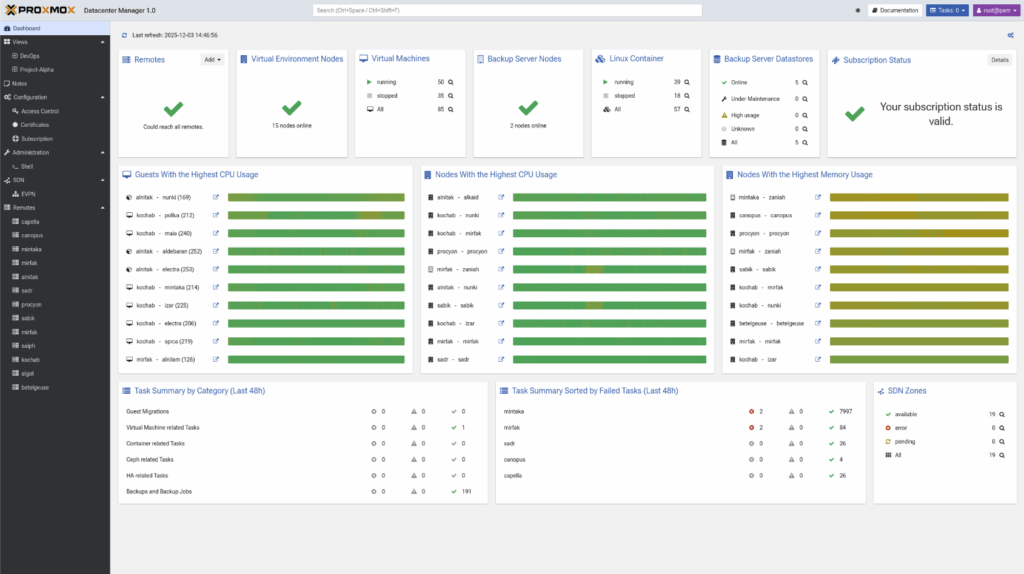
Proxmox Datacenter Manager is a centralized management platform for multi-node and multi-cluster Proxmox environments. It gives administrators a single place to monitor, manage, and scale large virtual infrastructures. Instead of logging into individual Proxmox VE hosts one by one, teams get a complete view of all clusters, all nodes, all VMs, all containers, and all Proxmox Backup Server instances in one interface.
The goal is simple: reduce complexity, increase visibility, and help teams run distributed environments with clarity instead of guesswork.
Why did Proxmox build a datacenter-level management tool?
As organizations adopt Proxmox VE at scale, distributed virtualization becomes harder to control. Workloads spread across sites, backup servers multiply, and new nodes appear in new regions. Without a centralized view, teams lose time switching between hosts or building makeshift workflows.
Proxmox Datacenter Manager solves this by linking everything through a single control plane. It brings structured, global oversight to operations that previously required manual effort. It also enables capabilities that are difficult or impossible when clusters are managed in isolation.
What is new in Proxmox Datacenter Manager 1.0?
Version 1.0 introduces several enterprise-grade capabilities:
- Global metrics aggregation
- Local caching for offline visibility
- A powerful Elasticsearch-style search
- Centralized update management
- Unified logs and task histories
- Secure shell access to all remotes
- A UI built with Rust/Yew for high responsiveness
The software runs on Debian 13.2 with Linux kernel 6.17 and ZFS 2.3. It is free, open source, and available as an ISO installer. Enterprises can subscribe to the Proxmox support program for stable repositories and technical assistance.
Why does this matter for VMware users searching for alternatives?
VMware customers are facing price increases, product bundling, and shrinking licensing flexibility. Many want an option that delivers enterprise-grade virtualization without the heavy overhead. What these users often miss most is the unified visibility they had in vCenter: inventory views, resource graphs, workload insights, and lifecycle controls.
Proxmox Datacenter Manager answers that gap. It introduces a similar centralized experience for Proxmox VE and Proxmox Backup Server.
- The interface feels familiar to anyone coming from VMware.
- The management model is simple.
- The licensing is predictable.
- The platform is open source and avoids lock-in.
For teams evaluating a VMware exit, Datacenter Manager makes Proxmox more suitable for enterprise-scale operations. It gives administrators confidence that they can transition away from vSphere and still manage everything from one pane of glass.
It offers the features many VMware shops rely on: central visibility, cross-cluster migrations, role-based access, auditing, and lifecycle controls. But it does so without forcing a subscription bundle or locking customers into proprietary components.
For many organizations, this is enough to justify piloting Proxmox alongside their existing infrastructure. As more VMware environments age out of support, tools like Datacenter Manager make Proxmox easier to adopt at scale.
How does Proxmox Datacenter Manager improve decision-making?
You get a clear, consolidated view of your entire environment. CPU, RAM, storage I/O, cluster health, node status, backup utilization, performance trends—everything displays in one place.
Instead of stitching together metrics, the system aggregates data from all connected remotes. Teams can spot growth patterns early, avoid unnecessary purchases, and understand the real resource profile of the datacenter.
This is especially valuable during VMware migrations. Many VMware environments hide inefficiencies. Administrators discover oversized VMs, unused volumes, and workloads that are more elastic than expected. Proxmox Datacenter Manager gives visibility into these details the moment clusters are connected.
What makes the platform native to the Proxmox ecosystem?
Datacenter Manager is built specifically for Proxmox VE and Proxmox Backup Server. It does not attempt to manage hypervisors outside the Proxmox family. That focus gives it tight integration:
- Native resource graphs
- Native datastore insights
- Native backup metrics
- Native access control
- Native API and SSO integration
Proxmox VE is already easy to manage as a standalone cluster. Proxmox Backup Server gives teams fast, deduplicated backups. Datacenter Manager ties them together into a cohesive, enterprise-ready control layer.
How does Proxmox Datacenter Manager support high availability?
The system enables cross-cluster live migration. This is one of the most important features for enterprise environments. A running VM can move between clusters without downtime. Administrators can shift workloads during maintenance, rebalance capacity, or respond to unexpected issues.
Combined with replication and backup integrations, the platform helps maintain uptime during incidents. VMware customers familiar with vMotion will understand this immediately. Proxmox offers a comparable capability with a more flexible, open-source architecture.
How does the platform scale with growing infrastructure?
As organizations add clusters, nodes, or remote locations, Datacenter Manager scales linearly. Each new remote becomes part of the central cockpit. The interface updates automatically. Search scales with it. Metrics scale with it. Role-based access scales with it.
This is valuable for service providers, MSPs, hosting companies, and large internal IT teams. Instead of stitching Proxmox clusters together manually, Datacenter Manager provides a unified framework for growth.
What are the key features that enable enterprise operations?
Several capabilities make the platform suitable for large, distributed infrastructures:
| Feature | Description |
Central Cockpit |
All Proxmox VE clusters, nodes, and backup servers display in one structured dashboard. Every VM, container, and datastore is visible. |
Multi-Cluster Management and Live Migration |
Start, stop, reboot, or migrate thousands of virtual guests from the central interface. No need to log into individual nodes. |
Deep Backup Integration |
Proxmox Backup Server remotes appear in the same environment with datastore metrics, RRD graphs, and performance indicators. |
Custom Views and Delegated Control |
Teams can create filtered views based on tags, remotes, or resource types. Permissions allow safe delegation without exposing underlying hosts. |
Metrics and Visualization |
Dashboards display usage, performance, and growth patterns. This helps with planning, rightsizing, and troubleshooting. |
Enterprise Authentication and API |
Supports LDAP, Active Directory, OpenID Connect, and API tokens for external automation pipelines. |
Centralized SDN (EVPN) |
EVPN zones and VNets can be configured across remotes from one place, simplifying networking at scale. |
Update Management |
A single panel displays all available updates across Proxmox VE and Proxmox Backup Server. |
Are there security considerations to keep in mind?
Like any open-source ecosystem, security depends on timely patching. Some organizations run outdated Proxmox versions tied to older Debian releases. These fall out of security coverage. Proxmox Datacenter Manager helps reduce this risk by centralizing update visibility. Teams can see which nodes need patches and take action before gaps widen.
Proxmox Server Solutions also encourages enterprise subscriptions for stable repository access and certified support. For production environments, this is strongly recommended.
Is Proxmox Datacenter Manager a true alternative to VMware vCenter?
For many organizations, yes. It delivers centralized visibility, multi-cluster control, live migration, resource insights, and simplified operations. It supports enterprise authentication, delegated access, and scalable management. It reduces licensing complexity and avoids vendor lock-in.
Proxmox VE already functions as a strong hypervisor alternative. Datacenter Manager extends that strength by giving enterprises the oversight layer they expect from a mature virtualization platform.
VMware customers searching for a predictable, transparent, open-source alternative will find that Proxmox now meets many of the operational requirements that once kept them tied to vSphere.
Looking to migrate without overlap costs?
Migration shouldn’t drain your budget. With HorizonIQ’s 2 Months Free, you can move workloads, skip the overlap bills, and gain extra time to switch providers without double paying.
Get 2 Months FreeExperience enterprise-ready Proxmox management with HorizonIQ
Proxmox Datacenter Manager unlocks powerful multi-cluster control, but the real value emerges when it’s paired with a production-grade environment. At HorizonIQ, we deliver fully managed Proxmox Private Clouds built for scale and reliability, including:
- Enterprise HA clustering
- Ceph-backed block and object storage
- Predictable, flat-rate pricing
- 24×7 monitoring, patching, and incident response
If you want to move away from VMware’s rising costs without taking on infrastructure complexity, HorizonIQ handles the entire Proxmox stack for you. You get the simplicity of a turnkey private cloud while keeping the flexibility and control Proxmox is known for.
We also offer pre-built trial environments so you can test Proxmox Datacenter Manager, explore the UI, and validate performance before committing to a migration.
Explore HorizonIQ's
Managed Private Cloud
LEARN MORE
Stay Connected
Related Posts

From the Slopes to the Data Center: Why Mission-Critical Events Still Depend on Private Infrastructure
Read Blog
What Are Noisy Neighbors in Cloud Computing? How Isolation Improves Performance Guarantees
Read Blog
Single-Tenant vs. Multi-Tenant Infrastructure: How to Choose the Right Model for Performance, Security, and Cost Control
Read BlogAbout Author

The growth in AI workloads over the past two years has pushed GPU demand into a new orbit. Enterprises that once used a handful of A100s now require entire racks of Hopper-class accelerators to train, tune, and serve models efficiently. With the introduction of the NVIDIA H200, organizations are re-evaluating their cluster designs, comparing it directly to the widely adopted NVIDIA H100.
Let’s analyze the architectural differences, workload behaviors, cluster scaling considerations, and enterprise implications of choosing between the H200 and H100. In this article, we aim to help technical leaders make informed decisions as AI infrastructure requirements evolve.
Why are businesses comparing the NVIDIA H200 and H100?
Three industry shifts make this comparison especially relevant:
1. Model sizes have accelerated past earlier hardware assumptions
Modern LLMs increasingly exceed 70 billion parameters. Enterprises deploying AI assistants, generative pipelines, or multi-agent systems need GPUs that can store and serve these models efficiently.
2. Inference is becoming the dominant operational workload
Across many enterprise AI environments, inference and fine-tuning workloads now outweigh full-scale model training. This places memory, batch efficiency, and model capacity at the center of GPU decisions.
3. Private cloud and dedicated GPU infrastructure are surging
With hyperscaler costs climbing and predictable pricing becoming a priority, organizations are turning to single-tenant private cloud deployments. Choosing the right GPU matters for cost control, compliance, and long-term scalability.
What are the architectural differences between the NVIDIA H200 and H100?
Both GPUs use NVIDIA’s Hopper architecture and support next-generation AI workloads, but the H200 introduces a major upgrade: HBM3e memory with significantly higher capacity and bandwidth.
Here’s the full comparison:
| Feature | NVIDIA H200 | NVIDIA H100 |
| Architecture | Hopper | Hopper |
| Memory Type | HBM3e | HBM3 |
| Memory Capacity | 141 GB | 80 GB |
| Memory Bandwidth | Up to ~4.8 TB/s | 3.35 TB/s |
| FP64 | 34 TFLOPS | 34 TFLOPS |
| FP64 Tensor Core | 67 TFLOPS | 67 TFLOPS |
| FP32 | 67 TFLOPS | 67 TFLOPS |
| TF32 Tensor Core | 989 TFLOPS | 989 TFLOPS |
| FP16 / BF16 Tensor Core | High-capacity FP16 compute | 1979 TFLOPS |
| FP8 Tensor Core | Supported (HBM3e optimized) | 3958 TFLOPS |
| NVLink | Next-gen NVLink supported | 900 GB/s |
| MIG Support | Yes | Up to 7 MIGs |
| Confidential Computing | Yes | Yes |
| Best For | Large-model inference, RAG, long-context LLMs | Training, HPC compute, tensor-core scaling |
The difference in memory capacity (141 GB vs 80 GB) is the most important architectural divergence and shapes nearly all workload recommendations.
How does the H200’s HBM3e memory affect performance?
HBM3e is the core reason the H200 behaves differently from the H100.
The H200’s memory advantages include:
- Accommodating much larger models on a single GPU
- Reducing or eliminating tensor parallelism for many workloads
- Enabling larger batch sizes for inference
- Improving throughput for long-context transformers
- Minimizing memory spillover into CPU RAM
- Lowering latency for interactive applications
For enterprises deploying production LLMs, the H200’s memory capacity is often the deciding factor.
Which GPU is better for AI training: the H200 or H100?
For most training scenarios, the H100 remains the stronger choice, especially in multi-GPU environments.
Based on the NVIDIA H100 datasheet:
- H100 delivers up to 4X faster GPT-3 175B training than A100
- H100 provides 60 TFLOPS of FP64 tensor compute, a major advantage for HPC
- H100’s NVLink bandwidth (900 GB/s) enables highly efficient multi-GPU scaling
These capabilities make the H100 ideal for:
- Foundational model training
- Multi-node training using tensor or pipeline parallelism
- HPC workloads requiring FP64 precision
- Dense scientific compute
The H200 can assist memory-bound training, but its primary value is not raw tensor compute throughput.
Which GPU is better for LLM inference?
The H200 is the stronger GPU for large-model inference due to its memory capacity and higher HBM bandwidth.
H200 inference advantages
- Hosts very large LLMs directly on GPU memory
- Allows larger batch sizes with lower latency
- Reduces cross-GPU communication
- Supports long-context models with less fragmentation
- Simplifies production deployment architecture
Where the H100 still performs well
- Smaller or mid-size models
- Inference on 30B–70B models when paired with efficient sharding
- Architectures where tensor-core throughput matters more than memory
In large-scale LLM hosting scenarios—particularly 70B+ model families—the H200 provides an architectural advantage that is difficult to replicate through scaling alone.
Looking to migrate without overlap costs?
Migration shouldn’t drain your budget. With HorizonIQ’s 2 Months Free, you can move workloads, skip the overlap bills, and gain extra time to switch providers without double paying.
Get 2 Months Free
Looking to migrate without overlap costs?
Migration shouldn’t drain your budget. With HorizonIQ’s 2 Months Free, you can move workloads, skip the overlap bills, and gain extra time to switch providers without double paying.
Get 2 Months FreeHow do their cluster scaling behaviors differ?
Cluster scaling is where the two GPUs diverge most clearly.
H100 scaling characteristics
- NVLink (900 GB/s) provides extremely fast interconnects
- Ideal for distributed training
- Works well with the NVLink Switch System for large clusters
- Training frameworks already deeply optimized for H100
H200 scaling characteristics
- Reduces the need for large multi-GPU clusters by hosting larger models on a single GPU
- Minimizes multi-GPU tensor parallelism
- Lowers operational complexity for inference workloads
- Simplifies long-context and memory-heavy deployments
In short: H100 = best for scaling out training. H200 = best for avoiding scaling altogether for inference.
How do the H200 and H100 compare for MIG partitioning and security?
Both GPUs support:
- NVIDIA Confidential Computing
- Up to 7 MIG instances
- Strong isolation for multi-workload environments
This makes either GPU suitable for industries requiring strict compliance and workload separation, including:
- Financial services
- Healthcare
- Government and public sector
- Regulated enterprise environments
On HorizonIQ’s single-tenant architecture, MIG is typically used for internal team separation rather than multi-customer tenancy, aligning well with security and predictability goals.
Which GPU is more cost-effective in an enterprise environment?
HorizonIQ provides predictable, transparent monthly pricing for both GPUs, but cost-effectiveness depends entirely on workload:
Choose the H100 when:
- You are training models regularly
- You need NVLink-enabled scaling
- You work heavily with tensor-core-optimized frameworks
- You run scientific or HPC workloads that benefit from FP64 and FP32 performance
Choose the H200 when:
- You are deploying LLMs in production
- You work with models above 70B parameters
- You need larger context windows
- You want to simplify your inference stack or reduce node count
- You want lower inference latency for user-facing apps
HorizonIQ strengthens both options with:
- Predictable monthly pricing
- 9 global regions
- Single-tenant GPU environments
- 100% uptime SLA
- Compass for proactive monitoring and control
- Compliance-ready infrastructure
What’s the best long-term GPU strategy for enterprise AI?
Choose the H200 if your primary workload is LLM inference
It simplifies architecture, supports larger models, and eliminates memory constraints.
Choose the H100 if your primary workload is training
It delivers the strongest tensor-core throughput and multi-GPU scaling efficiency.
Many enterprises benefit from a hybrid approach
Train on H100, deploy on H200. This balances cost, performance, and long-term versatility.
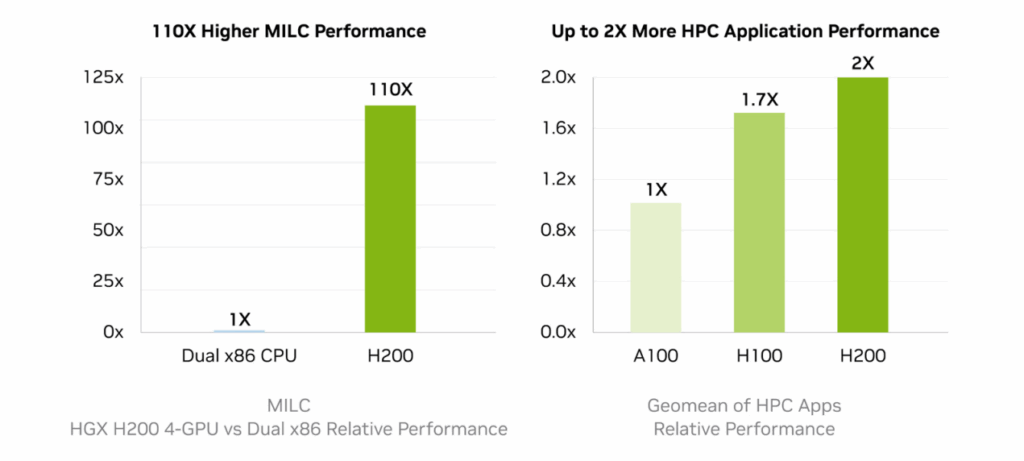
Final Verdict: NVIDIA H200 vs H100?
Both GPUs are exceptional, but designed for different tasks:
- H200 is optimized for large-model inference, RAG pipelines, long-context LLMs, and memory-bound AI workloads.
- H100 is optimized for training, HPC workloads, and multi-GPU scaling, where tensor-core throughput and NVLink performance matter most.
Enterprises running modern AI platforms often pair both: H100 for training pipelines and H200 for production-scale inference. HorizonIQ’s single-tenant GPU infrastructure provides a predictable, compliant, and high-performance foundation for either approach.
Explore HorizonIQ's
Managed Private Cloud
LEARN MORE
Stay Connected

About Author