Month: February 2026
NVIDIA H200 vs H100 vs L40S: A Decision Matrix for AI Infrastructure
Choosing the right NVIDIA GPU depends on how your workload behaves. High-performance AI infrastructure doesn’t have to be expensive. But it does have to be intentional.
If you’re deploying mature AI applications for customer-facing use, the wrong GPU can mean:
- Overpaying for unused capacity
- Hitting memory ceilings during training
- Latency instability during inference
- Inefficient scaling across clusters
At HorizonIQ, we deploy NVIDIA-powered small to mid-sized GPU clusters in single-tenant environments at up to 50% lower cost than major public cloud providers.
Clusters can start as small as three nodes with three GPUs and scale to hundreds of GPUs for production AI systems.
This guide compares the NVIDIA H200, NVIDIA H100, and NVIDIA L40S GPUs using a workload-driven decision matrix instead of a spec sheet.
GPU Comparison Overview
Core Architectural Differences
| GPU | Architecture | Memory | Memory Bandwidth | Primary Strength |
| H200 | Hopper | 141GB HBM3e | ~4.8 TB/s | Memory-heavy AI + HPC |
| H100 | Hopper | 80GB HBM3 | ~3.35 TB/s | Compute-heavy AI acceleration |
| L40S | Ada Lovelace | 48GB GDDR6 | Lower vs Hopper | Versatile AI + graphics |
At a high level:
H200 = memory-first
H100 = compute-first
L40S = versatile + cost-efficient
Decision Matrix: Which GPU Fits Your Workload?
-
Large Language Model (LLM) Training
| Scenario | Best Choice | Why |
| Training models >70B parameters | H200 | Larger HBM3e memory keeps more parameters on-GPU |
| Training 7B–40B models | H100 | High FP8 Tensor Core throughput |
| Small model experimentation | L40S | Lower cost, sufficient compute |
If you are memory-bound, H200 reduces inter-GPU communication overhead.
If you are compute-bound, H100 often delivers stronger cost-to-throughput efficiency.
-
AI Inference at Scale
| Scenario | Best Choice | Why |
| Large context window inference | H200 | Higher memory bandwidth reduces stalls |
| High-throughput API inference | H100 | Transformer Engine optimizes mixed precision |
| Edge / lightweight inference | L40S | Lower power draw, strong cost efficiency |
Inference environments are often less memory-constrained than training environments. That makes H100 a strong middle-ground choice for production AI APIs.
-
High Performance Computing (HPC)
| Scenario | Best Choice | Why |
| Memory-bound simulations | H200 | Higher bandwidth |
| Compute-bound simulations | H100 | Strong FP64 and Tensor throughput |
| Mixed AI + visualization | L40S | Combines compute + graphics |
For tightly coupled HPC workloads, multi-GPU scaling behavior matters more than raw TFLOPS.
-
Generative AI + Media + 3D Workloads
| Scenario | Best Choice | Why |
| Text + image generation | H100 | High mixed precision acceleration |
| AI + 3D rendering | L40S | Graphics + AI in one platform |
| Video encoding pipelines | L40S | Integrated media acceleration |
L40S shines in multi-workload environments that combine AI with rendering or media pipelines.
Cost-to-Performance Positioning
| GPU | Starting Monthly Price* | Ideal Buyer Profile |
| H200 | $1,800 | Enterprises training large models |
| H100 | $1,500 | Teams running production AI pipelines |
| L40S | $500 | Startups, SLM deployments, hybrid workloads |
*GPU hardware pricing only. Full systems include compute, storage, and networking.
For many organizations, the real question isn’t “which is fastest?” It’s:
Which GPU minimizes cost per useful training hour?
L40S often wins for small-model deployments.
H100 balances performance and economics.
H200 wins when memory ceilings become architectural bottlenecks.
Cluster Sizing Considerations
HorizonIQ can deploy:
- 3-GPU starter clusters for lightweight AI
- 8–32 GPU mid-scale clusters
- Hundreds of GPUs for large-scale AI systems
All deployments are single-tenant, eliminating noisy neighbors and shared PCIe contention.
This matters more than most teams realize.
In multi-tenant cloud environments, interconnect contention and thermal throttling can erode theoretical GPU advantages.
Dedicated infrastructure preserves:
- Deterministic memory bandwidth
- Stable NVLink performance
- Consistent thermal headroom
- Clear compliance boundaries
When Should You Choose Each GPU?
Choose H200 If:
- You’re training very large foundation models
- Memory is your primary bottleneck
- You want fewer GPUs per model replica
- You operate memory-heavy HPC workloads
Choose H100 If:
- You run production LLM pipelines
- You need balanced compute + memory
- You want strong FP8 acceleration
- You are scaling inference APIs
Choose L40S If:
- You deploy small language models
- You combine AI with graphics workloads
- You need cost-efficient generative AI
- You are piloting AI without full-scale investment
Public Cloud vs Dedicated GPU Infrastructure
| Scenario | Public Cloud GPU | Dedicated HorizonIQ Cluster |
| Bursty experimentation | Flexible | May be overprovisioned |
| 24/7 production AI | Variable cost | Predictable monthly pricing |
| Compliance-bound workloads | Shared tenancy | Single-tenant isolation |
| Long-term AI roadmap | OpEx volatility | Stable TCO planning |
If GPUs operate continuously, dedicated infrastructure often lowers long-term cost.
If workloads are unpredictable, elasticity can justify cloud pricing.
The key is utilization rate.
Frequently Asked Questions
Is H200 always better than H100?
Not always. H200 excels in memory-bound workloads. H100 can deliver better cost efficiency in compute-bound environments.
Is L40S powerful enough for LLM inference?
Yes, especially for small to mid-sized models. It is often ideal for SLM deployments and hybrid AI + graphics workloads.
Can I start small and scale later?
Yes. HorizonIQ can deploy clusters starting at three GPUs and scale to hundreds.
Do I need large upfront capital?
No. HorizonIQ offers predictable monthly pricing with no major upfront capital expense.
Final Decision Framework
Instead of asking “Which GPU is the most powerful?”
Ask yourself:
- Is my workload memory-bound or compute-bound?
- What is my expected GPU utilization rate?
- Do I need graphics acceleration?
- Am I training models or serving them?
- Do I need compliance isolation?
The right accelerator depends on workload maturity, duty cycle, and architectural constraints.
Explore HorizonIQ's
Managed Private Cloud
LEARN MORE
Stay Connected



About Author

NVIDIA H100 Specs and Use Cases: When Hopper Acceleration Works for AI and HPC
What Is NVIDIA H100 GPU?
The NVIDIA H100 GPU is a high-performance data center accelerator built on NVIDIA’s Hopper architecture. It is designed to accelerate AI training, large language model (LLM) inference, high-performance computing (HPC), and large-scale data analytics.
Unlike consumer GPUs, the H100 is engineered for sustained production workloads. It integrates fourth-generation Tensor Cores, a dedicated Transformer Engine optimized for modern AI models, and high-bandwidth HBM3 memory to reduce data movement bottlenecks.
According to NVIDIA’s official H100 documentation, the platform targets large-scale AI systems where both compute throughput and memory bandwidth directly impact model training time and inference latency.
For organizations building proprietary AI systems, the H100 is designed for sustained acceleration, not short-lived experimentation.
What Are the NVIDIA H100 Specs?
The H100 is available in both PCIe and SXM form factors. Core architecture remains consistent, while power envelope and interconnect capabilities differ.
NVIDIA H100 Specifications
| Specification | H100 PCIe | H100 SXM |
| FP64 | ~26 TFLOPS | ~51 TFLOPS |
| FP32 | ~51 TFLOPS | ~67 TFLOPS |
| FP16 Tensor Core | Up to ~1,000 TFLOPS | Up to ~2,000 TFLOPS |
| BF16 Tensor Core | Up to ~1,000 TFLOPS | Up to ~2,000 TFLOPS |
| FP8 Tensor Core | Up to ~2,000 TFLOPS | Up to ~4,000 TFLOPS |
| INT8 Tensor Core | Up to ~2,000 TOPS | Up to ~4,000 TOPS |
| GPU Memory | 80GB HBM3 | 80GB HBM3 |
| GPU Memory Bandwidth | ~3.35 TB/s | ~3.35 TB/s |
| Max TDP | ~350W | ~700W |
| NVLink Support | Limited | Full NVLink |
| Form Factor | PCIe | SXM |
Key architectural elements include:
- Hopper architecture
- Fourth-generation Tensor Cores
- Transformer Engine with dynamic FP8 precision
- 80GB HBM3 high-bandwidth memory
- NVLink and NVSwitch support for multi-GPU scaling
The defining shift with H100 is compute efficiency through mixed precision, especially FP8 acceleration for transformer-based AI models.
What Are the NVIDIA H100 GPU Features?
| Feature | Description |
| Hopper Architecture | Optimized for AI, HPC, and mixed-precision acceleration. |
| Fourth-Generation Tensor Cores | Accelerates FP8, FP16, BF16, and INT8 workloads. |
| Transformer Engine | Dynamically adjusts precision for LLMs to improve throughput while maintaining accuracy. |
| HBM3 Memory | 80GB of high-bandwidth memory to reduce data movement stalls. |
| NVLink Interconnect | Enables high-speed GPU-to-GPU communication in multi-GPU deployments. |
The Transformer Engine is particularly important for large language models. By intelligently selecting precision formats, it increases throughput without materially degrading model quality.
NVIDIA H100 vs A100: What Changed?
One of the most common evaluation questions is whether H100 meaningfully improves on A100, or simply represents an incremental upgrade.
The A100, built on NVIDIA’s Ampere architecture, remains a capable accelerator for AI and HPC workloads. However, H100 introduces several architectural changes that materially affect transformer-based model performance:
- Hopper architecture
- FP8 precision support
- The Transformer Engine for dynamic precision scaling
- Higher memory bandwidth
- Improved multi-GPU scaling via NVLink and NVSwitch
The most important shift is the introduction of FP8 acceleration and the Transformer Engine, which dynamically selects optimal precision for large language models. This reduces memory pressure while increasing throughput during both training and inference.
What Do NVIDIA’s Benchmarks Show?
NVIDIA benchmark data shows up to 30× higher inference throughput on extremely large transformer models compared to A100, depending on latency targets and cluster configuration.

These gains are most pronounced in multi-GPU configurations using NVLink and high-speed interconnects. The benchmark results reflect optimized cluster environments. Real-world performance depends on workload shape, model architecture, interconnect topology, and infrastructure design.
For training workloads, NVIDIA reports up to:
- 4× faster training for GPT-3–class models
- Up to 9× speedup in Mixture-of-Experts configurations when using NVLink Switch systems
In compute-bound transformer workloads, these improvements can materially shorten training cycles and increase inference density per rack.
Where A100 Still Makes Sense
Despite Hopper’s advantages, A100 remains viable in several scenarios:
- Smaller or mid-sized models that do not benefit from FP8 acceleration
- Cost-sensitive deployments where peak throughput is less critical
- Existing Ampere-based clusters where incremental upgrades are impractical
If your workload is not saturating Tensor Core throughput or is limited by factors outside the GPU, H100 may not deliver proportional ROI.
Where H100 Excels
H100 tends to outperform A100 most clearly in:
- Large transformer models
- Foundation model training
- Multi-GPU distributed AI systems
- High-throughput production inference environments
If your bottleneck is compute density and transformer acceleration rather than raw memory capacity, H100 is typically the stronger architectural choice.
For teams evaluating Hopper-based options, it is also worth reviewing NVIDIA H200 specs and use cases. While H100 is compute-first, H200 shifts the emphasis toward increased memory capacity and bandwidth for memory-bound AI and HPC workloads.
When Should You Use NVIDIA H100 for AI Workloads?
H100 delivers the most value in compute-intensive, transformer-heavy AI systems.
| Workload Type | H100 Fit | Why |
| Foundation model training | Strong | FP8 Tensor Cores + high throughput |
| Fine-tuning large models | Strong | Mixed precision acceleration reduces training cycles |
| High-throughput inference | Strong | Transformer Engine improves efficiency |
| Small inference models | Limited | Underutilizes compute density |
| Bursty experimentation | Weak | Dedicated hardware ROI drops with idle time |
The performance gains are most pronounced when GPUs operate continuously. In steady-state AI environments, higher throughput reduces training cycles and improves overall infrastructure efficiency.
If your GPUs sit idle, premium accelerators rarely justify their cost.
How Does NVIDIA H100 Perform in HPC and Scientific Computing?
Beyond AI, H100 supports compute-bound HPC workloads that benefit from strong FP64 and mixed-precision acceleration.
Common applications include:
- Climate modeling
- Computational fluid dynamics
- Molecular dynamics simulations
- Genomics
- Financial risk modeling
In distributed environments, SXM configurations with NVLink provide strong scaling for tightly coupled simulations. In many HPC scenarios, H100 replaces large CPU clusters while reducing time-to-result.
What Infrastructure Requirements Does NVIDIA H100 Introduce?
GPU selection is only part of the equation. Infrastructure design materially impacts sustained performance.
Key considerations include:
- High power density per rack
- Advanced cooling to prevent thermal throttling
- PCIe topology and lane allocation
- NVLink interconnect configuration
- Network bandwidth for distributed training
In shared environments, contention on PCIe lanes, thermal headroom constraints, and network variability can erode performance gains.
This is why production AI systems often run on dedicated NVIDIA H100 servers rather than oversubscribed cloud instances.
For organizations evaluating single-tenant GPU infrastructure, HorizonIQ’s GPU dedicated servers provide isolated, managed environments purpose-built for sustained AI workloads.
Why Does Single-Tenant Infrastructure Matter for NVIDIA H100?
The H100 is designed for sustained, predictable acceleration.
In multi-tenant environments, noisy neighbors can introduce variability across PCIe paths, memory access, and network fabrics. This directly impacts training stability and inference latency.
Single-tenant infrastructure preserves:
- Dedicated GPU access
- Predictable interconnect performance
- Consistent thermal capacity
- Clear compliance boundaries
- Deterministic performance behavior
For regulated industries such as healthcare, finance, and legal sectors, performance predictability and compliance control often outweigh elasticity.
What Industries Benefit Most from NVIDIA H100?
| Industry | Why H100 Matters |
| Technology & AI Platforms | Enables large-scale model training and inference services. |
| Research & Academia | Accelerates simulation-heavy research workloads. |
| Financial Services | Supports quantitative modeling and fraud detection. |
| Healthcare & Life Sciences | Enables genomic analysis and AI-driven research. |
| Data-Intensive Enterprises | Accelerates analytics and real-time processing pipelines. |
Organizations running sustained AI or HPC workloads benefit most from Hopper-based acceleration.
What Are the Cost and TCO Tradeoffs of NVIDIA H100?
H100 is premium hardware, so its economics depend on utilization.
H100 makes financial sense when:
- GPUs operate at high duty cycles
- Training cycles are frequent
- Inference is latency-sensitive
- Data residency restricts public cloud use
- Compliance requires single-tenant isolation
For intermittent experimentation, on-demand cloud GPUs may reduce upfront commitment. For production AI systems running continuously, dedicated infrastructure often lowers total cost of ownership over time.
The decision rarely hinges on peak TFLOPS. It relies on sustained workload behavior.
Frequently Asked Questions About NVIDIA H100
How much memory does NVIDIA H100 have?
NVIDIA H100 includes 80GB of HBM3 high-bandwidth memory.
Is H100 better than A100 for LLM training?
For large transformer-based models, H100 typically delivers higher throughput due to FP8 precision and the Transformer Engine.
Can H100 run large language models?
Yes. H100 is specifically optimized for LLM training and inference at scale.
Is H100 available in PCIe and SXM versions?
Yes. PCIe offers broader compatibility, while SXM supports higher power envelopes and full NVLink scaling.
How much does a dedicated H100 server cost?
Dedicated H100 GPU pricing starts around $1,500 per month for the GPU hardware, with total system cost depending on configuration.
Is NVIDIA H100 the Right GPU for Your Infrastructure?
The NVIDIA H100 reflects a compute-first approach to AI acceleration. It excels in transformer-heavy AI systems, distributed training, and compute-bound HPC workloads. However, the GPU alone does not determine outcomes. System topology, isolation, cooling design, and operational control ultimately decide whether hardware specifications translate into business value.
For organizations evaluating whether NVIDIA H100 belongs in public cloud, colocation, or dedicated infrastructure, the real question is not peak performance. It is sustained workload behavior.
HorizonIQ’s single-tenant GPU infrastructure is built for production AI systems where performance predictability, compliance, and long-term cost control matter.
Explore HorizonIQ's
Managed Private Cloud
LEARN MORE
Stay Connected
About Author
NVIDIA H200 Specs and Use Cases: When Hopper HBM3e Makes Sense for AI Infrastructure
What Is NVIDIA H200?
The NVIDIA H200 is a data center GPU designed to address one of the most persistent constraints in modern AI systems: memory bandwidth.
As large language models (LLMs) and data-intensive workloads scale, performance is increasingly constrained by data movement rather than raw compute. NVIDIA introduced the H200 to extend the Hopper platform with faster, higher-capacity HBM3e memory, allowing larger models to remain resident on the GPU and reducing interconnect overhead. According to NVIDIA’s official H200 specifications, this design targets bottlenecks common in large-scale training, inference, and scientific computing.
The result is a GPU optimized for sustained, production workloads rather than bursty or experimental use.
What Are the Core Technical Specifications of NVIDIA H200?
The H200 does not introduce a new compute architecture. Its differentiation comes from memory capacity and bandwidth.
NVIDIA H200 Specifications
| Specification | H200 PCIe | H200 SXM |
| FP64 | ~34 TFLOPS | ~67 TFLOPS |
| FP32 | ~67 TFLOPS | ~134 TFLOPS |
| FP16 Tensor Core | Up to ~989 TFLOPS | Up to ~1,979 TFLOPS |
| BFLOAT16 Tensor Core | Up to ~989 TFLOPS | Up to ~1,979 TFLOPS |
| INT8 Tensor Core | Up to ~1,979 TOPS | Up to ~3,958 TOPS |
| GPU Memory | 141GB HBM3e | 141GB HBM3e |
| GPU Memory Bandwidth | ~4.8 TB/s | ~4.8 TB/s |
| Max Thermal Design Power (TDP) | ~350W | ~700W |
| NVLink Support | Limited | Full NVLink |
| Form Factor | PCIe | SXM |
The defining upgrade over prior Hopper GPUs is the move to HBM3e memory, significantly increasing both memory capacity and bandwidth.
What Are the NVIDIA H200 GPU Features?
| Feature | Description |
| HBM3e High-Bandwidth Memory | 141GB of next-generation HBM3e memory designed to support larger models and memory-intensive workloads. |
| Hopper Architecture | Advanced GPU architecture optimized for AI, HPC, and mixed-precision workloads. |
| Fourth-Generation Tensor Cores | Enhanced performance across FP8, FP16, BF16, and INT8 operations. |
| Transformer Engine | Optimized precision handling for large language models and generative AI. |
| NVLink Interconnect | High-speed GPU-to-GPU communication for multi-GPU scaling. |
These features position H200 for memory-bound AI training, inference, and scientific computing.
What Are the NVIDIA H200 Performance Metrics?
| Application | Performance Impact |
| AI Training | Up to 110X higher performance compared to dual x86 CPUs in memory-sensitive workloads (HGX 4-GPU configuration). |
| AI Inference | Improved throughput and lower latency for large-context LLM inference due to increased memory bandwidth. |
| HPC Applications | Up to 2X higher performance over prior-generation GPUs in memory-bound HPC applications. |
| Data Analytics | Faster graph processing and large dataset operations due to reduced memory stalls. |
These results reflect vendor-published benchmarks under optimized configurations. Real-world performance varies based on workload characteristics and system design.
Which AI and ML Workloads Benefit Most from NVIDIA H200?
The H200 delivers the most value when memory constraints previously forced architectural compromises.
Workloads that consistently benefit include:
- LLM training where model parameters and optimizer states push beyond conventional GPU memory limits
- Fine-tuning and continual learning pipelines that benefit from keeping more state resident on the GPU
- Inference at scale with large context windows, where fewer GPUs per request improves throughput predictability
- Multi-modal AI systems combining text, image, and embedding data in memory-intensive pipelines
In these scenarios, increased memory bandwidth improves overall system efficiency rather than just accelerating isolated kernels.
How Does NVIDIA H200 Perform in HPC and Scientific Computing?
Beyond AI, the H200 is well suited for HPC workloads where memory locality and bandwidth dominate runtime.
Climate modeling, computational fluid dynamics, molecular simulations, and large-scale graph analytics frequently involve working sets that exceed cache capacity and stress memory subsystems. By increasing memory throughput, H200 reduces time spent waiting on data movement, which can materially shorten simulation runtimes.

NVIDIA’s published benchmarks illustrate this effect in memory-sensitive HPC workloads such as MILC and across a geomean of common HPC applications, where H200 shows clear gains over prior GPU generations when bandwidth is the limiting factor. While these results reflect optimized HGX configurations, they align with behavior seen in real-world, memory-bound HPC environments.
In many HPC deployments, these gains are more predictable than in AI workloads, where performance varies more with model architecture, frameworks, and batch characteristics.
When Is NVIDIA H200 the Right Fit for a Given Workload?
The table below summarizes when H200 tends to deliver clear advantages and when it may be unnecessary.
Workload Characteristics vs. NVIDIA H200 Fit
| Workload Characteristic | H200 Fit | Why It Matters |
| Very large model size | Strong | Larger HBM3e capacity keeps more parameters and state on-GPU |
| Memory-bound performance | Strong | High bandwidth reduces stalls and synchronization overhead |
| Long context windows | Strong | Fewer GPUs required per inference request |
| Continuous GPU utilization | Strong | Dedicated infrastructure maximizes ROI |
| Bursty or experimental workloads | Weak | Cost often outweighs benefit |
| Small or medium-sized models | Limited | Memory advantages go underutilized |
| Cost-sensitive inference | Limited | Other GPUs often deliver better price-performance |
This framing aligns with how HorizonIQ evaluates GPU deployments in practice: starting with workload behavior rather than hardware novelty.
What Infrastructure Requirements Does NVIDIA H200 Introduce?
H200 performance is highly sensitive to infrastructure design.
Power density, cooling capacity, PCIe topology, and interconnect bandwidth all influence sustained performance. Contention on PCIe lanes or NVLink fabrics can erode memory-bandwidth gains. Thermal throttling and scheduling variability further impact consistency.
For this reason, H200 is most effective in purpose-built, dedicated environments rather than oversubscribed shared platforms.
Why Does Single-Tenant Infrastructure Matter for NVIDIA H200?
The architectural strengths of H200 assume isolation. In multi-tenant environments, noisy neighbors can introduce variability at precisely the layers where H200 is designed to excel.
Single-tenant infrastructure preserves:
- Dedicated access to memory bandwidth and PCIe lanes
- Predictable interconnect performance
- Consistent thermal headroom
- Clear compliance and security boundaries
This is why HorizonIQ emphasizes single-tenant GPU deployments for production AI workloads, prioritizing performance predictability over elastic abstraction.
What Industries Benefit Most from NVIDIA H200?
| Industry | Why H200 Matters |
| Technology & AI Platforms | Supports foundation model training and scalable inference services. |
| Research & Academia | Accelerates simulation-heavy scientific workloads. |
| Finance | Enhances quantitative modeling and risk analytics. |
| Healthcare & Life Sciences | Enables genomic analysis and AI-driven drug discovery. |
| Energy & Manufacturing | Supports digital twin modeling and large-scale simulation. |
Organizations operating memory-intensive workloads across these sectors benefit most from H200’s architecture.
What Are the Cost and TCO Tradeoffs of NVIDIA H200?
H200 is premium hardware, and its economics depend on utilization.
H200 tends to make financial sense when:
- GPUs operate at high duty cycles
- Models exceed conventional GPU memory limits
- Inference workloads require large context windows
- Compliance or data residency limits public cloud use
Other GPUs may be more appropriate for burst workloads, smaller models, or cost-sensitive inference deployments.
Dedicated infrastructure often delivers lower total cost of ownership for steady-state AI workloads compared to scarcity-driven public cloud pricing.
Is NVIDIA H200 the Right GPU for Your Infrastructure?
NVIDIA H200 reflects a broader shift in AI infrastructure toward memory-first acceleration. Its value emerges not from headline specs, but from how effectively it removes bottlenecks in real systems.
The GPU alone does not determine outcomes. Infrastructure design, isolation, and operational control ultimately decide whether H200’s advantages translate into business value. HorizonIQ’s GPU-powered single-tenant infrastructure is built to support that reality, enabling organizations to run advanced AI workloads with performance and predictability.
Explore HorizonIQ's
Managed Private Cloud
LEARN MORE
Stay Connected
About Author

The 2026 Winter Olympics are already a cybersecurity target. Global events of this scale draw attention from threat actors long before opening day.
Visibility changes the risk equation.
When infrastructure supports a time-bound, globally watched event, attackers understand three realities: disruption will be visible, recovery windows are compressed, and operational leverage increases.
The attack surface expands months in advance through broadcast systems, vendors, ticketing platforms, and media pipelines. Every integration adds potential exposure.
High visibility increases attacker incentive.
What makes high-visibility environments uniquely exposed?
Most enterprise systems operate under scrutiny. High-visibility events operate under global scrutiny. That distinction shifts attacker behavior.
During these periods, threat actors are motivated by:
- Political signaling
- Ransom leverage during fixed timelines
- Data exfiltration targeting sensitive operational systems
- Supply chain compromise
Time-bound events amplify risk because response flexibility shrinks. When uptime and performance are contractual obligations, disruption carries measurable financial consequences.
Security risk becomes strategic.
How does infrastructure design shape cybersecurity risk?
Security posture is determined by architecture. Shared environments expand exposure through:
- Multi-tenant resource pools
- Shared control planes
- East-west traffic complexity
- Distributed accountability
In multi-tenant systems, compromise can extend beyond a single workload if boundaries are unclear. Blast radius becomes harder to define.
Private infrastructure changes that profile.
Single-tenant environments create explicit isolation. Workloads operate within defined failure domains. Network segmentation is intentional. Physical resources are dedicated.
This does not eliminate risk. It constrains it.
Cybersecurity for mission-critical infrastructure depends on limiting scope before incidents occur.
How does blast radius differ in shared vs. private environments?
| Risk Factor | Shared Infrastructure | Single-Tenant Private Infrastructure |
| Isolation boundaries | Logical and policy-driven | Physical and architectural |
| Lateral movement risk | Broader potential spread | Contained within defined domains |
| Accountability | Distributed across providers and services | Direct and centralized |
| Incident containment speed | Dependent on shared layers | Faster due to explicit segmentation |
| Regulatory clarity | Shared responsibility complexity | Defined control and placement |
During high-visibility events, containment speed matters as much as prevention.
Infrastructure with defined boundaries enables precision response. Ambiguity slows containment.
Why does shared responsibility complicate response?
Public cloud security follows a shared responsibility model. While powerful, it distributes control across infrastructure, platform, and configuration layers.
During high-visibility events, distributed accountability introduces friction.
Teams must quickly determine whether exposure sits at the configuration layer, network layer, or underlying infrastructure.
Single-tenant environments restore clarity. Infrastructure teams know where workloads reside, how network paths are configured, and which systems share physical resources.
Clarity accelerates response.
Why does data sovereignty matter more during global events?
High-visibility events often span jurisdictions. Broadcast systems, ticketing platforms, and operational data may cross borders.
Regulatory exposure increases alongside cyber risk.
Private infrastructure provides:
- Defined geographic placement
- Explicit data residency control
- Reduced ambiguity around processing location
For organizations operating across the US, EU, and APAC, architectural control reduces regulatory uncertainty during already compressed timelines.
Security and compliance converge in these environments.
Why does hybrid cloud still depend on a secure private core?
Hybrid architectures are common. Public cloud supports burst capacity and experimentation. Private infrastructure anchors steady-state systems.
During high-visibility events, this structure becomes critical.
A secure private core provides:
- Controlled exposure for critical workloads
- Stable network baselines
- Defined failure domains
- Clear governance boundaries
Public cloud can extend capacity. The foundation must maintain structural isolation.
HorizonIQ Connect enables cloud bursting into AWS, Azure, or GCP while preserving a single-tenant private core. That balance supports scale without unnecessarily expanding attack surface.
What should infrastructure leaders evaluate before high-visibility events?
Security failures during global events rarely stem from a single vulnerability. They emerge from architectural complexity.
Leaders should assess:
- Isolation boundaries between workloads
- Defined containment strategies
- Network segmentation and traffic visibility
- Third-party integrations and supply chain exposure
- Data residency clarity
- Accountability mapping across service layers
High-visibility environments do not tolerate ambiguity. Architecture must anticipate exposure well before peak demand.
How does this connect to performance and reliability?
In our recent analysis of why mission-critical events still rely on private infrastructure, we examined performance determinism under pressure.
Security follows the same architectural logic.
Performance stability, failure domain control, and isolation are not separate from cybersecurity posture. They are interdependent.
High visibility compresses performance risk and security risk into the same narrow window.
Why private infrastructure still anchors high-visibility environments
High-visibility events compress risk, visibility, and consequence into a single moment. Infrastructure decisions are tested publicly.
Private infrastructure endures because it constrains exposure and clarifies accountability. Paired with managed services and hybrid flexibility, it becomes practical at scale.
Security is not layered onto infrastructure after the fact. It is shaped by how infrastructure is designed.
That reality becomes most visible when the world is watching.
Explore HorizonIQ's
Managed Private Cloud
LEARN MORE
Stay Connected
About Author

From the Slopes to the Data Center: Why Mission-Critical Events Still Depend on Private Infrastructure
When the world tunes in to the Winter Olympics, the margin for error is near zero.
Broadcast schedules are fixed. Results are time-sensitive. Rights holders, advertisers, and fans expect flawless delivery across continents and devices. A buffering stream or delayed result erodes trust, triggers contractual penalties, and creates immediate revenue impact.
For large digital platforms, downtime routinely costs hundreds of thousands of dollars per hour, with total impact rising once brand damage and SLA penalties are considered. Research consistently shows that even short outages during peak digital events can trigger cascading business impacts, from wasted ad spend to higher customer abandonment and churn.
That is why organizations supporting mission-critical events still anchor their architecture in private infrastructure, even as public cloud adoption continues to grow.
The Olympics provide a useful lens because they compress every infrastructure risk into a narrow window, as illustrated by the scale and coordination required to support the 2026 Winter Games. Latency spikes, security gaps, or cost overruns cannot be deferred to the next sprint. They surface immediately and publicly.

What makes an event “mission-critical” from an infrastructure perspective?
Mission-critical systems share a common set of traits across industries. They run on fixed timelines, face intense but predictable load, and create regulatory, contractual, or reputational fallout when they fail.
This includes global broadcasts, payment networks, logistics platforms, healthcare systems, and real-time analytics pipelines. The common thread is not only scale but also the combination of performance sensitivity, operational risk, and accountability.
For these workloads, infrastructure decisions are less about elasticity as an abstract benefit and more about deterministic behavior under stress.
Why is consistent performance still easier to guarantee on private infrastructure?
Consistent performance depends on eliminating variability at the physical layer. Shared environments introduce contention across CPU, memory, storage, and network paths. Even with quotas and throttling, noisy neighbor effects remain difficult to fully control.
Private infrastructure removes that uncertainty by design.
Key contributors to performance consistency include:
- Dedicated compute and storage resources with no multi-tenant contention
- Predictable I/O paths and reserved network capacity
- Hardware configurations aligned to workload profiles rather than generic instance types
- Network traffic management to maintain predictable latency under load
Public cloud platforms optimize for aggregate utilization across millions of customers. That model works well for bursty workloads, but becomes less effective when performance must remain stable minute by minute during a live event.
This is why broadcast pipelines, timing systems, and real-time data feeds often run on single-tenant environments.
How does control over hardware translate into real reliability?
Reliability is often discussed at the abstraction layer, but it is enforced at the hardware layer. Hypervisors, orchestration platforms, and managed services all depend on the physical systems beneath them.
Private infrastructure restores direct control over:
- Failure domains and blast radius
- Redundancy design across compute, storage, and networking
- Maintenance windows and lifecycle management
During events like the Olympics, infrastructure teams cannot accept opaque dependencies. They need clarity into workload placement, failover behavior, and component degradation.
HorizonIQ’s Managed Private Cloud reflects this reality by pairing single-tenant infrastructure with redundant architecture, proactive monitoring, and automated failover, reinforced by a proven 100% uptime SLA.
Why do security and compliance risks intensify during high-visibility events?
High-profile events attract attention from attackers, regulators, and auditors at the same time. Media rights, personal data, and operational systems all become targets.
Private infrastructure simplifies security and compliance in several ways:
- Physical and logical isolation reduces the attack surface
- Clear data residency supports jurisdictional compliance
- Layered controls align with frameworks like SOC 2, ISO 27001, PCI DSS, and GDPR
Public cloud platforms offer robust security tooling, but responsibility is shared and often fragmented across services. During a global event, that fragmentation can slow incident response and complicate accountability.
A single-tenant environment with defined controls allows security teams to move faster and auditors to validate more easily.
Why does cost predictability matter more than elasticity during live events?
Elasticity is valuable when demand is uncertain. Global events are different. Traffic patterns are intense but largely known in advance.
In these scenarios, cost predictability becomes the priority.
Public cloud pricing models introduce variables that are hard to model precisely:
- Egress fees tied to global distribution
- Burst capacity premiums
- Secondary costs for observability, security, and redundancy
Private infrastructure replaces variable spend with fixed, transparent pricing. For organizations underwriting the financial risk of an event, this predictability simplifies budgeting and reduces exposure to surprise bills.
HorizonIQ emphasizes transparent pricing backed by centralized management through the Compass Portal, giving teams visibility without sacrificing control.
How do private and public cloud models compare for mission-critical workloads?
Understanding where private, public, and hybrid cloud models differ helps explain why mission-critical workloads continue to favor private infrastructure for their core systems.
| Dimension | Private Infrastructure | Public Cloud |
| Performance consistency | High and deterministic | Variable under shared load |
| Failure domain control | Explicit and configurable | Abstracted and opaque |
| Security isolation | Single-tenant by default | Shared responsibility |
| Cost predictability | Fixed and transparent | Usage-based and variable |
| Best use case | Steady, critical workloads | Bursting and experimentation |
This reflects how high-performing teams deploy infrastructure in production. The question is not which model wins, but where each belongs.
Why do hybrid architectures still depend on a private core?
Hybrid cloud has matured beyond simple connectivity. Modern architectures intentionally place workloads based on their operational profile.
A common pattern looks like this:
- Core systems run on private infrastructure for stability and control
- Public cloud absorbs burst traffic, analytics spikes, or short-term experiments
- Secure connectivity ties environments together with consistent governance
HorizonIQ Connect supports this approach by enabling cloud bursting into AWS, Azure, or GCP while keeping steady-state workloads anchored in single-tenant environments. This supports AI inference, seasonal demand, and disaster recovery without hyperscaler lock-in.
For mission-critical events, the private core remains non-negotiable. Hybrid extends its reach.
What can infrastructure leaders learn from the Winter Olympics?
The Olympics highlight truths that apply well beyond sports.
- Performance is about consistency (as opposed to peak benchmarks)
- Reliability depends on maintaining control across the infrastructure stack
- Security and compliance become harder when accountability is unclear
- Predictable costs reduce risk when timelines are fixed
These lessons resonate with HorizonIQ’s customers across industries, whose objective is sustained trust, especially under pressure.
Why private infrastructure still anchors critical moments
Mission-critical events compress risk, visibility, and consequence into a single window. In those moments, infrastructure decisions are tested publicly.
Private infrastructure endures because it provides control with accountability. Paired with managed services and hybrid flexibility, it becomes practical at scale.
That is why, from the slopes to the data center, the world’s most critical moments still depend on private infrastructure.
Explore HorizonIQ's
Managed Private Cloud
LEARN MORE
Stay Connected
About Author

CPU vs GPU Workloads on Bare Metal: When to Add GPUs and Why It Matters
As AI adoption accelerates and infrastructure costs come under sharper scrutiny, many teams find themselves asking the same question: do we actually need GPUs, or are CPUs still the right foundation for our workloads?
The answer is rarely obvious. GPUs promise dramatic performance gains for certain use cases, but they also introduce higher costs, tighter capacity planning, and new operational considerations. On bare metal, where hardware choices are explicit and utilization matters, the decision carries long-term implications for performance, budget predictability, and compliance.
Understanding how CPU and GPU workloads differ, and when GPUs truly add value, is essential for making infrastructure decisions that scale with the business rather than overshooting it.
What is the difference between CPU vs GPU workloads?
At a high level, CPUs and GPUs solve different kinds of problems, even though both are “compute.”
CPUs are optimized for:
- Low-latency, sequential processing
- Branch-heavy logic and mixed workloads
- Operating systems, databases, APIs, and transactional systems
GPUs are optimized for:
- Massive parallelism
- High-throughput math operations
- Repeating the same calculation across large data sets
A modern CPU might have 16-64 powerful cores designed to handle diverse tasks efficiently. A modern GPU may have thousands of simpler cores designed to execute the same instruction simultaneously across large matrices.
This architectural difference is why GPUs dominate AI training, blockchain environments, and scientific simulation, while CPUs still run most production infrastructure.
NVIDIA’s own architecture documentation breaks this down clearly, showing how GPUs trade flexibility for parallel scale in exchange for orders-of-magnitude throughput gains on the right workloads .
Why do most production workloads still run on CPUs?
Despite the attention GPUs receive, the majority of enterprise workloads remain CPU-bound for practical reasons.
Most business-critical systems involve:
- Databases with unpredictable access patterns
- APIs and microservices with bursty traffic
- ERP, CRM, and line-of-business applications
- Stateful services that prioritize latency over throughput
These workloads benefit from:
- High clock speeds
- Large caches
- Strong single-thread performance
- Predictable scheduling
Adding GPUs to these environments rarely improves performance and often increases cost and operational complexity. This is especially true on shared cloud platforms where GPU instances are scarce, expensive, and oversubscribed.
On bare metal, dedicated CPUs deliver consistent performance without noisy neighbor risk, which is why many teams repatriate steady-state workloads from public cloud once utilization stabilizes.
What types of workloads actually benefit from GPUs?
GPUs are most effective when performance depends on executing the same operation across large data sets at once, rather than on fast execution of individual threads.
Common GPU-accelerated workload categories include:
- Machine learning training: Neural networks rely on matrix multiplication and backpropagation, both of which scale efficiently across thousands of GPU cores.
- Inference at scale: Real-time or batch inference benefits from GPUs when throughput requirements are high and models are large.
- Computer vision and image processing: Tasks like object detection, video encoding, and medical imaging rely on parallel pixel-level computation.
- Scientific computing and simulation: Genomics, climate modeling, and physics simulations often show 10–100x acceleration on GPUs.
- Media rendering and transcoding: Video pipelines benefit from GPU acceleration when processing large volumes concurrently.
Frameworks like TensorFlow and PyTorch are explicitly optimized to offload tensor operations to GPUs, which is why GPU utilization often jumps from near-zero to near-saturation once properly configured.
When does adding GPUs on bare metal make financial sense?
This is where many teams misstep.
GPUs make sense when utilization is high and predictable. They rarely make sense for:
- Occasional experimentation
- Spiky, short-lived jobs
- Low-throughput inference
- General-purpose workloads
On bare metal, the cost model is straightforward:
- You pay for the hardware whether it’s used or not
- There is no per-minute abstraction to hide inefficiency
That clarity is a feature.
For teams running sustained AI training, continuous inference pipelines, or always-on data processing, bare metal GPUs often cost less over time than comparable hyperscaler instances once utilization exceeds roughly 40–50%, based on public cloud pricing comparisons.
GPU-heavy cloud pricing fluctuates with instance runtime, idle capacity, egress costs, and orchestration overhead. Bare metal provides a fixed, auditable cost structure that simplifies forecasting and budget control.
How do CPU-only and GPU-accelerated bare metal environments compare?
| Workload Characteristic | CPU-Only Bare Metal | GPU-Accelerated Bare Metal |
| Best for | Databases, APIs, ERP, steady services | AI/ML, simulation, rendering |
| Performance profile | Low latency, consistent | High throughput, parallel |
| Cost predictability | Very high | High with sustained use |
| Operational complexity | Low | Moderate |
| Compliance & isolation | Strong | Strong |
| Scaling model | Vertical or horizontal CPU | GPU count and memory bound |
This distinction matters because many environments benefit from both. A common pattern is CPU-dense clusters handling core services, paired with a smaller number of GPU servers dedicated to training or inference pipelines.
What are common mistakes teams make when adding GPUs?
Several patterns show up repeatedly in infrastructure audits:
Over-provisioning GPUs too early
Teams add GPUs before workloads are production-ready, leaving expensive hardware idle.
Underestimating data movement costs
GPU performance depends heavily on storage throughput and network locality.
Ignoring CPU-GPU balance
Starving GPUs with weak CPUs or insufficient RAM limits real-world gains.
Assuming GPUs fix latency problems
GPUs improve throughput, not request-level response time.
The most successful deployments start with CPU-only environments, profile workloads carefully, then introduce GPUs once bottlenecks are clearly identified.
How does bare metal improve GPU performance compared to shared cloud?
GPUs are sensitive to resource contention and topology inefficiencies.
In shared environments:
- Hardware topology and PCIe placement are abstracted and less controllable
- NUMA placement is opaque
- Network and storage paths vary per instance
- GPU scheduling introduces jitter
On dedicated bare metal:
- GPUs are physically isolated
- Memory bandwidth is consistent
- Network topology is predictable
- Storage can be tuned for throughput
For regulated industries or performance-sensitive AI workloads, this isolation simplifies compliance and removes performance variance that complicates benchmarking and capacity planning.
This is why many organizations train models on dedicated infrastructure even if inference later runs elsewhere.
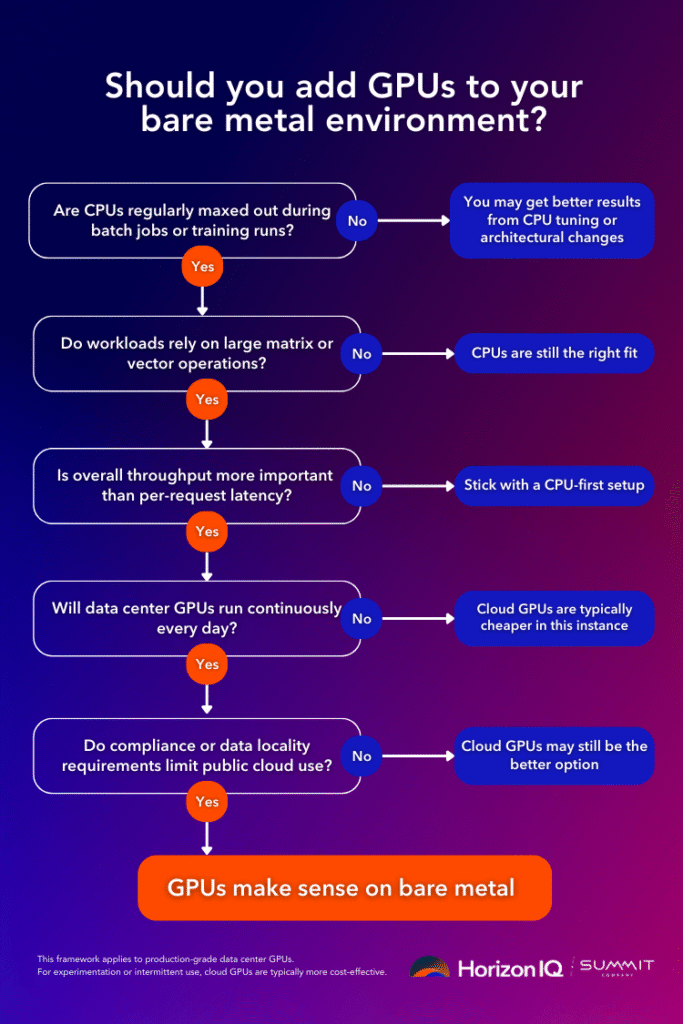
How should teams decide when to move from CPU to GPU infrastructure?
A practical decision framework looks like this:
- Are CPU cores consistently saturated during batch or training jobs?
- Do workloads involve large matrix or vector operations?
- Is throughput more important than per-request latency?
- Will GPUs be utilized for hours per day, not minutes?
- Does compliance or data locality restrict public cloud use?
If the answer is “yes” to most of these, GPUs are likely justified.
If the answers are mixed, CPU optimization, better parallelization, or architectural changes often deliver better ROI.
What does HorizonIQ recommend for GPU adoption on bare metal?
HorizonIQ typically sees the strongest outcomes when customers treat GPUs as purpose-built infrastructure, not general compute.
That means:
- Dedicated GPU nodes sized for sustained workloads
- CPU-only nodes for core services and control planes
- Fixed pricing that aligns cost with real utilization
- Direct access to hardware for tuning and optimization
This approach aligns with HorizonIQ’s broader bare metal philosophy: deliver raw performance, predictable cost, and full control without introducing unnecessary complexity.
For teams operating across multiple regions, dedicated GPU infrastructure also simplifies data residency and compliance requirements while maintaining consistent performance characteristics across environments.
When should you add GPUs to bare metal?
Add GPUs when parallelism is the constraint, utilization is sustained, and predictability matters more than elasticity.
Bare metal GPUs are most effective when they are actively used, sized to match real workload demand, integrated into day-to-day operations, and justified by sustained utilization rather than occasional experimentation.
For everything else, modern CPUs on dedicated infrastructure remain the most efficient and reliable foundation for production workloads.
If you’re evaluating whether GPUs belong in your environment, HorizonIQ’s bare metal specialists can help profile workloads, model costs, and design architectures that balance performance, control, and budget without overbuilding.
Explore HorizonIQ's
Managed Private Cloud
LEARN MORE
Stay Connected



About Author