Month: October 2025

Proxmox LXC 101: What Are Linux Containers and How Do They Work in Proxmox VE?
What is LXC in Proxmox and why should your business care?
Proxmox VE (PVE) supports two major virtualization methods: full virtual machines (using KVM) and lightweight containers (using LXC). LXC, short for Linux Containers, has been integrated into PVE to help businesses run more workloads with less overhead. Because containers share the host’s Linux kernel, they start up faster, use fewer resources, and deliver greater efficiency for Linux-based workloads.
For businesses focused on scalability and cost control—especially those exploring managed solutions like HorizonIQ’s Managed Proxmox Private Cloud—understanding LXC’s role in infrastructure planning is key. Containers allow teams to consolidate workloads, simplify operations, and reduce spend without sacrificing performance.
What is an LXC container in Proxmox?
An LXC container in Proxmox is a system-level virtualization method that runs under the host kernel but operates as its own isolated environment. Unlike traditional virtual machines that emulate hardware and require their own operating systems, LXCs share the host kernel directly.
This makes them incredibly efficient. They consume less memory, start almost instantly, and minimize the duplication of system processes.
Each container can be managed through Proxmox’s intuitive web UI or via the pct command-line tool. From a cluster management perspective, they behave much like VMs: capable of integration with shared storage, backups, and networking.
In short, LXCs let organizations achieve higher workload density and better resource utilization across the same hardware footprint.
When should you choose an LXC container vs a VM in Proxmox?
Deciding between containers and virtual machines depends on your workloads, security needs, and performance goals. Use this quick comparison to identify which option fits your environment best.
| Factor | LXC Container | Virtual Machine (KVM) |
| Startup Speed | Boots in seconds. No guest OS required. | Slower startup. Each VM runs its own OS instance. |
| Resource Usage | Shares the host kernel, using less CPU and memory. | Higher overhead due to full virtualization. |
| OS Compatibility | Runs Linux-based systems only. | Supports any OS (Windows, Linux, BSD, etc.). |
| Isolation Level | Lightweight isolation via namespaces and cgroups. | Strong isolation. Each VM is fully independent. |
| Performance | Excellent for lightweight, container-native workloads. | Consistent performance for heavy or mixed workloads. |
| Security | Adequate for trusted workloads on a managed host. | Preferred for untrusted or multi-tenant environments. |
| Management Overhead | Easier to deploy and maintain at scale. | More complex to patch, update, and manage individually. |
| Ideal Use Case | Web servers, APIs, microservices, CI/CD, AI workloads. | Databases, legacy apps, Windows systems, regulated workloads. |
Key takeaway: Most environments benefit from a hybrid strategy, so using LXC containers for efficient Linux workloads and VMs where isolation, compliance, or OS diversity is essential.
Looking to migrate without overlap costs?
Migration shouldn’t drain your budget. With HorizonIQ’s 2 Months Free, you can move workloads, skip the overlap bills, and gain extra time to switch providers without double paying.Get 2 Months Free
How do you create an LXC container in Proxmox?
Setting up an LXC container in Proxmox is quick and repeatable when you follow a structured process. Use this checklist to guide each deployment:
☑ Download a container template
Navigate to your node → CT Templates → download a base Linux image (e.g. Debian or Ubuntu).
☑ Launch the “Create CT” wizard
Click Create CT in the Proxmox UI to start the setup.
☑ Assign a hostname and password
Use a descriptive hostname and set a secure root password.
☑ Select your template
Choose the downloaded OS image.
☑ Allocate resources
Define CPU cores, memory, disk size, and swap space appropriate for your workload.
☑ Configure networking
Attach to a bridge (e.g. vmbr0), assign IP/DNS as needed.
☑ Review and create
Verify settings, then create the container.
☑ Start and access the console
Open the container from Summary → Console to confirm connectivity.
☑ Fine-tune configuration (optional)
Edit /etc/pve/lxc/<CTID>.conf for advanced parameters.
☑ Implement backups and monitoring
Add the container to your backup schedule and performance dashboard.
What are the advantages and trade-offs of LXC containers in Proxmox?
LXC containers can dramatically improve efficiency and scalability, but they also come with specific technical and compliance considerations.
The table below outlines what to expect before deploying them in production.
| Aspect | LXC Advantages | LXC Trade Offs |
| Performance | Share the host kernel for lower memory and disk usage. Start in seconds and run more workloads per node. | Limited kernel control—cannot run non-Linux OS or custom kernels. |
| Scalability | Integrate with Proxmox clustering for easy scaling and high workload density. | Requires careful monitoring to avoid over-consolidation. |
| Management | Fully supported by Proxmox UI and CLI for consistent deployment and automation. | Some advanced configurations may require CLI-level adjustments. |
| Security | Semi-isolated, lightweight environments reduce surface area compared to full VMs. | Shared kernel introduces potential security risks if misconfigured. |
| Cost Efficiency | Fewer resources per workload means lower hardware and energy costs. | Some enterprise compliance frameworks may still require VM-level isolation. |
| Use Case Fit | Ideal for Linux-based apps, microservices, and container-native workloads. | Not suited for legacy, kernel-dependent, or non-Linux systems. |
In short: LXC delivers speed, density, and cost savings, while VMs still provide stronger isolation and flexibility for specific workloads. HorizonIQ’s fully managed Proxmox Private Cloud provides a fully supported platform for both VMs and customer-managed containers, delivering flexibility and performance without adding orchestration complexity.
How does LXC fit into HorizonIQ’s Managed Proxmox Cloud?
In HorizonIQ’s ecosystem, customers use LXC containers just as they would in any Proxmox environment. We manage and support the underlying Proxmox infrastructure (VMs, storage, and networking) while customers retain full control over creating and managing their own containers using Proxmox’s built-in template library.
This design gives organizations the flexibility to experiment with lightweight containerized workloads while relying on HorizonIQ for the uptime, redundancy, and infrastructure performance that keep environments stable.
What are best practices for running LXC containers in business environments?
Running containers at scale requires the same discipline as managing any production-grade virtual infrastructure. Follow these best practices to ensure performance, security, and reliability across your Proxmox environment:
- Standardize container templates to maintain consistency across deployments and simplify updates.
- Set clear resource limits for CPU, memory, and storage to prevent noisy-neighbor effects and ensure balanced performance.
- Use high-availability storage such as Ceph or ZFS to protect against node failures and ensure data redundancy.
- Deploy unprivileged containers whenever possible to improve isolation and reduce potential attack surfaces.
- Implement proactive monitoring through Proxmox metrics or Compass to track performance, resource usage, and uptime.
- Schedule automated backups and DR replication to safeguard workloads and minimize downtime during recovery.
- Regularly apply security patches and OS updates to both the host and container templates.
- Document your configuration policies to streamline audits and maintain compliance readiness.
Key takeaway: Strong container management is all about consistency, visibility, and proactive oversight. When these best practices are built into your environment, your team can focus on innovation instead of infrastructure maintenance.
How much can your business save using LXC in a managed Proxmox environment?
Because LXC eliminates guest OS overhead, you can run more workloads per physical host. That means fewer servers, lower power and cooling costs, and simplified management. Combined with Proxmox’s open-source licensing and HorizonIQ’s transparent pricing, total cost of ownership drops sharply: often by 50–70% compared to public cloud providers and VMware’s licensing model.
We’ve seen the impact firsthand: we migrated our own VMware environment to Proxmox and achieved around 94% cost savings.
Savings aside, businesses also gain speed: containers deploy in seconds, allowing teams to scale or roll out new environments instantly. The result is faster iteration and better ROI on infrastructure investments.
What are common pitfalls to avoid with LXC?
The most common mistake is trying to containerize everything. LXCs are powerful, but not all workloads fit. Applications that require their own kernel, use unusual drivers, or need strict isolation should stay in VMs. Another pitfall is overloading a node—containers are lightweight, but without proper monitoring, you can still hit hardware limits.
Security is another area to watch. Containers share a kernel, so applying regular patches and limiting privileges is essential. Finally, don’t neglect your storage layer. Even the most efficient container setup will struggle if it sits on slow or unreliable storage. HorizonIQ’s managed infrastructure eliminates many of these pitfalls by pairing best-practice configurations with proactive monitoring and support.
How can your IT team plan a container adoption roadmap?
Use this checklist to guide your transition from traditional virtualization to Proxmox LXC containers:
☑ Audit workloads
Identify which applications are Linux-based, container-friendly, and benefit from faster deployment or lower overhead.
☑ Evaluate performance needs
Benchmark CPU, memory, and I/O requirements to determine the right balance between LXCs and VMs.
☑ Model total cost of ownership (TCO)
Compare licensing, hardware, and operational costs across containers, VMs, and public cloud to project savings potential.
☑ Map services to deployment tiers
Assign each workload to its ideal environment—LXC for efficiency and scale, VM for isolation or non-Linux systems.
☑ Define governance and compliance policies
Establish rules for access control, patching, and data protection that align with SOC 2, PCI DSS, or internal standards.
☑ Build your storage and backup strategy
Integrate HA storage (Ceph/ZFS) and automated backups to safeguard containerized workloads.
☑ Plan for monitoring and scaling
Implement proactive resource tracking and alerts using Compass or Proxmox metrics.
☑ Expand regionally
Use HorizonIQ’s nine global regions to deploy containers closer to users, reducing latency and meeting data residency needs.
☑ Review and optimize regularly
Reassess container density, uptime, and ROI quarterly to ensure performance and cost targets remain aligned.
Why choose Proxmox LXC with HorizonIQ?
Proxmox LXC provides the foundation for fast, efficient, and scalable infrastructure. HorizonIQ elevates it with managed reliability, global reach, and proactive support. You’ll gain the control and openness of Proxmox with the assurance of an enterprise-grade environment, empowering your business to innovate without compromise.
With HorizonIQ, you get infrastructure on your terms, performance without surprises, and a partner built for what’s next.
Explore HorizonIQ's
Managed Private Cloud
LEARN MORE
Stay Connected



About Author


2025 AWS Outage: When Redundancy Isn’t Enough
Today’s outage shows how even the most massively redundant cloud systems can fall victim to a single point of failure. At roughly 3:11 a.m. ET, Amazon Web Services (AWS) first reported the event, noting it was seeing “increased error rates and latencies for multiple AWS Services in the US-EAST-1 Region.”
Despite the company’s vast scale and extensive redundancy, the ripple effects were felt across the internet. From games like Fortnite and apps like Snapchat to major banks and government services, there are over 1000 companies affected by the AWS outage.
The 2025 AWS outage reveals once again how dependent global infrastructure has become on Amazon’s cloud backbone.
A timeline of the impact
- At around 3:11 a.m. ET, AWS began experiencing major outages. And since AWS serves as the backbone of much of the internet, hundreds of websites and services were taken down with it.
- Almost immediately, outage reports spiked for apps like Snapchat, Venmo, and Ring, as well as Amazon services like Alexa, and popular games such as Fortnite and Pokémon GO.
- By 4:26 a.m. ET, AWS confirmed it was a serious issue tied to its DynamoDB endpoint—essentially the “digital phonebook” of the internet.
- At 5:01 a.m. ET, the root cause was identified and a fix was initiated.
- By 5:22 a.m. ET, the fix was deployed and services gradually began returning to normal. Then, Reddit went down, and AWS reported a backlog of issues still being worked through.
- At 7:48 a.m. ET, Amazon announced it had found a fix but continued addressing lingering issues—Ring and Chime remained affected.
- By 8:48 a.m. ET, more fixes were being rolled out, yet in a game of digital whack-a-mole, Wordle and Snapchat users once again saw outages as AWS reports began to climb back up.
Why didn’t AWS redundancy prevent the 2025 outage?
AWS’s architecture appears bullet-proof: multiple availability zones, fail-over systems, and geographically distributed data centers. Yet this outage underscores how redundancy alone isn’t enough when critical components or dependencies are shared across those supposedly independent systems.
- Shared control planes & backend services: Centralized management layers like IAM, DynamoDB, and routing APIs become bottlenecks when they fail.
- Layered dependencies: Downstream services all rely on the same upstream endpoints.
- Control plane vs. data plane failures: Even if compute and storage are still online, if the control systems that manage them fail, your operations can grind to a halt.
What lessons should architects and IT leaders take from the 2025 AWS outage?
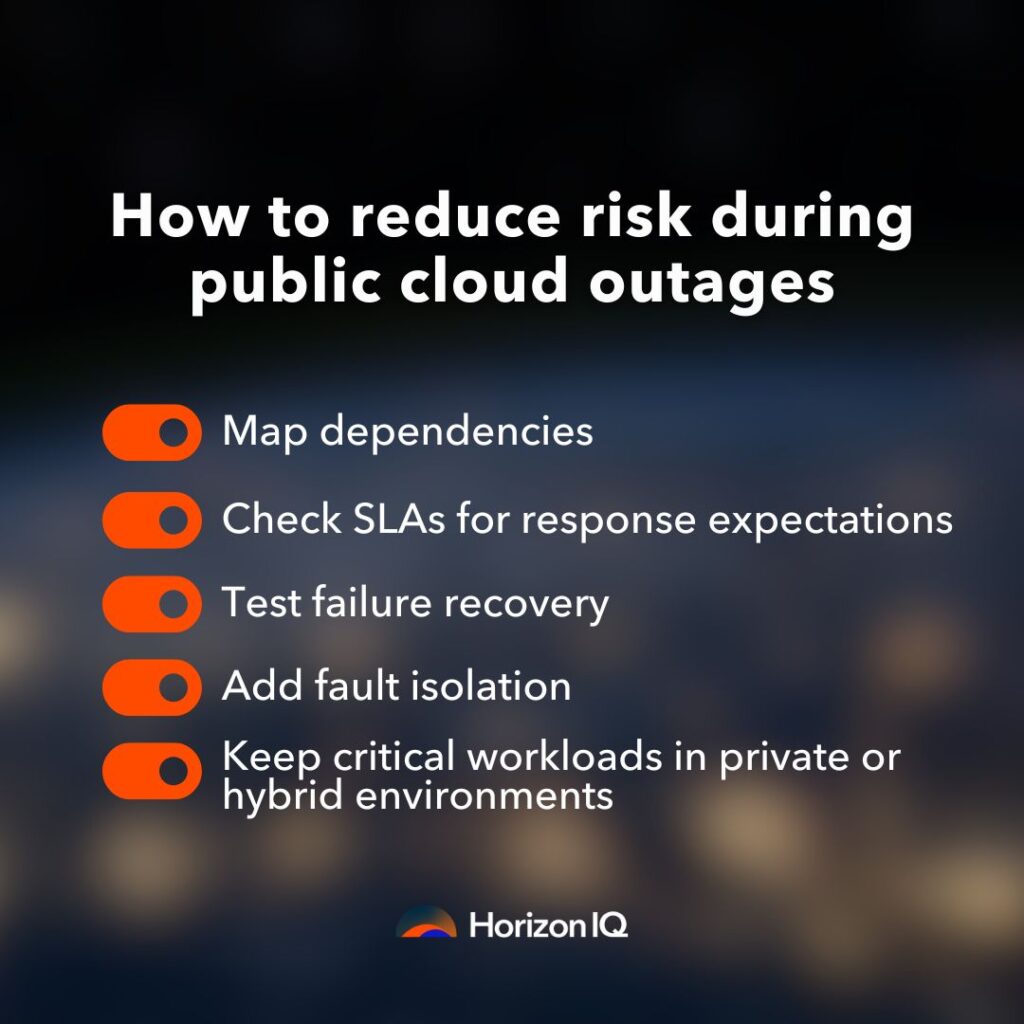
- Assume infrastructure will fail, and design accordingly.
- Diverify infrastructure to avoid concentration risk. Multi-region or multi-cloud designs reduce blast radius.
- Map hidden dependencies and shared components. Understand what “shared” actually means in your architecture.
- Test isolation and recovery paths regularly. Verify that your fallback actually runs on independent systems.
- Have communication and recovery playbooks ready and up-to-date, especially for mission-critical workloads.
Why is isolation the new redundancy?
The AWS outage highlights a fundamental shift in how we think about resilience. Traditional redundancy—mirroring servers, replicating databases, or deploying across availability zones—can protect you from localized hardware failures. But it doesn’t protect you from systemic dependencies.
When an entire control plane, identity service, or storage API fails, no amount of mirroring within that same ecosystem keeps you online.
True continuity requires isolation. That means running environments that remain operational even when shared control planes or upstream providers go dark.
How can businesses prevent downtime after events like the 2025 AWS Outage?
The 2025 AWS outage revealed a major flaw in cloud-native design. Even highly redundant systems can fail when shared control planes or public interconnects go down. For many businesses, redundancy alone wasn’t enough. Their workloads were still tied to centralized systems that created single points of failure, leading to widespread downtime.
At HorizonIQ, we eliminate this dependency with isolation-first architecture.
- Private Cloud and Bare Metal platforms provide single-tenant environments that are self-contained, predictable, and directly controllable. This keeps workloads safe from cascading regional failures.
- HorizonIQ Connect delivers software-defined interconnects up to 100 Gbps, bridging private and public environments through secure, private links that bypass the public internet.
- Dedicated Disaster Recovery Environments make sure critical workloads can instantly fail over to isolated infrastructure if primary systems are disrupted.
If this architecture had been in place for many of the applications hit by the AWS outage, they could have stayed online by failing over to an isolated private environment or a bare metal standby node.
HorizonIQ’s approach ensures redundancy protects hardware, isolation protects uptime, and hybrid connectivity keeps businesses agile, without the risks of shared downtime.
Explore HorizonIQ's
Managed Private Cloud
LEARN MORE
Stay Connected
Related Posts



About Author

What Does vSphere 7 End of Life Mean for the VMware Ecosystem?
- Bare Metal | Cloud | Insights
The last few years have brought seismic changes in the virtualization industry. When Broadcom completed its acquisition of VMware on November 22, 2023, the industry didn’t immediately understand the scale of what was coming. But today it’s clear: support lifecycles, license models, cloud bundles, and upgrade paths are being rewritten.
Broadcom is framing this shift as product simplification, paring VMware down to two core offerings: The VMware Cloud Foundation (VCF) private cloud stack and the smaller VMware vSphere Foundation virtualization platform, plus a set of add-on services.
Let’s walk through a timeline of key milestones, explore what the end of vSphere 7 support means, and examine how businesses of all sizes are being affected.
Key Milestones in VMware’s Broadcom Transition
- November 22, 2023: Broadcom completes its $69 billion acquisition of VMware.

- 2024: Broadcom begins phasing out perpetual VMware licences and shifts customers toward subscription-only bundles (notably via the VCF platform).
- July 15, 2025: Broadcom announced a major consolidation of the VMware Cloud Service Provider (VCSP) Program.
- October 2, 2025: End of general support for vSphere 7, vSAN 7, and vCenter 7.
- October 15, 2025: Last day to buy VMware-licensed nodes on Google Cloud VMware Engine and other public cloud platforms.
- November 1, 2025: Broadcom enforces a “bring your own licence” model for VCF on public cloud providers.
What is VMware vSphere 7?
Released in 2020, vSphere 7 became a cornerstone for many organizations adapting to the pandemic. As remote work and digital demand surged, it provided the reliability and scalability businesses needed.
The newly upgraded platform unified virtual machines and Kubernetes containers. It improved automation, security, and lifecycle management through features like a redesigned lifecycle manager, a streamlined vCenter Server Appliance, and enhanced identity federation.
Since it supported both traditional and cloud-native applications, vSphere 7 defined virtualization during a pivotal moment.
How did the end of vSphere 7 affect organizations?
Under Broadcom, the rules changed fast. As Iain Saunderson, CTO at IT service provider Spinnaker Support, said in September, “If you don’t upgrade or renew, whatever the case might be, you will not get support from Broadcom, full stop.”
Since October 2, 2025, security patches, bug fixes, and vendor support for vSphere 7 have stopped. Organizations that ran vSphere 7 faced a clear choice: upgrade to Vmware vSphere 8, migrate, or stay on an unsupported platform.
For many, the change marked a major cultural and financial shift. Those used to perpetual licenses, multiple support tiers, or incremental upgrades over many years were pushed toward a subscription bundle or a migration path.
The transition also introduced operational uncertainty, as service providers and end customers alike were forced to re-evaluate budgets, renewal timelines, and long-term platform strategies.
How are public cloud providers being impacted?
The changes don’t stop at VMware vSphere 7. Public cloud vendors that offered VMware-based infrastructure are caught in the shift, too.
Google Cloud VMware Engine Product Team discusses the change on their blog, “Broadcom recently announced a change to its VMware licensing model for hyperscalers, moving to an exclusive ‘bring your own’ subscription model for VMware Cloud Foundation (VCF) starting on November 1, 2025.”
Jim Gaynor, Editorial Vice President at Directions on Microsoft, also recently stated, “This latest change moves VCF to what Broadcom calls a license portability-only operating model. This means hyperscalers like Microsoft and Amazon can’t bundle VCF licenses in their offerings, and customers have to purchase licenses directly from Broadcom (or its reseller partners) to bring with them in a bring your own license (BYOL) scenario.”
Under Broadcom’s new model, public cloud providers can no longer bundle VCF licenses with their services.
Customers must purchase VCF subscriptions separately—either from Broadcom itself or from one of Broadcom’s authorized reseller partners—and then apply those licenses to their chosen environment.
What used to be a single, turnkey purchase through a cloud provider now requires multiple transactions, additional contract management, and tighter version control.
It also limits flexibility, since expanding workloads in Google Cloud, Azure, or AWS now depends on having available Broadcom-issued licenses. As a result, many will potentially face delaying deployment times and increased TCO.
What’s the impact of VMware vSphere 7 end of life for businesses?
For many enterprises and small businesses, the shift isn’t theoretical. It’s hitting budgets, operations, and strategy.
An IT director for a school district in Indiana illustrated the strain. The district, which serves about 3,000 students, used VMware’s vSphere virtualization platform and vSAN storage as part of a Dell VxRail hyperconverged infrastructure package. The setup allowed students to gain real-world IT experience by working directly with virtual machines.
Broadcom’s acquisition of VMware triggered a dramatic licensing price increase for the school district. They received a quote that was three to six times higher than expected, a change that put its existing environment out of reach.
“It’s the same software — nothing major changed — yet the cost exploded,” the IT director said. “We aren’t getting more features, just paying way more.”
The district can now no longer maintain the same VMware setup. The IT team has had to redirect time and budget away from classroom projects and into migration planning or finding a more affordable alternative.
Students have lost access to the enterprise-grade tools that once formed the backbone of their IT curriculum.
The problem also extended beyond licensing fees. According to the IT director, Dell will not provide long-term support for the VxRail hardware if it’s no longer running VMware. This has left the district stuck between paying higher software costs or losing vendor-backed maintenance for its infrastructure.
This situation highlights the growing risks of vendor lock-in. When a single company controls both licensing and hardware integration, even small changes in pricing or support can have far-reaching consequences for a company’s operations.
Looking to migrate without overlap costs?
Migration shouldn’t drain your budget. With HorizonIQ’s 2 Months Free, you can move workloads, skip the overlap bills, and gain extra time to switch providers without double paying.Get 2 Months Free
What does this mean for VMware’s future?
VMware currently has roughly 375,000 paying customers worldwide. In its most recent earnings report, Broadcom’s software revenue, primarily driven by VMware sales, soared 25% YoY to $6.6 billion during the quarter.
However, that topline number hides a sharp strategic pivot. Organizations are taking note of the changes and VMware’s future, and many are planning their next steps.
According to Gartner Research VP, Julia Palmer, 35 percent of VMware workloads are expected to migrate elsewhere by 2028. That figure represents a significant erosion of VMware’s installed base and a clear signal that customers are seeking alternatives.
At the same time, Broadcom is doubling down on its preferred path. At VMware Explore 2025, they used the stage to declare that the “future is private cloud.”
CEO Hock Tan proclaimed, “With VCF 9.0, private cloud now outperforms public cloud. It has better security, better cost management, and of course, greater control.”
Broadcom is marketing VCF as the future platform. The company is no longer positioning itself as a broad virtualization platform for every organization, but as a premium private-cloud provider serving large enterprises willing to invest heavily in VCF.
As Tan notes, “If you’re going to do cloud, do it right. Embrace VCF 9 and stay on-premise.”
Within the coming years, smaller customers and public cloud providers will be deprioritized, perpetual licenses will fade, and long-time users will be pushed toward expensive, subscription-based bundles.
Time will only tell what this means for VMware’s future.
What should IT decision-makers be doing now?
Here are four key steps to consider:
- Audit your VMware footprint
Identify how many hosts, clusters, and workloads you’re running on vSphere 7 (or earlier) and whether they fall under perpetual support or have renewal windows. - Map your licence and support expiry dates.
If you’re on vSphere 7 and rely on vendor support, the October 2, 2025, date was non-negotiable. Failure to upgrade meant going unsupported. - Build a cost model that factors in licensing, migration, and support
Don’t look at just the next year’s renewal fee. Include upgrade time, staff retraining, migration risks, hardware compatibility, and alternative platform costs. - Explore alternatives early
The earlier you assess, the more options you have. If you wait until you’re forced by deadlines, your negotiation power shrinks, and costs grow. Whether that means migrating to vSphere 8/VCF, shifting workloads to public cloud, or adopting a new virtualization/hyper-converged stack.
How can HorizonIQ help you during the VMware vSphere 7 end of life transition?
At HorizonIQ, we help customers take the right path for their business. Whether that means upgrading to VMware vSphere 8, migrating to our Proxmox Managed Private Cloud, or running workloads on other platforms, we’re here to help you make the right choice.
Why teams choose HorizonIQ:
- Flexibility: Support for VMware vSphere 8, Proxmox, other virtualization platforms, and hybrid deployments.
- Lower costs: Flat-rate pricing with 2 months free for migration, so you’re not paying two providers.
- Proven performance: We’ve successfully migrated our own infrastructure from VMware to Proxmox.
No matter which platform you choose, HorizonIQ is here to make sure your infrastructure stays optimized, supported, and ready for what’s next.
Explore HorizonIQ's
Managed Private Cloud
LEARN MORE
Stay Connected
About Author

With Broadcom’s licensing changes to VMware, many organizations are rethinking their virtualization strategies. Some are moving away from proprietary hypervisors toward open alternatives like Proxmox VE, while others are seizing the opportunity to modernize their application layer with OpenShift, Red Hat’s enterprise Kubernetes platform.
So how do you choose between OpenShift vs Proxmox? Both are powerful, but serve different purposes. Proxmox delivers control over infrastructure, while OpenShift orchestrates applications. Let’s dive into how they differ to help you decide which best fits your modernization goals.
What Is Proxmox VE?
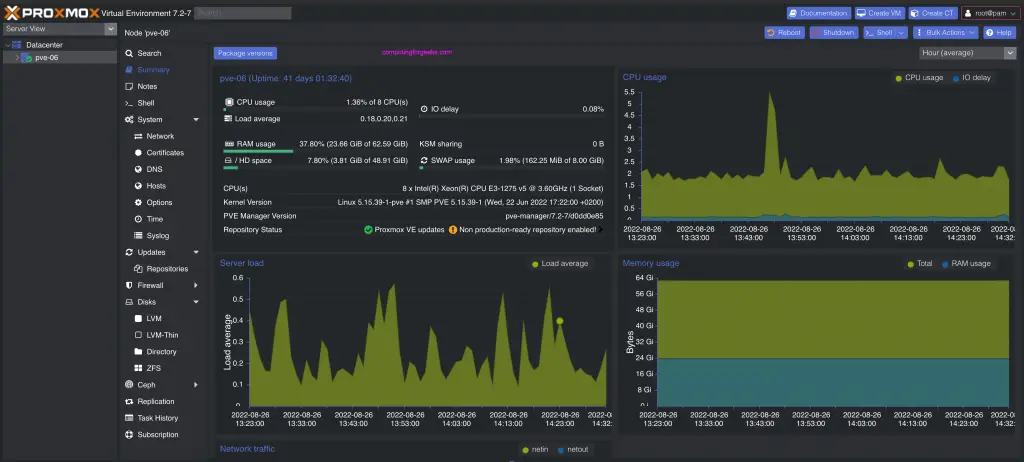
Proxmox Virtual Environment (VE) is an open-source platform for running virtual machines and Linux containers (LXC) on a single, integrated system. Built on Debian GNU/Linux, it combines KVM virtualization, container management, and software-defined storage and networking in one interface.
Proxmox is ideal for organizations leaving VMware behind, offering similar enterprise capabilities without licensing restrictions.
Key features include:
- KVM for high-performance VM hosting.
- LXC for lightweight, OS-level containers.
- Ceph, ZFS, and LVM-thin storage options.
- Corosync and Proxmox Cluster File System for high availability.
What Is OpenShift?
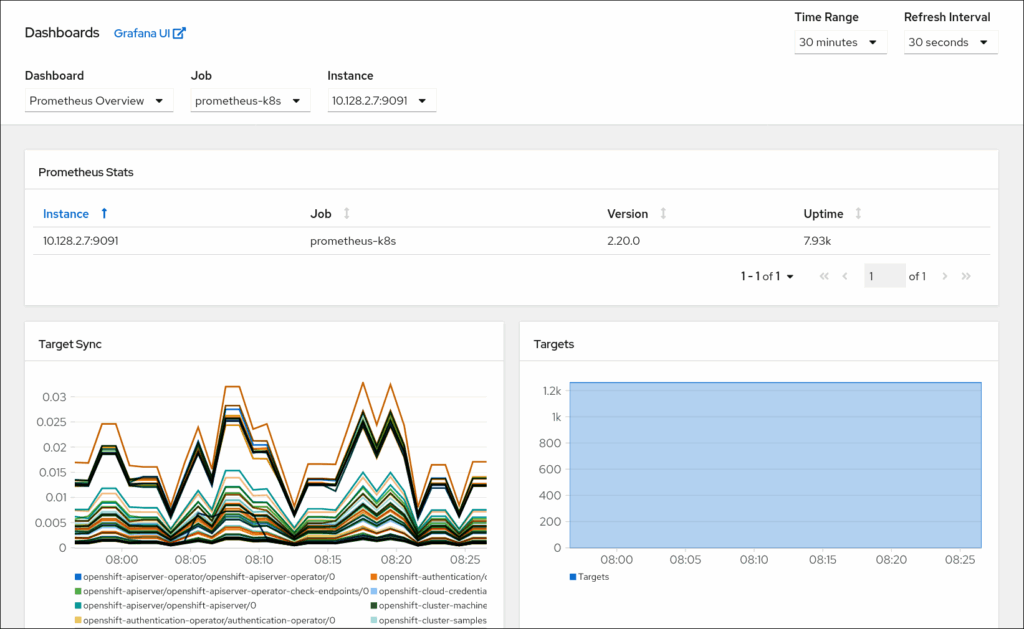
OpenShift Container Platform is Red Hat’s Kubernetes distribution designed to deploy and scale containerized applications across clouds and data centers. Each cluster runs on Red Hat Enterprise Linux CoreOS (RHCOS) and uses Kubernetes with CRI-O for container runtime.
OpenShift extends Kubernetes with:
- CI/CD pipelines and integrated build automation.
- OperatorHub for lifecycle management.
- Built-in image registry and routing layer.
- Enterprise security and compliance via SELinux and RBAC.
While Proxmox focuses on infrastructure, OpenShift focuses on delivering modern, cloud-native applications.
How Do Their Architectures Differ?
Proxmox runs the infrastructure layer: hypervisors, containers, and storage. OpenShift operates above it, orchestrating workloads and automating DevOps processes.
Feature |
Proxmox VE | OpenShift |
Core Function |
Virtualization and container hosting | Application orchestration |
Base OS |
Debian GNU/Linux | Red Hat Enterprise Linux CoreOS |
Management Tools |
Web GUI, CLI, REST API | oc CLI, web console, Operators |
Storage |
Ceph, ZFS, NFS, LVM | Persistent Volumes, CSI drivers |
Users |
System administrators | Developers and DevOps teams |
How Do They Handle Virtualization?
Proxmox VE natively manages both VMs and containers. Administrators can:
- Run any OS with QEMU/KVM.
- Deploy LXC containers for fast, efficient workloads.
- Use Proxmox Backup Server for deduplicated backups and restores.
OpenShift focuses on containers but includes OpenShift Virtualization to run VMs alongside pods. This hybrid approach lets teams migrate gradually from legacy virtualization while adopting DevOps practices.
How Is Networking Managed?
Proxmox VE
- Uses Linux bridges, VLAN tagging, and bonded interfaces.
- Includes a cluster-aware firewall with per-VM rules.
- Offers full control for private or hosted environments.
OpenShift
- Uses software-defined networking (SDN) for automated pod connectivity.
- Supports NetworkPolicies, Ingress Controllers, and Service Mesh.
- Enforces multi-tenant isolation through RBAC and SELinux.
Proxmox manages host-level networking; OpenShift manages service-to-service traffic between containers.
How Is Storage Managed?
Proxmox is hardware-centric. OpenShift is application-centric.
Proxmox VE
- Integrates directly with Ceph for distributed, fault-tolerant storage.
- Supports ZFS, LVM-thin, and NFS for flexible configurations.
- Offers snapshots, replication, and automated backup scheduling.
OpenShift
- Abstracts storage through Persistent Volumes (PVs) and StorageClasses.
- Uses the OpenShift Data Foundation for scalable block and object storage.
- Automatically provisions storage through Kubernetes APIs.
How Do They Handle High Availability and Scaling?
Proxmox scales infrastructure capacity. OpenShift scales applications and services.
Proxmox VE
- Uses Corosync for quorum and failover.
- Automatically restarts workloads on healthy nodes.
- Expands easily by adding nodes to a cluster.
OpenShift
- Scales applications horizontally through Kubernetes autoscaling.
- Includes multicluster management for hybrid or multi-cloud operations.
- Balances workloads automatically across infrastructure.
How Are Backup and Recovery Managed?
Proxmox VE includes Proxmox Backup Server for encrypted, incremental backups with deduplication and scheduled restore points.
OpenShift integrates backup through Operators or third-party tools that protect cluster data and persistent volumes. It’s flexible but requires more setup compared to Proxmox’s built-in backup system.
How Easy Are They to Use and Automate?
Proxmox simplifies infrastructure management. OpenShift simplifies continuous delivery.
Proxmox VE
- Intuitive Web GUI for managing VMs, storage, and networking.
- Command-line tools (qm, pct, pvesh) and a REST API for scripting.
- Works with Ansible and Terraform for automation.
OpenShift
- Developer-friendly web console and oc CLI.
- Operator Framework, CI/CD pipelines, and GitOps workflows built in.
- Enables self-service deployment under centralized governance.
Looking to migrate without overlap costs?
Migration shouldn’t drain your budget. With HorizonIQ’s 2 Months Free, you can move workloads, skip the overlap bills, and gain extra time to switch providers without double paying.Get 2 Months Free
How Do OpenShift vs Proxmox Costs Compare?
Proxmox simplifies infrastructure management. OpenShift simplifies continuous delivery.
- Proxmox VE is fully open source, licensed under AGPL, with optional paid support. It is ideal for service providers and enterprises seeking predictable costs.
- OpenShift is subscription-based, including Red Hat’s enterprise support, certified updates, and security assurance.
Who Should Use Each Platform?
Use Case |
Proxmox VE | OpenShift |
Replacing VMware |
Native HA clustering and Ceph integration make it a strong alternative. | Supports gradual VM-to-container transition via OpenShift Virtualization. |
Private Cloud Hosting |
Excellent for on-prem or managed service providers. | Ideal for enterprises building modern app platforms. |
Hybrid or Multi-Cloud |
Manual network and storage federation possible. | Native hybrid and multicluster tools included. |
DevSecOps and CI/CD |
Integrates via Ansible or Terraform. | CI/CD pipelines and GitOps are native. |
Budget and Licensing |
Free and open source. | Commercial subscription with full vendor support. |
How Do You Choose Between OpenShift vs Proxmox?
If your goal is to control infrastructure—VMs, containers, and storage—Proxmox VE provides a complete, open platform with predictable costs. It’s an excellent replacement for VMware environments or for building private clouds that need transparency and flexibility.
If your goal is to deliver applications faster, OpenShift provides a turnkey platform for DevOps teams with enterprise security and automation built in. It’s best suited for large organizations managing microservices and multi-cloud workloads.
In many cases, the strongest approach is using both together. Proxmox as the underlying compute layer on bare-metal or manually provisioned VMs, and OpenShift as the application orchestration layer.
To learn more about deploying OpenShift on Proxmox, check out Deploy OpenShift OKD on Proxmox VE or bare-metal (user-provisioned).
How Can HorizonIQ Help?
At HorizonIQ, we help businesses modernize infrastructure and transition away from proprietary systems.
Our Proxmox Managed Private Cloud replaces costly VMware environments with high-availability clustering, Ceph storage, and predictable pricing.
With HorizonIQ, you gain:
- Expert-led migration planning and management.
- Fully managed Proxmox environments with transparent pricing.
- Compass, our management portal for monitoring, support, and scaling from one dashboard.
By combining open-source flexibility with enterprise reliability, HorizonIQ gives you a cloud strategy that grows on your terms, without lock-in or compromise.
Explore HorizonIQ's
Managed Private Cloud
LEARN MORE
Stay Connected
About Author

AI is only as powerful as the data that fuels it. Training large models, fine-tuning small ones, or running inference at scale requires massive volumes of unstructured data—images, video, audio, text, sensor logs, and more. Traditional storage methods often fall short when workloads demand scalability, low latency, and cost efficiency.
This is where object storage steps in. But how exactly does object storage support AI workloads? And how can HorizonIQ help businesses deploy storage that is cost-predictable, globally available, and performance-optimized for AI?
Let’s dive in.
What is object storage and why is it important for AI?
Object storage organizes data as objects (with metadata and unique identifiers) instead of blocks or files. This structure makes it infinitely scalable and ideal for unstructured data—the lifeblood of modern AI.
For AI teams, this means:
- Storing petabytes of data in a flat namespace
- Efficient parallel access during training and inference
- Easier metadata tagging to support dataset management
- Seamless integration with APIs (most commonly Amazon’s S3 standard)
Learn more about the basics of HorizonIQ’s object storage service.
How does object storage differ from block or file storage in AI workloads?
- Block storage is optimized for low-latency, high-IOPS workloads such as databases or VMs.
- File storage works well for shared file systems, but doesn’t scale as easily.
- Object storage is built for massive scale and throughput, which makes it the best fit for AI training data, model checkpoints, and logs.
AI workloads focus on moving huge volumes of unstructured data efficiently, rather than handling small transactions.
Looking for a deeper breakdown? Read our storage guide to explore use cases, performance trade-offs, and best-fit scenarios.
Why do AI workloads need scalable object storage?
Training a single large language model (LLM) can involve hundreds of terabytes of text, images, or video. Even smaller, domain-specific models depend on massive, ever-growing datasets.
Object storage allows:
- Elastic scaling without performance drops
- Parallel access from distributed compute nodes
- Cost efficiency compared to traditional enterprise SAN/NAS
According to Goldman Sachs, AI workloads could account for around 28% of global data center capacity by 2027, with hyperscale operators expected to control about 70% of capacity by 2030 as demand and power usage surge due to AI.
How does HorizonIQ object storage support AI?
HorizonIQ was built with AI and high-performance computing in mind. Our object storage includes:
- Always-hot storage with no egress or operations fees
- 2,000 requests/sec per bucket (measured on Ceph clusters)
- 11 nines of durability (99.999999999%)
- 99.9% availability SLA
This makes it ideal for high-throughput pipelines like image preprocessing, model training, or inference at scale.
Explore our object storage features here.
Looking to migrate without overlap costs?
Migration shouldn’t drain your budget. With HorizonIQ’s 2 Months Free, you can move workloads, skip the overlap bills, and gain extra time to switch providers without double paying.Get 2 Months Free
How does HorizonIQ help control AI infrastructure costs?
Cloud costs are one of the biggest pain points for AI teams. 82% of enterprises cite managing cloud spending as their top challenge.
HorizonIQ solves this with:
- Flat, predictable pricing (no egress or API call fees)
- Up to 70% cost savings vs. hyperscalers
- 94% savings compared to VMware licensing for private environments
- Full S3 compatibility, so savings don’t come at the expense of rebuilding workflows or retraining teams
This means AI teams can run massive training or inference jobs without the “bill shock” that comes with variable cloud charges.
How does HorizonIQ compare to AWS, Azure, and Google Cloud for AI object storage?
Let’s look at a real-world AI training scenario:
- 50 TB hot storage
- 200M GET requests + 2M PUT requests
- Variant 1: All compute + storage in-cloud
- Variant 2: Same workload, plus 20 TB egress
| Provider | In-Cloud Cost | With 20 TB Egress | Notes |
| HorizonIQ Advanced Multi-tenant Object Storage | $1050 | $1050 | Flat, no egress or API fees |
| AWS S3 Standard | $1267 | $3037 | $80 per 200M GETs, $10 per 2M PUTs, egress charged |
| Azure Hot | $1032 | $2772 | Similar request and egress fees to AWS |
| Google Cloud Standard | $1936 | $3846 | Highest GET costs and egress charges |
Key takeaway: With HorizonIQ, costs are transparent and predictable. Whether you keep data in-cloud or move it out for distributed AI training, pricing doesn’t change. Hyperscalers, on the other hand, pile on fees for API calls and egress—costs that can triple your bill in high-usage scenarios.
Is HorizonIQ object storage secure and compliant for regulated AI use cases?
Yes. Many AI applications process sensitive data because industries like healthcare, finance, or government workloads require strict compliance.
HorizonIQ ensures:
- Dedicated, single-tenant architecture (no noisy neighbors)
- SOC 2, ISO 27001, and PCI DSS compliance
- Data sovereignty with 9 global regions to meet residency requirements
This makes it possible to train and deploy AI models while meeting regulatory demands.
How does HorizonIQ integrate object storage with GPUs and private cloud?
Storage is only one side of the AI equation. AI pipelines also need GPU acceleration and low-latency interconnects.
HorizonIQ provides:
- GPU-ready infrastructure colocated with object storage
- Private cloud and bare metal options for hybrid deployments
- Compass, a management platform to monitor, reboot, and control environments in just a few clicks
This creates an end-to-end AI stack: compute + storage + networking, optimized for both performance and predictability.
What are the real-world AI use cases for object storage?
Some common workloads HorizonIQ supports include:
- Machine learning training (vision, NLP, recommendation engines)
- Data lakes for generative AI pipelines
- Media & entertainment AI (video upscaling, captioning, recommendation)
- Scientific research (genomics, physics simulations, R&D)
- AdTech (real-time audience modeling)
Our customers include companies that are pushing boundaries with AI, such as Unity, ActiveCampaign, and IREX.
How can businesses get started with HorizonIQ object storage for AI?
The best way is through a proof of concept (POC) tailored to your workload. HorizonIQ offers:
- Custom POCs to benchmark AI training/inference
- Migration support to move datasets off hyperscalers
- Long-term discounts for predictable budgeting
Start exploring HorizonIQ object storage today.
Final Takeaway
AI runs on data, and object storage is the foundation for scaling it. Businesses need infrastructure that balances performance, cost predictability, compliance, and global reach. HorizonIQ delivers all four with up to 70% savings, GPU-ready infrastructure, and dedicated support.
HorizonIQ empowers your AI journey with storage built for innovation, without surprises.
Explore HorizonIQ's
Managed Private Cloud
LEARN MORE
Stay Connected


About Author