Month: November 2025
What is Ceph?
Ceph is an open-source, software-defined storage platform that is capable of scaling seamlessly, handling failures automatically, and delivering reliable performance across massive clusters.
Core components include:
- RADOS (Reliable Autonomic Distributed Object Store)
- OSD daemons (Object Storage Daemons)
- MONs (Monitors) for cluster quorum
- CRUSH algorithm for data placement
- Librados client libraries
- Gateways and drivers for block (RBD), file (CephFS), and object (RGW S3/Swift-compatible)
Ceph’s architecture separates metadata from data, distributes everything intelligently, and lets clients talk directly to storage nodes, eliminating central controllers and bottlenecks.
In short: Ceph is the technology and architecture that powers modern distributed storage.
What is Ceph Storage?
Ceph storage is the real-world, deployed Ceph cluster—the combination of commodity hardware and the Ceph software stack—delivering usable block, file, or object storage.
Common examples:
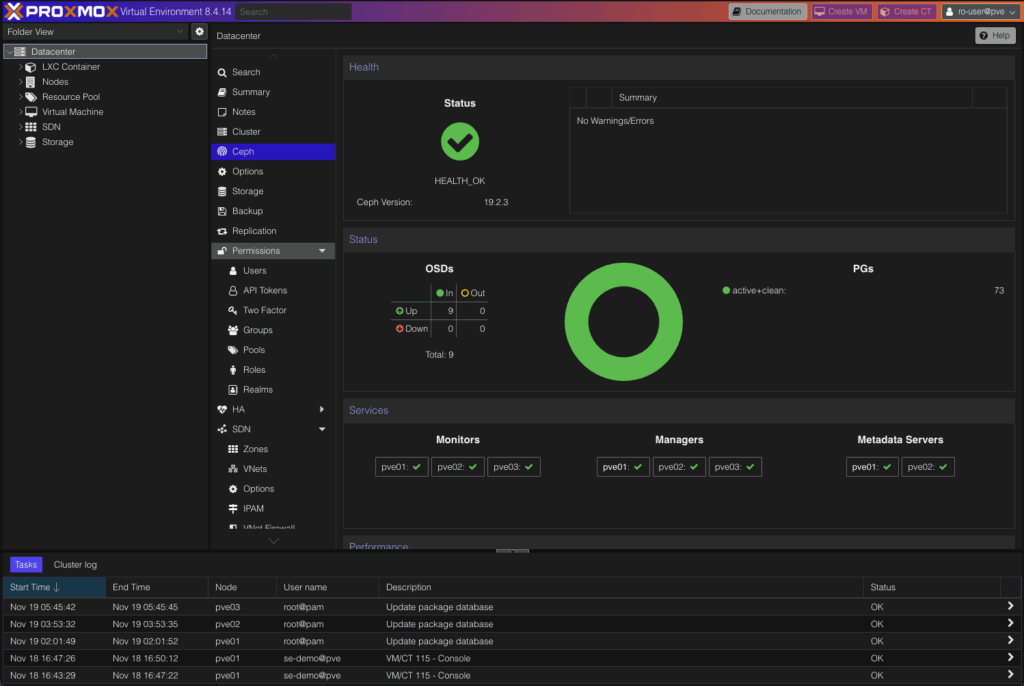
- Hyperconverged Ceph cluster inside Proxmox or OpenStack
- External Ceph cluster providing RBD block devices or CephFS shared filesystems
- Dedicated Ceph RGW deployment offering S3-compatible object storage
- Large-scale backend for Kubernetes/OpenShift persistent volumes
If Ceph is the engine, Ceph storage is the fully built and tuned vehicle ready for production workloads.
What are Ceph’s features?
Ceph provides unified object-based storage, automatic healing, no single point of failure, and near-linear scalability across distributed nodes.
| Feature | Description |
Object-based storage |
All data (block, file, object) is stored as objects in a flat namespace |
CRUSH algorithm |
Deterministic, pseudo-random placement function — no lookup tables needed |
No single point of failure |
Fully distributed monitors, metadata servers, and data placement |
Self-healing & self-managing |
Automatic detection, rebalancing, and recovery of failed nodes/drives |
Linear scalability |
Performance and capacity scale near-linearly by adding more OSD nodes |
Unified storage |
Same cluster can simultaneously serve block (RBD), file (CephFS), and object (RGW) storage |
Strong consistency (optional) |
Configurable replication or erasure coding with tunable consistency levels |
How does Ceph store and locate data?
Ceph stores data as objects in placement groups mapped deterministically to OSDs using the CRUSH algorithm.
| Component | Description |
Object |
Fixed or variable-size chunk of data with a unique identifier |
Placement Group (PG) |
Logical bucket that groups objects for replication/erasure coding and distribution |
OSD |
One disk (or NVMe/SSD) running an OSD daemon — stores objects, handles replication & recovery |
CRUSH map |
Cluster map + ruleset that tells the system exactly where each PG (and therefore each object) belongs |
Clients and OSDs use the same CRUSH function. Anyone can calculate where data lives without consulting a central index.
How does Ceph manage metadata?
File system metadata (CephFS) is handled by a cluster of Metadata Servers (MDS).
Modern Ceph (Luminous and later) supports:
- Multiple active MDS daemons (commonly 3–32+ in large clusters)
- Automatic rank balancing and failover
- In-memory caching with lazy persistence to RADOS
- Separate journaling pool on fast storage for maximum performance
This design scales to millions of IOPS and billions of files without the legacy dynamic subtree partitioning bottlenecks.
What makes Ceph’s data placement unique?
CRUSH (Controlled, Scalable, Decentralized Placement of Replicated Data) is the heart of Ceph’s scalability.
| Benefit | Explanation |
No allocation tables |
Eliminates metadata bottleneck |
Minimal data movement on cluster change |
Adding/removing nodes moves only ~1/num_PGs fraction of data |
Failure-domain awareness |
Rules can separate replicas across racks, rows, data centers, etc. |
Weighted capacity handling |
Larger/faster drives automatically receive more data |
Client-driven placement |
Clients compute placement themselves → direct I/O to OSDs, no proxy |
How does Ceph handle failure and recovery?
- Every object belongs to a placement group that is replicated or erasure-coded across multiple OSDs
- OSDs continuously heartbeat and peer with each other
- On failure, surviving OSDs immediately promote new primaries and begin parallel backfill/recovery
- Cluster remains fully available during recovery (degraded mode)
- Recovery traffic is throttled and prioritized to avoid impacting client workloads
How well does Ceph scale?
Ceph scales nearly linearly in capacity, metadata throughput, and client concurrency simply by adding nodes.
| Metric | Scaling Behavior |
Capacity & throughput |
Near-linear with added OSDs (10 GbE → 100 GbE+ networks now common) |
Metadata performance |
Near-linear with additional active MDS nodes |
Concurrent clients |
Tens of thousands of clients supported without gateways or load balancers |
Real-world deployments |
Production clusters from <10 nodes to >10,000 OSDs and exabytes of storage (Meta, CERN, Bloomberg, etc.) |
Who is Ceph best suited for?
Ceph shines when you need:
- Petabyte-to-exabyte scale on commodity hardware
- Mixed block + file + object workloads from the same cluster
- High availability with no single point of failure
- Frequent cluster growth/shrink and hardware churn
- Kubernetes/OpenShift, OpenStack, Proxmox, or private cloud environments
- S3-compatible object storage for AI, analytics, backups, archives
How does HorizonIQ use Ceph for our Proxmox Managed Private Cloud and storage environments?
At HorizonIQ, Ceph is the backbone of our Proxmox Managed Private Cloud. In our Proxmox clusters, we typically run a hyperconverged Ceph design: each compute node includes NVMe drives dedicated to Ceph, with no RAID controller in the path to reduce latency.
Ceph handles data resilience through replication (we standardize on three replicas), so if a drive fails, the cluster automatically rebuilds from healthy copies while workloads keep running. You would need multiple, overlapping failures across nodes before data is at risk, which is extremely unlikely given our hardware SLAs and fast replacement process.
These same Ceph foundations are offered across our dedicated block and object storage platforms. With Ceph enabled, our block storage tiers deliver strong, predictable performance for VMs and databases.
Our object storage clusters can leverage Ceph as well, delivering high throughput, exceptional durability, and scalable S3-compatible storage built for AI, analytics, and large datasets.
Across private cloud, block storage, and object storage, Ceph enables HorizonIQ to deliver high availability, consistent performance, and flexible scaling. Our goal is to give customers the ability to choose the architecture and growth model that fits their environment.
Explore HorizonIQ's
Managed Private Cloud
LEARN MORE
Stay Connected


About Author


What’s the size of the cloud market?
The global cloud computing market continues to grow rapidly, powering nearly every modern enterprise. According to Grand View Research, the market is on track to surpass $1 trillion within the next decade.
A few hyperscalers—AWS, Azure, and Google Cloud—now operate much of the world’s digital infrastructure. This centralization amplifies risk: when one region goes down, critical applications across multiple industries are affected.
For businesses, this means reliability can no longer be taken for granted. With AWS and Azure outages impacting banks, logistics, and AI platforms, predictability has become every bit as important as performance.
What happened during the AWS outage?
In October 2025, AWS experienced a widespread disruption in its US-EAST-1 region, lasting several hours and impacting major services including EC2 and S3.
According to Reuters and The Register, the root cause was traced to a DNS subsystem error within AWS’s internal network monitoring system.
The failure began as a configuration issue that cascaded across dependent services, disrupting thousands of applications. It was not caused by hardware or a cyberattack but by human oversight amplified by automation.
The result: a short but widespread outage that highlighted the fragile dependencies inside even the most advanced cloud platforms.
What caused the Azure outage?
Microsoft’s Azure outage, which occurred within the same month as AWS, stemmed from a misconfiguration in Azure Front Door (the service’s global content delivery network).
Reports from ITPro and Data Center Knowledge confirmed that an incorrect parameter pushed during a system update disrupted availability across several regions.
The automation systems responsible for deploying and validating configuration changes propagated the error instead of containing it, revealing how automation without adequate safeguards can magnify small mistakes.
Why do so many cloud outages trace back to human error?
Automation has improved consistency and scale, but it hasn’t removed the human element from infrastructure management. In hyperscale environments, even minor configuration mistakes can spread instantly through interconnected systems.
Common contributing factors include:
- Complexity: Millions of interdependent services make pinpointing and isolating faults difficult.
- Change velocity: Continuous deployment increases the chance of unnoticed configuration drift.
- Visibility gaps: Monitoring tools often detect issues only after cascading failures occur.
- Centralized dependencies: Core services like DNS, routing, and authentication become single points of failure.
Studies suggest that roughly 70 percent of cloud outages originate from configuration or human error rather than hardware malfunction or cyberattacks.
Human decisions remain a leading cause of downtime in the most automated systems on Earth.
What can IT leaders learn from these outages?
Several lessons stand out for infrastructure decision-makers:
- Single-provider dependence increases systemic risk. Centralization delivers efficiency, but it also creates shared points of failure.
- Change management is a critical resilience factor. Providers with mature rollback and validation processes recover faster and with less collateral damage.
- Visibility must extend to the foundational layer. Monitoring DNS, load balancers, and routing health is as important as tracking application uptime.
- Architecture should assume failure. Build redundancy, test recovery paths, and ensure that workloads degrade gracefully rather than collapse.
How do outages like these affect businesses using hyperscale cloud?
The direct cost of downtime is visible in delayed transactions and lost productivity. The hidden cost is operational fragility. When critical systems depend on the same shared infrastructure, even a regional misconfiguration can disrupt global operations.
Sectors like finance, healthcare, and logistics are particularly exposed because compliance, data sovereignty, and uptime are all mission-critical. Many organizations are now reevaluating how much of their stack should remain in public cloud environments and how much control they need to retain.
How can companies protect themselves against public cloud outages?
A few proactive measures can dramatically reduce exposure:
- Map dependencies across internal systems and third-party providers.
- Audit provider SLAs for clarity around incident response and communication.
- Simulate failure scenarios regularly to test real recovery performance.
- Design fault isolation into applications to contain impact.
- Diversify workloads across private and hybrid environments for critical operations.
Preparedness is less about avoiding errors and more about ensuring that when they occur, they stay contained.
Looking to migrate without overlap costs?
Migration shouldn’t drain your budget. With HorizonIQ’s 2 Months Free, you can move workloads, skip the overlap bills, and gain extra time to switch providers without double paying.Get 2 Months Free
How does HorizonIQ’s approach address these risks?
At HorizonIQ, we eliminate this dependency through an isolation-first architecture designed for continuity and confidence.
| Solution | Purpose | Key Capabilities |
| Private Cloud | Deliver scalable, virtualized environments with dedicated resources and full management control. | • Single-tenant architecture for compliance and security
• Predictable performance with customizable VMs • Integrated management through Compass for visibility and control |
| Bare Metal | Provide maximum performance for latency-sensitive or high-compute workloads. | • Direct hardware access with zero virtualization overhead
• Fully customizable configurations for CPU, RAM, and storage • Ideal for HPC, AI, and database applications requiring consistent throughput |
| HorizonIQ Connect | Bridge private and public environments through secure, software-defined interconnects. | • Up to 100 Gbps dedicated connectivity powered by Megaport
• Private links that bypass the public internet • Enables hybrid scaling between HorizonIQ and over 200 public clouds like AWS, Azure, and Google Cloud |
| Dedicated Backup and Recovery Environments | Protect business continuity with fully managed, compliance-ready data resilience. | • Supports the 3-2-1 backup strategy (three copies of data, two media types, one offsite)
• Same-site or offsite replication to Chicago and Phoenix data centers • Powered by Veeam with a 100 % uptime SLA for reliable, automated recovery |
If this architecture had been in place for many of the applications impacted by the AWS outage, they could have remained online by failing over to a private environment or bare metal standby node.
HorizonIQ’s approach ensures redundancy protects hardware, isolation protects uptime, and hybrid connectivity keeps businesses agile without the risks of shared downtime.
Is public cloud still safe?
The public cloud remains an essential part of modern IT, but trust in automation must be balanced with operational transparency and architectural control. The biggest providers offer enormous capacity and innovation, yet centralized change management will always carry systemic risk.
A resilient infrastructure strategy blends dedicated resources, private connectivity, and fault isolation to ensure continuity no matter what happens inside the hyperscale ecosystem.
Is your infrastructure prepared for the next major cloud outage?
The 2025 AWS and Azure outages reveal that scale alone cannot guarantee stability. Human oversight within automated systems continues to trigger some of the industry’s most far-reaching disruptions.
Businesses that treat resilience as a design principle—rather than an afterthought—will avoid the cascading failures that bring global platforms to a halt.
HorizonIQ delivers that resilience through isolation, visibility, and control, empowering teams to stay online even when the world’s largest clouds go dark.
Explore HorizonIQ's
Managed Private Cloud
LEARN MORE
Stay Connected
About Author

The death knell of VMware seems poised to ring in a new era for Proxmox. With its ease of use and popularity for home labs, it can be tough to find enterprise-class deployment examples among the extensive how-to guides and tutorial videos.
Not every company can dedicate its engineering resources to a full deep dive on VMware alternatives, let alone repurpose or acquire hardware just to test and reskill on a new virtualization platform.
At HorizonIQ, we migrated our infrastructure from VMware to Proxmox. A footprint of 300 VMs, using just under 800 vCPU and 10 TB of RAM, backed by 90 TB of redundant Ceph storage and 225 TB of flash storage for performance-critical workloads.
We put in the time on our end so you can save it on yours. This post offers a quick tour of a high-availability Proxmox environment on server-grade hardware, viewed through a familiar VMware lens.
Logging In and Authentication
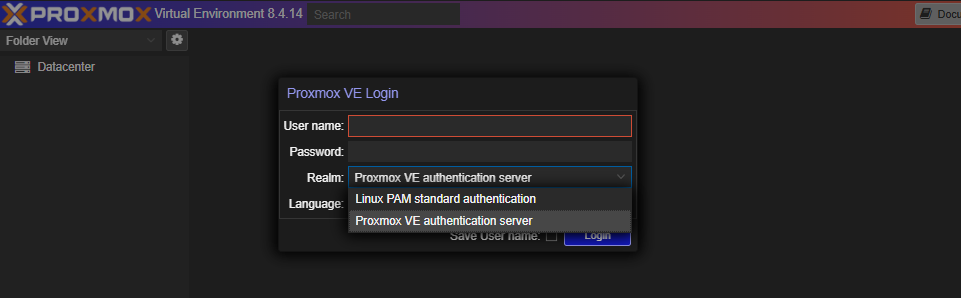
When clustered, every Proxmox node serves up a GUI on port 8006, roughly analogous to vCenter for cluster management.
We use a load balancer here for simplicity in our demo environment.
You can log in with:
- A local user (same as SSH credentials)
- Or with Proxmox VE authentication (accounts created within Proxmox)
Login Screen
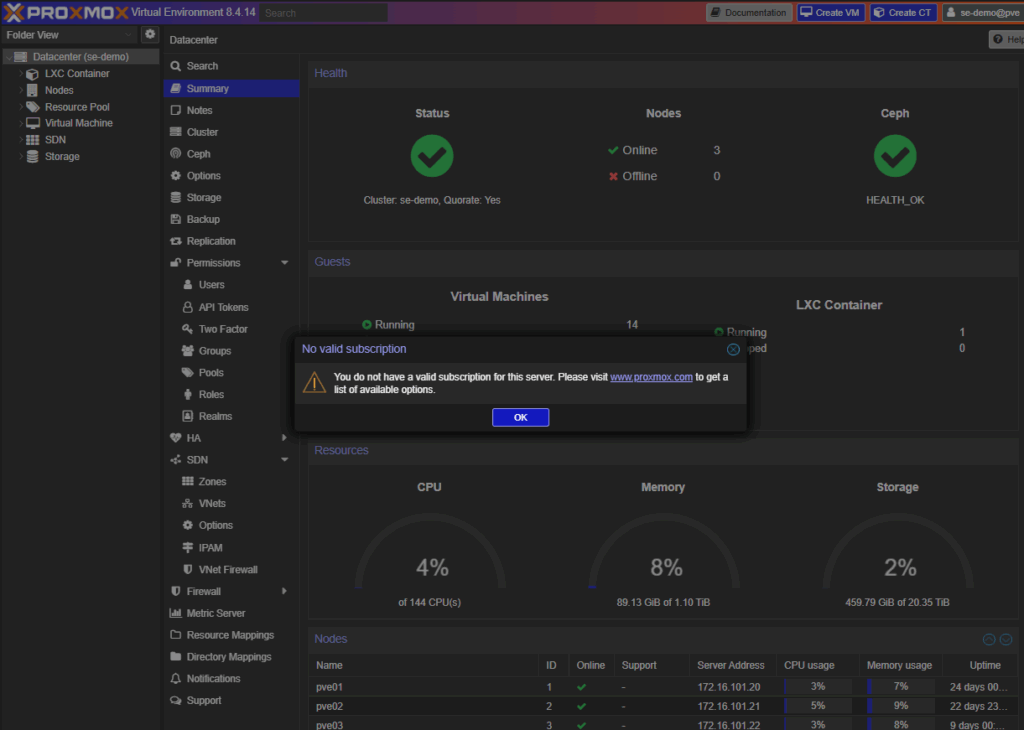
After login, you may see a subscription notification if your environment isn’t licensed for enterprise support.
Our production environments are fully subscribed, so this screen doesn’t appear outside of demos.
Subscription Notice
Navigating the Interface
The interface is intuitive, with views accessible from the top left.
Available Views
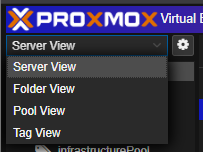
- Server View: Similar to vCenter’s inventory view if each node were standalone, though they function as a true cluster.
- Folder View: Groups objects by type.
- Pool View: Lets you organize and assign permissions.
Datacenter Overview
Clicking the Datacenter object provides configuration options for the entire cluster.
Summary Page
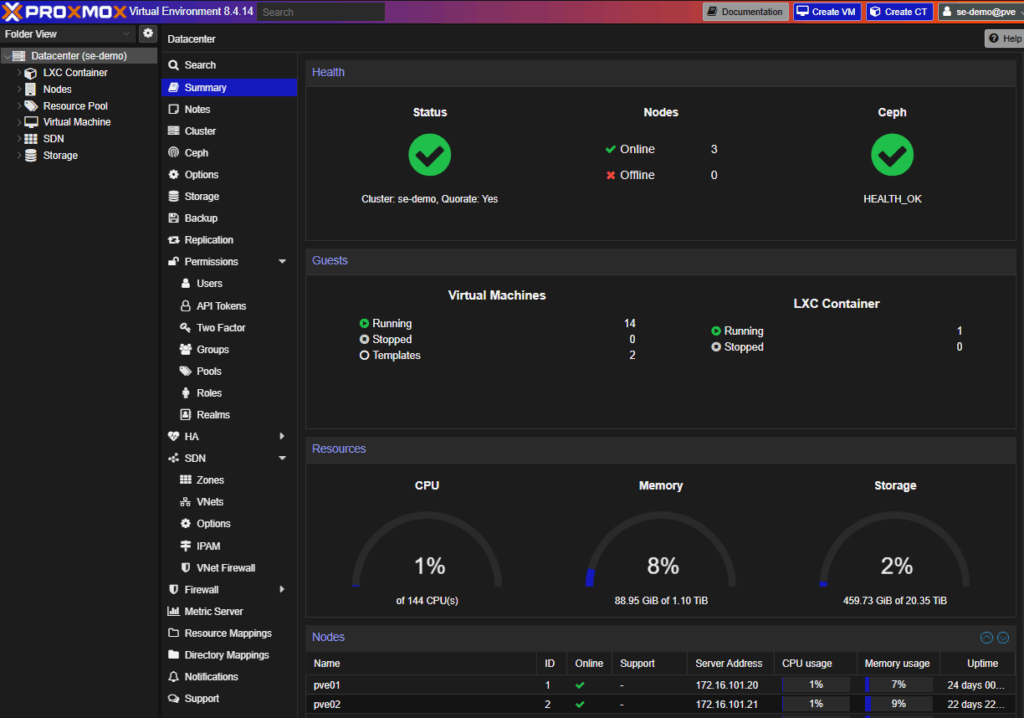
From here you can:
- Monitor cluster health and usage
- Manage permissions and authentication
- Add and configure storage
- Configure high availability (HA) and software-defined networking (SDN)
Permissions and Authentication
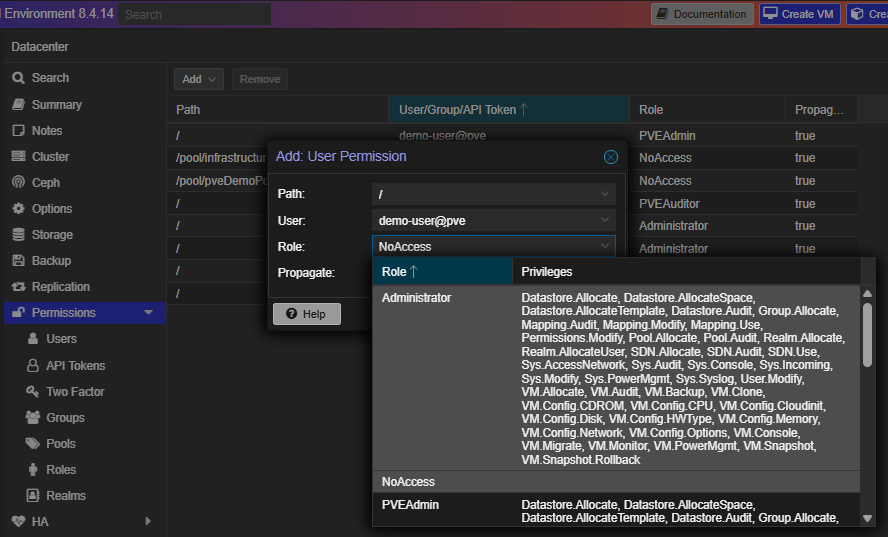
User management mirrors vCenter’s role-based access control, with additional granularity.
Add User
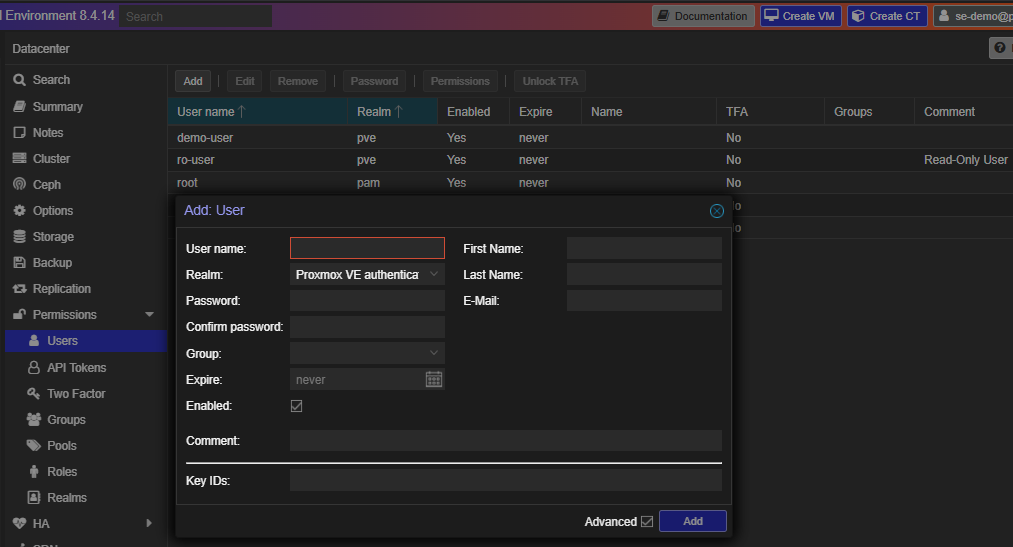
Add Permissions
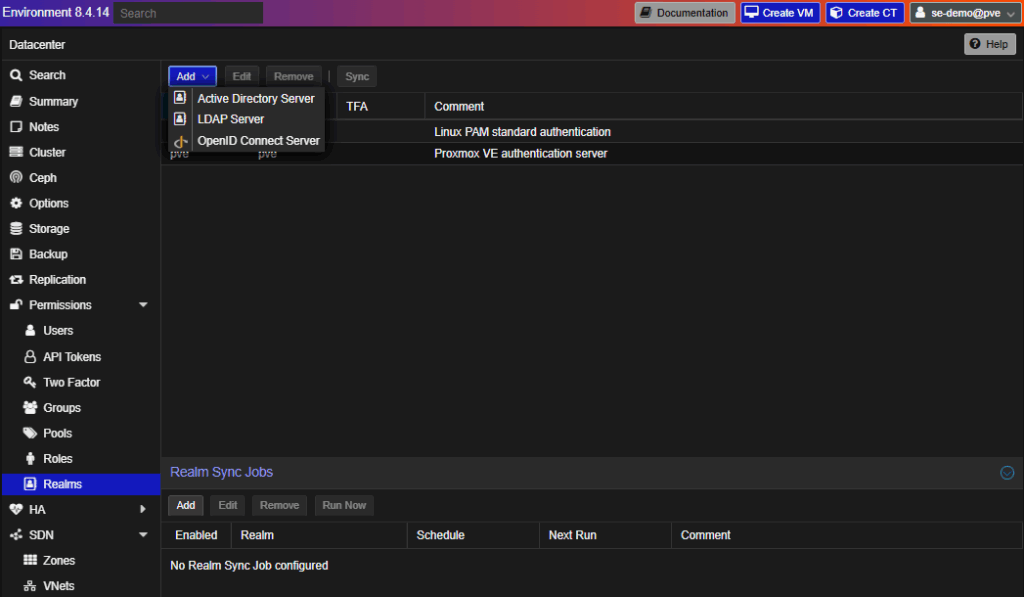
Authentication realms include LDAP, local, or Proxmox-native systems.
Realms Options
Storage Configuration
Under Storage, you can define what content types are permissible by storage class.
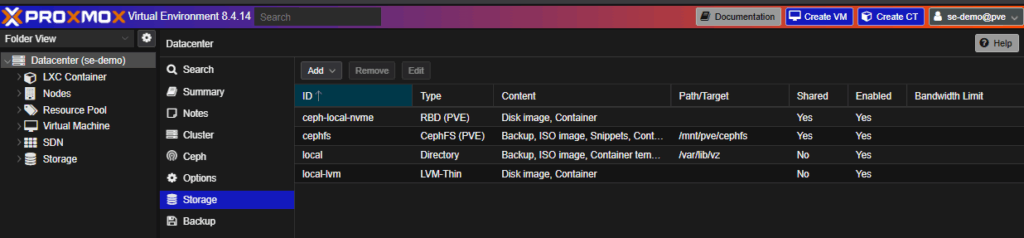
- Our standard deployment uses Ceph clustering across drives on each node, exposed as RBD (for VMs) and CephFS (for ISOs/object data).
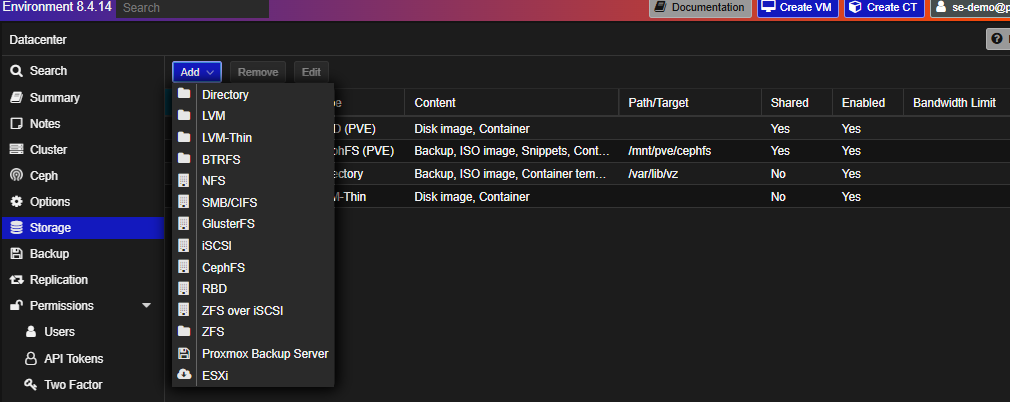
- Externally hosted Ceph storage is another good, natively supported option
- Odds are you will want to know the options for SAN storage connectivity since that’s traditionally been easier to implement than vSAN hyperconverged storage in VMware.
- NFS is our recommended option for attaching SAN storage
- iSCSI is supported but limited. We generally discourage it for production for highly available workloads.
High Availability (HA)
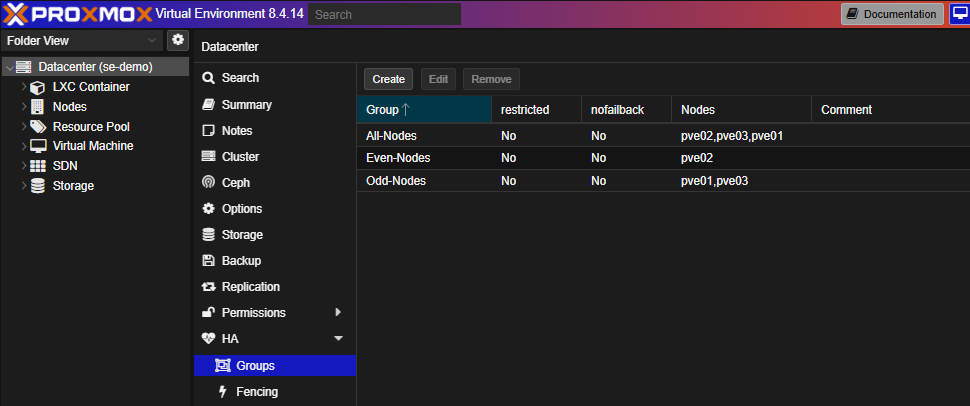
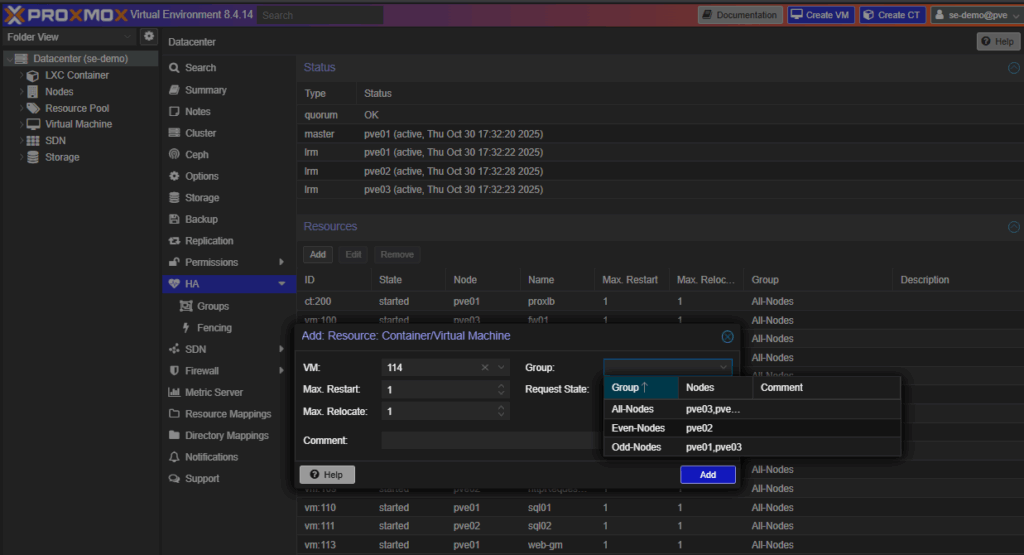
VMs aren’t HA-enabled by default. This section lets you assign them for protection in case of a node failure.
HA Groups
Add VM to HA
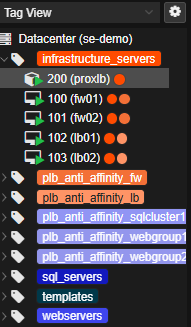
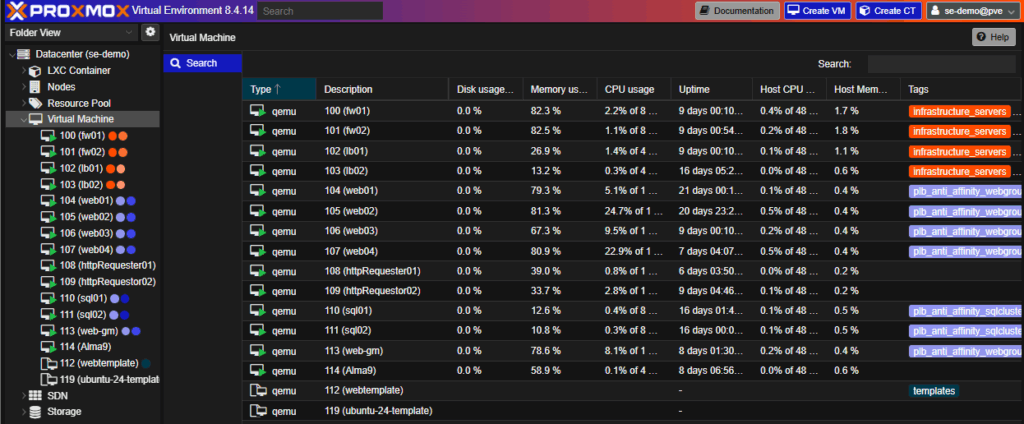
By default, Proxmox lacks vCenter-style affinity/anti-affinity rules and DRS-style balancing. We augment that using ProxLB, an open-source add-on providing:
- DRS-like load redistribution
- Proper affinity/anti-affinity functionality, facilitated through Tags
ProxLB Tag View
Software-Defined Networking (SDN)
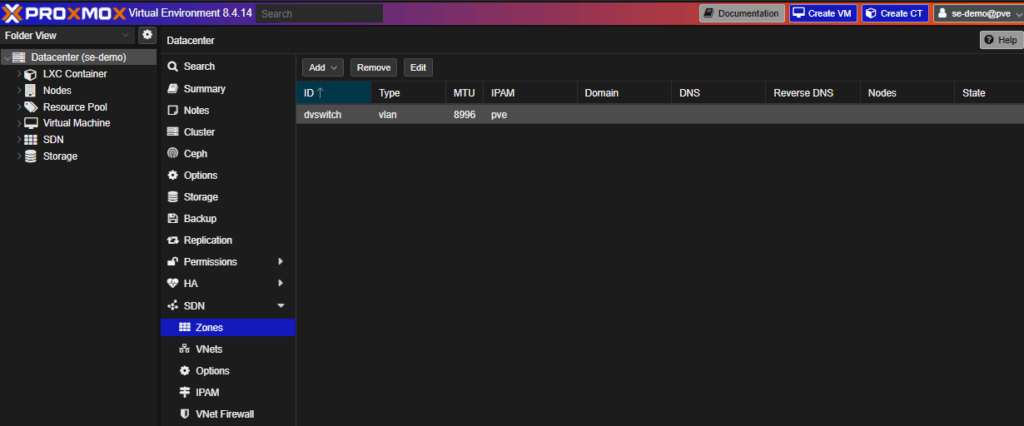
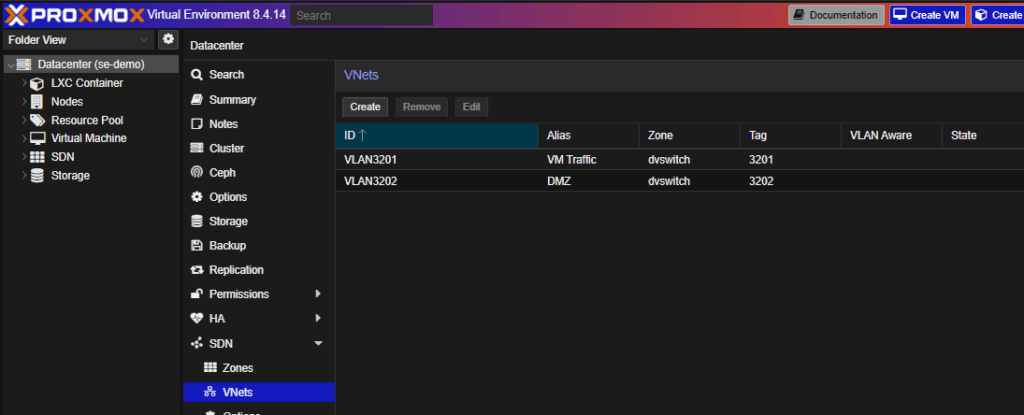
The SDN module replaces VMware’s vDS and port groups.
- Zones = Virtual Distributed Switches
- VNets = Portgroups
We rely on VLANs and firewall appliances for segmentation in our datacenter, so the isolation and firewall options within the SDN section aren’t as relevant for most deployments.
SDN Overview
SDN VNets
Looking to migrate without overlap costs?
Migration shouldn’t drain your budget. With HorizonIQ’s 2 Months Free, you can move workloads, skip the overlap bills, and gain extra time to switch providers without double paying.Get 2 Months Free
Node and VM Management
Each Node represents a hypervisor.
Node Summary
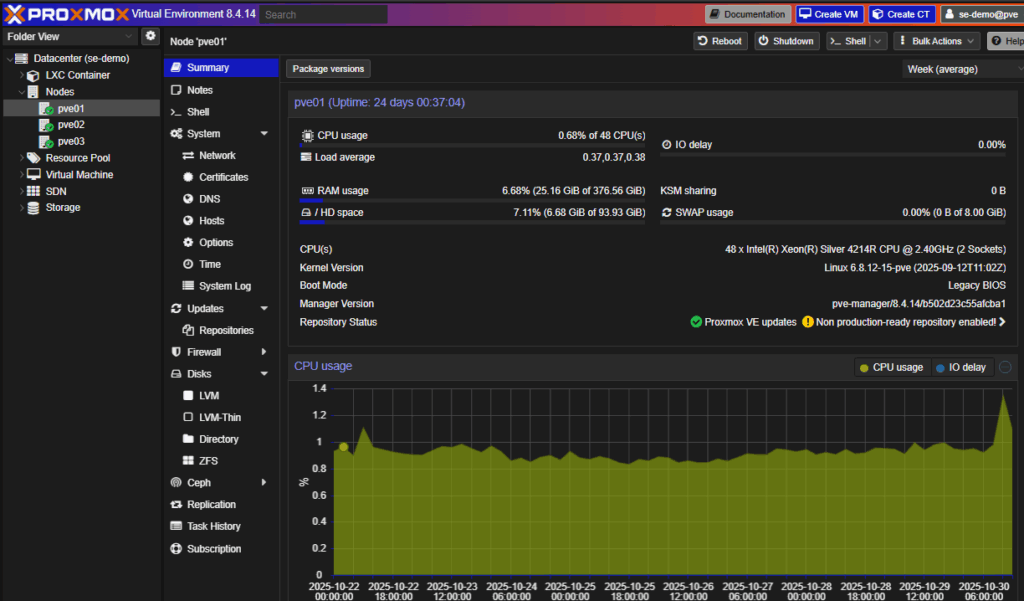
This page mirrors what you’d expect in vCenter:
- Resource usage
- Configuration panels
As an added bonus, there’s web access to the shell (no SSH needed)
VM List
VM Summary
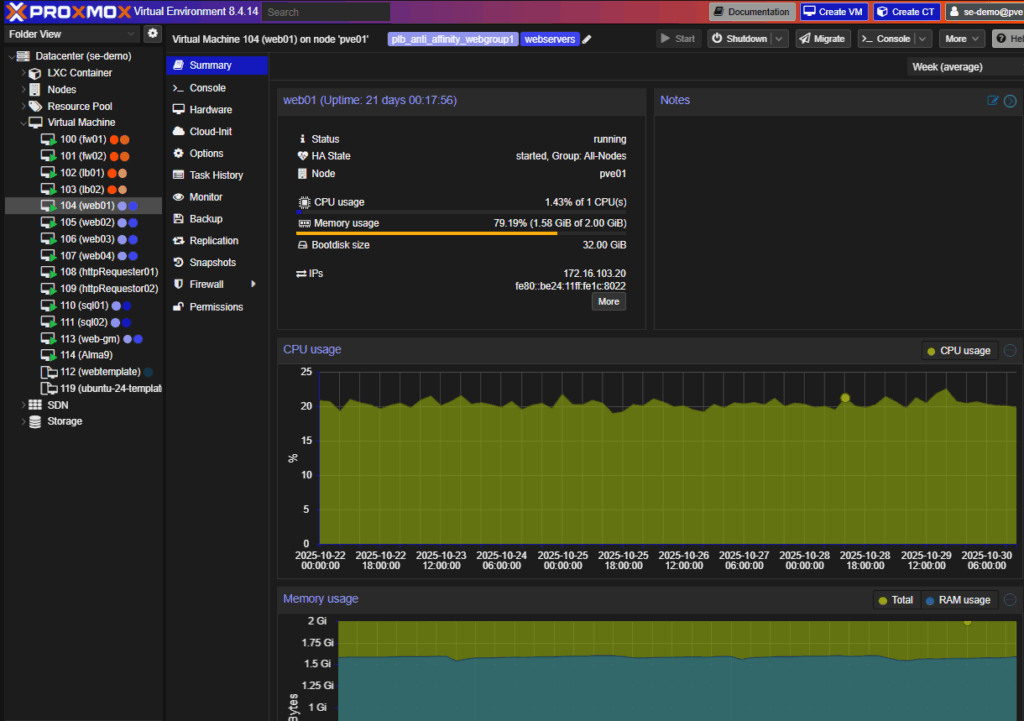
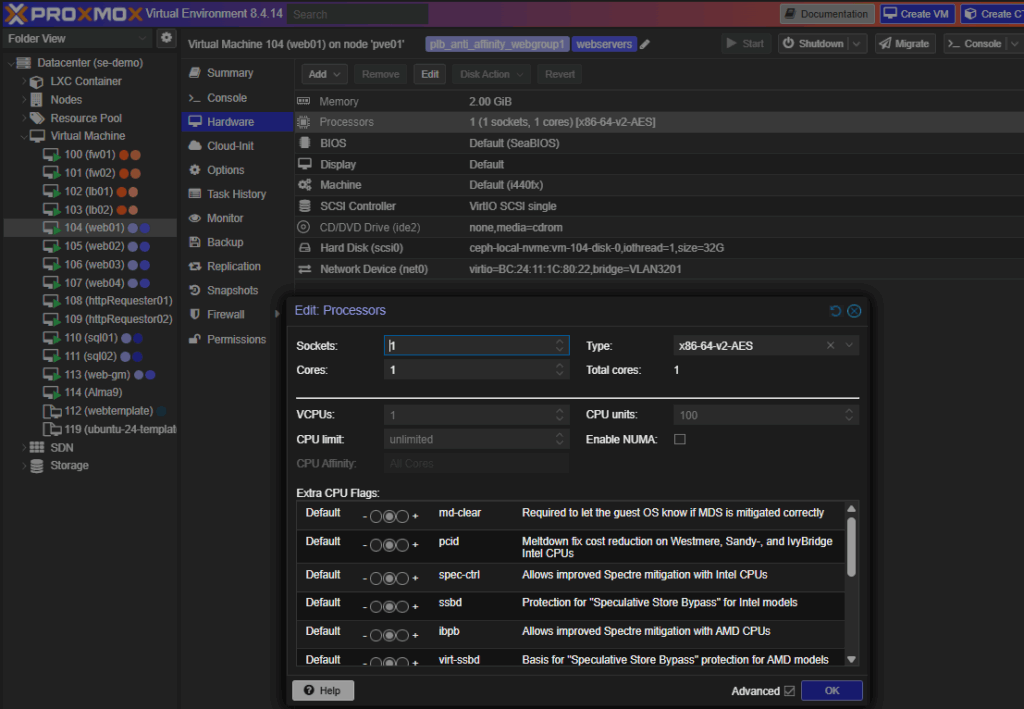
Proxmox supports console access, QEMU agent integration, and hardware hot-plugging for CPU and RAM (OS-dependent).
Edit CPU Live
Creating a Virtual Machine
VM creation in Proxmox mirrors vCenter’s workflow, with a few additional options.
- Choose a resource pool
- Add tags
- Mount an ISO for manual install
- Choose the virtual hardware and network details
Below are the key screens in order:
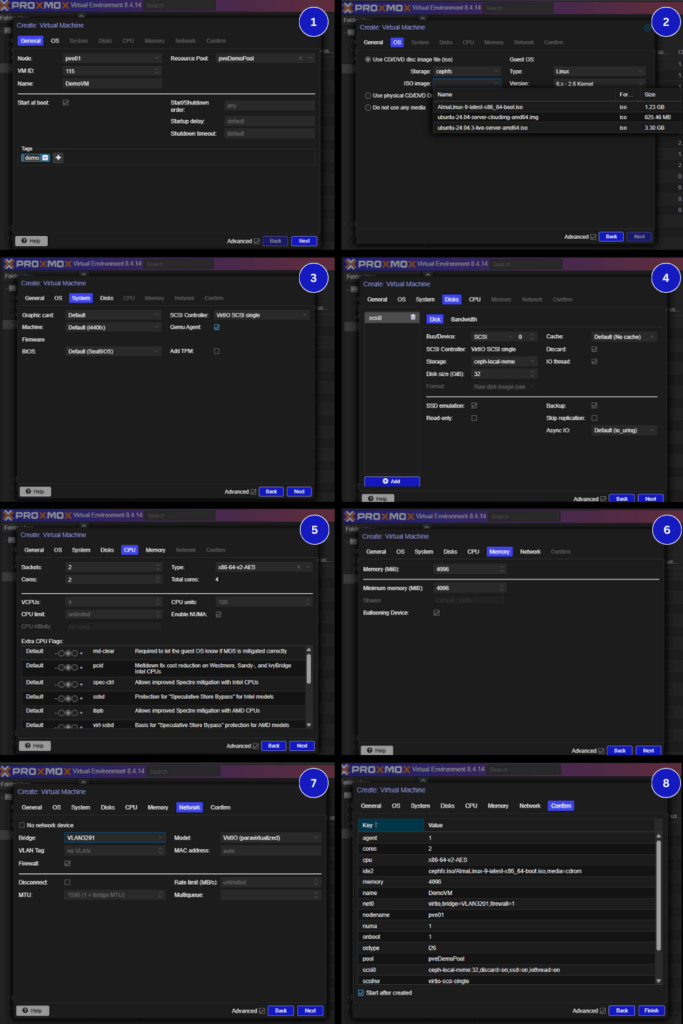
You can add multiple drives during creation, but extra NICs or devices must be added post-wizard.
Live Migration
From Server View, the Migrate function works like vMotion when shared storage exists in the cluster.
Replication-based migration is also possible without shared storage, though for enterprise environments, we focus on ensuring there’s stable shared storage available.
Discover an Enterprise-Grade Proxmox Environment with HorizonIQ
Proxmox is far more than a homelab tool. At HorizonIQ, we build and host fully managed Proxmox-based Private Clouds, complete with:
- Enterprise HA clustering
- Ceph-backed storage
- Predictable, flat-rate pricing
- 24×7 managed infrastructure
If you’re ready to escape Broadcom’s licensing squeeze without spending months learning Proxmox internals, we’ll handle the infrastructure layer so you can focus on your VMs and applications.
We even provide pre-built trial environments at no cost, so you can experience enterprise Proxmox firsthand before making the switch.
Explore HorizonIQ's
Managed Private Cloud
LEARN MORE
Stay Connected
About Author