Month: July 2026

Proxmox Subscription & Pricing Guide: What a Production Deployment Can Cost
Proxmox VE has become one of the leading virtualization alternatives for organizations reconsidering VMware following Broadcom’s acquisition. The software is open-source and free to download, which is where most articles end. Real production spend looks nothing like the free download page.
This guide walks through what a Proxmox subscription actually costs in 2026, how the per-socket licensing works in practice, what Proxmox Backup Server adds on top, and what a realistic three-node cluster runs per year once you include hardware, storage, backup, and staff time.
We also show how Proxmox pricing stacks up against VMware vSphere Standard under Broadcom’s new per-core subscription model. At the end, we’ll discuss how HorizonIQ’s Managed Private Cloud folds all of it into a single monthly line item.
Is Proxmox VE actually free?
Yes. Proxmox Virtual Environment is free and open-source software released under the GNU AGPLv3 license.
You can download Proxmox VE, install it on unlimited hardware, and use it commercially or in production without paying Proxmox Server Solutions GmbH. The free version includes the complete virtualization feature set, including:
- High availability
- Live migration
- Clustering
- Ceph integration
- Snapshots
- KVM virtual machines
- LXC containers
A paid subscription does not unlock additional virtualization features. Instead, it provides access to Proxmox’s Enterprise Repository and, depending on the subscription level, direct technical support from Proxmox.
Without a subscription, you cannot use the Enterprise Repository or open support tickets directly with Proxmox.
You can still receive updates through the public no-subscription repository, but Proxmox describes that repository as more frequently updated and less extensively tested than its Enterprise Repository. Proxmox recommends the Enterprise Repository for production environments.
What does a Proxmox subscription actually get you?
Every paid Proxmox VE subscription includes access to the Proxmox VE Enterprise Repository and the complete Proxmox VE feature set. Basic, Standard, and Premium add direct support through the Proxmox Customer Portal and access to the Proxmox Datacenter Manager Enterprise Repository and support. Standard and Premium also include remote SSH support and offline subscription-key activation.
The Community tier gets updates but no ticket entitlement. Basic, Standard, and Premium each buy progressively more tickets and a tighter first-response SLA. None of the tiers cap features, socket counts, or cluster size. The tier only changes support economics, not what the software can do.
How much does each Proxmox VE subscription tier cost?
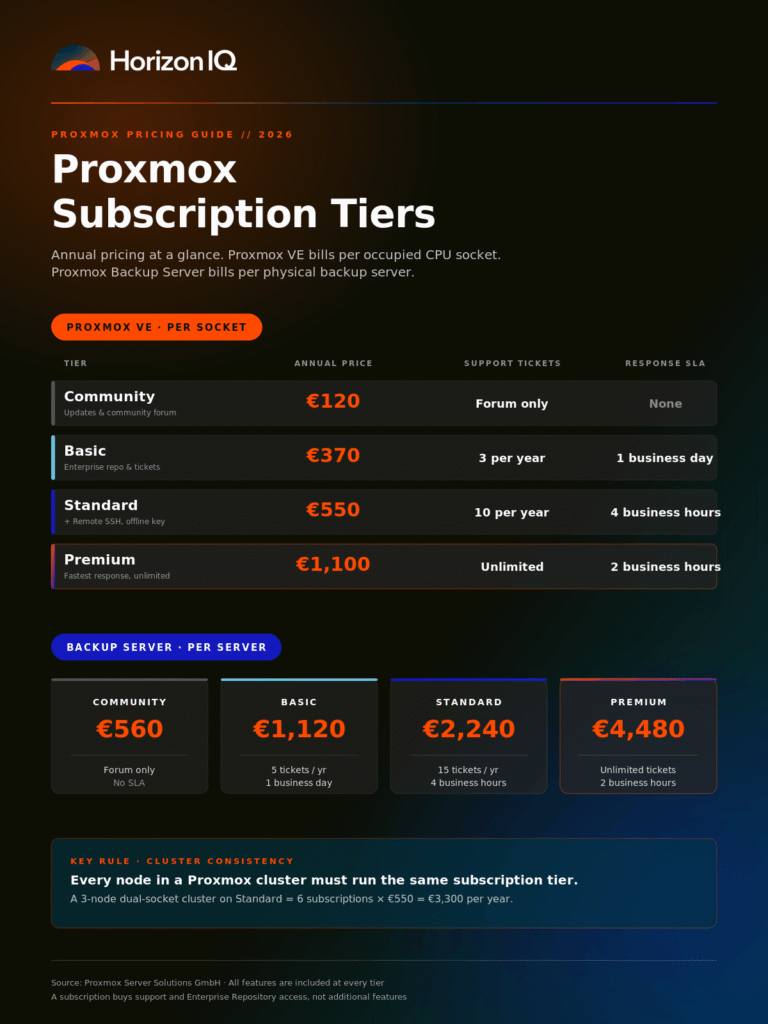
Proxmox offers four subscription tiers. Each is priced per occupied physical CPU socket, per year.
Tier |
Price (EUR) | Price (USD *) | Support tickets/yr | Response SLA |
|---|---|---|---|---|
Community |
€120 | $137 | Community forum only | None |
Basic |
€370 | $423 | 3 | 1 business day |
Standard |
€550 | $628 | 10 | 4 business hours |
Premium |
€1,100 | $1,257 | Unlimited | 2 business hours |
*USD estimates use the European Central Bank reference rate of €1 to approximately $1.1426 published on July 20, 2026. Exchange rates fluctuate.
All prices are net; VAT applies where relevant. The subscription runs one year from purchase. Renewal notices are sent 30 days before expiration.
Is Proxmox priced per CPU, per core, or per server?
Proxmox VE subscriptions are priced per occupied physical CPU socket. They are not priced per CPU core, virtual CPU, virtual machine, or server.
A server with one occupied CPU socket needs one subscription. A dual-socket server with two installed processors needs two subscriptions. An empty processor socket does not require a subscription.
That means a 64-core processor in one socket carries the same Proxmox subscription cost as a 16-core processor in one socket.
This structure can give Proxmox a significant subscription-cost advantage on modern, high-core-count hardware when compared with platforms licensed per physical core. The exact savings depend on the competing product, contract term, support level, and any additional software included in the quote.
Cluster subscription rule
Every node in the same Proxmox cluster must be subscribed at the same level. You cannot subscribe one cluster node at Community and another at Standard. Proxmox requires a consistent subscription level across the cluster to maintain repository consistency and support eligibility.
How many Proxmox subscriptions do you actually need for a real cluster?
Calculate the total number of occupied CPU sockets across all nodes, then multiply that number by the annual price of the subscription tier.
Example: Three-node cluster using dual-socket hardware
- 3 nodes
- 2 occupied sockets per node
- 6 total occupied sockets
Subscription |
Calculation | Annual cost |
Standard |
6 × €550 | €3,300 |
Premium |
6 × €1,100 | €6,600 |
Using the July 20, 2026 ECB reference rate, that is approximately:
- Standard: $3,771 per year
- Premium: $7,541 per year
A three-node cluster built on single-socket servers would require only three subscriptions, reducing the subscription expense by 50% compared with an otherwise equivalent dual-socket configuration.
This does not automatically make single-socket hardware the better architectural choice. Processor capacity, memory channels, PCIe connectivity, workload density, resiliency and hardware pricing should all be considered when designing the cluster.
What is the difference between the Enterprise Repository and the no-subscription repository?
Proxmox VE provides several package repositories.
pve-enterprise
The Enterprise Repository requires an active subscription. It is the default, most extensively tested repository and is recommended by Proxmox for production environments. Updates are released after additional testing and validation.
pve-no-subscription
The no-subscription repository is publicly accessible without a paid subscription. It provides the same Proxmox feature set, but packages may be released earlier and receive less testing before becoming available. The package versions in the Enterprise and no-subscription repositories may therefore differ at a given point in time.
Proxmox primarily positions the no-subscription repository for evaluation and non-production environments. It is technically possible to use it in production, but you do so without direct Proxmox support or the additional validation associated with the Enterprise Repository.
pvetest
The test repository contains packages intended for testing before they move into the other repositories. It should not be used for production systems unless an administrator is intentionally testing a specific update and understands the associated risk. For a homelab, the no-subscription repository is usually sufficient.
For a production or regulated environment, the Enterprise Repository may help support a more controlled and documented patch-management process. However, purchasing a Proxmox subscription does not by itself establish compliance with HIPAA, PCI DSS, SOC 2, or another regulatory framework.
What does Proxmox Backup Server cost?
Proxmox Backup Server (PBS) is a separate backup and recovery product.
Like Proxmox VE, the Proxmox Backup Server software is open-source and can be downloaded and operated without purchasing a subscription. The paid subscription provides the Enterprise Repository and varying levels of vendor support. It is not a mandatory software license.
PBS subscriptions are priced per physical backup server rather than per CPU socket. Each subscription supports unlimited backup storage and unlimited backup clients on that server.
PBS tier |
Official price | Approximate USD* | Support tickets | First-response target |
Community |
€560 | $640 | Community support only | None |
Basic |
€1,120 | $1,280 | 5 per year | 1 business day |
Standard |
€2,240 | $2,559 | 15 per year | 4 business hours |
Premium |
€4,480 | $5,119 | Unlimited | 2 business hours |
Proxmox publishes PBS subscriptions on a per-server, per-year basis.
Combined software-subscription example
A three-node, dual-socket Proxmox VE cluster using Standard subscriptions would cost:
- Proxmox VE Standard: €3,300 per year
- One PBS Standard subscription: €2,240 per year
- Combined annual subscriptions: €5,540
That is approximately $6,330 per year at the July 20, 2026 exchange rate.
This is an optional support-and-repository expense. An organization can legally operate both Proxmox VE and Proxmox Backup Server without subscriptions, although it would not receive direct vendor support or Enterprise Repository access.
What does a realistic three-node Proxmox cluster actually cost per year?
Subscription pricing is only one part of operating a production Proxmox environment.
A self-managed deployment may also require:
- Server hardware
- NVMe or other production storage
- Backup storage
- Redundant network switches
- Firewalls
- Colocation or on-premises facility capacity
- Hardware support contracts
- Monitoring
- Engineering and on-call coverage
- Migration and implementation work
The following example models a three-node Proxmox cluster using Ceph hyperconverged storage, one Proxmox Backup Server, redundant networking, firewalls, colocation and internal platform-engineering time.
Illustrative three-year TCO
Line item |
Year 1 | Year 2 | Year 3 | Three-year total |
3 × Dell PowerEdge R7625 or HPE ProLiant DL385-class nodes with dual AMD EPYC processors, 384 GB RAM, and 8 × NVMe |
$54,000 | — | — | $54,000 |
Proxmox VE Standard, 6 sockets at €550 |
$3,771 | $3,771 | $3,771 | $11,313 |
Proxmox Backup Server Standard, one server at €2,240 |
$2,559 | $2,559 | $2,559 | $7,677 |
Backup target storage, 30 TB usable |
$8,500 | — | — | $8,500 |
Redundant 10 GbE top-of-rack switches and optics |
$14,000 | — | — | $14,000 |
Redundant firewalls and support |
$9,000 | $1,800 | $1,800 | $12,600 |
Colocation, two cabinets, power and cross-connects |
$21,600 | $21,600 | $21,600 | $64,800 |
Operations and platform-engineering time, 0.25 FTE |
$40,000 | $40,000 | $40,000 | $120,000 |
Approximate three-year TCO |
$153,430 | $69,730 | $69,730 | $292,890 |
*The model uses one exchange rate for illustration. Actual subscription-renewal costs in dollars will change as the euro-dollar exchange rate changes.
In this example:
- Three-year PVE and PBS subscription costs total approximately $18,990.
- All other infrastructure and staffing costs total approximately $273,900.
- Non-subscription costs outweigh the Proxmox subscription expense by approximately 14 to 1.
The subscription is not the largest expense involved in running Proxmox. In most production environments, hardware, facilities, and the people responsible for operating the platform create the majority of the total cost.
How does Proxmox pricing compare to VMware after the Broadcom changes?
Broadcom moved VMware to a subscription-only, per-core model with a 16-core-per-CPU minimum in early 2024, leading many customers to report significantly higher licensing and renewal costs.
VMware vSphere uses a per-core licensing model with a minimum requirement of 16 licensed cores per physical processor. Proxmox subscriptions are priced per occupied physical socket, regardless of the number of cores in that socket. For a three-node cluster with two 48-core processors in each node:
- Proxmox bills 6 occupied sockets.
- VMware licensing would account for 288 physical cores.
- Proxmox VE Standard would cost €3,300 annually.
- VMware’s annual cost requires a current Broadcom or partner quote based on the specific product bundle, term, and entitlement.
Licensing-structure comparison
Metric |
Proxmox VE Standard | VMware vSphere |
License or subscription unit |
Per occupied CPU socket | Per physical CPU core |
Minimum purchase |
One subscription for each occupied socket | Minimum 16 licensed cores per processor |
Units in example cluster |
6 sockets | 288 physical cores |
Public annual price |
€550 per socket | No universally applicable public list price used in this comparison |
Support |
10 tickets and four-business-hour response target | Varies by subscription, bundle and contract |
High availability |
Included | Available with vSphere Standard |
Live migration |
Included | vMotion is available with vSphere Standard |
Dynamic resource scheduling |
Proxmox VE 9.2 includes dynamic load balancing and automatic migration for HA-managed guests | VMware DRS availability depends on the purchased edition or bundle |
Hyperconverged storage |
Ceph integration included in Proxmox VE | vSAN entitlement and additional capacity requirements depend on the VMware bundle and contract |
Backup |
PBS available as a separate open-source product | Commonly provided through a separate backup and recovery platform |
Perpetual-license option |
Not applicable to the subscription service; software remains open-source | Broadcom has transitioned VMware offerings toward subscription licensing |
This table represents why Proxmox vs VMware has moved from a hobbyist debate to a boardroom conversation. Proxmox’s per-socket structure can create substantially lower subscription costs on high-core-count hardware. However, a defensible comparison must account for:
- The VMware product or bundle
- Contract duration
- Core quantity
- Support entitlement
- Included vSAN capacity
- Additional storage licensing
- Network virtualization
- Backup software
- Migration costs
- Management tooling
What are the hidden costs of running Proxmox in production?
The software subscription and hardware are the most visible line items. The larger operational requirements can be easier to underestimate.
Migration effort
Moving workloads from VMware or another hypervisor is not equivalent to a routine live migration between compatible hosts. The project may require workload discovery, dependency mapping, VM conversion, driver changes, network redesign, application validation, and planned downtime.
Ceph design and tuning
Ceph can provide resilient, scalable hyperconverged storage, but production performance depends on architecture and configuration. Important design factors include:
- Network throughput and latency
- NVMe and OSD layout
- Replication settings
- Failure domains
- Recovery traffic
- Capacity thresholds
- Workload I/O patterns
Organizations without internal Ceph expertise may need a consultant, partner, or managed provider.
Backup validation
Proxmox Backup Server provides deduplication, incremental backups, encryption, and replication capabilities. Your team must still define and operate:
- Restore-testing schedules
- Off-site replication
- Retention policies
- Immutability controls
- Recovery procedures
- Recovery-point and recovery-time objectives
Monitoring
Proxmox includes a useful management interface and platform-level metrics. Larger environments may still need integration with tools such as Prometheus, Zabbix or an existing enterprise monitoring platform for alerting, historical reporting, log correlation and capacity planning.
Networking
VLAN-heavy, multi-tenant and microsegmented environments require careful network design. Teams moving from a mature VMware environment should document the networking, security and automation functions they currently receive before assuming that every workflow has a direct Proxmox equivalent.
Compliance evidence
The hypervisor does not create compliance on its own. Your organization must still document and demonstrate controls involving:
- Patch cadence
- Access management
- Logging
- Change management
- Vulnerability management
- Backup testing
- Incident response
- Data protection
On-call coverage
Mission-critical infrastructure requires a response plan outside ordinary business hours. Direct Proxmox vendor support operates during Austrian business hours. Organizations requiring 24/7 response must provide internal coverage or work with a partner whose service includes around-the-clock platform support.
When should you purchase a subscription?
A rough decision framework, based on how Proxmox itself and its partner ecosystem tend to advise:
Environment |
Practical starting point | Rationale |
Regulated or customer-facing environment |
Standard or managed service | Enterprise Repository access and direct support can support controlled patch-management processes, but do not establish compliance |
Mission-critical environment |
Standard, Premium or managed service | Select based on the required ticket allocation and business-hours response target |
Workloads requiring 24/7 support |
Managed service or internal on-call team | Direct Proxmox support does not itself provide around-the-clock response |
Air-gapped environment |
Standard or Premium plus Proxmox Offline Mirror | Offline activation is included at these tiers, while the Offline Mirror requires a separate subscription key |
Can HorizonIQ simplify Proxmox subscription and operations costs?
Yes. HorizonIQ Managed Private Cloud is a fully managed private cloud built on Proxmox VE and hosted in HorizonIQ data centers. HorizonIQ manages the host hardware, Proxmox platform, storage, networking, operating-system updates and monitoring. Customers remain responsible for their virtual machines, applications and other responsibilities above the operating-system layer.
Instead of separately sourcing server hardware, building and configuring the cluster, and staffing the platform internally, customers receive a managed environment designed around their workload requirements.
The applicable Proxmox support and platform costs are incorporated into the managed service rather than purchased and reconciled separately by the customer. HorizonIQ maintains a Proxmox support license covering its customer environments, while the standard Proxmox MPC architecture uses Ceph hyperconverged storage with NVMe capacity distributed and replicated across the cluster.
How HorizonIQ pricing works
HorizonIQ Proxmox Managed Private Cloud is available in three performance tiers: Essential, Advanced and Ultimate. Each environment starts with a minimum of three nodes and includes compute, memory, NVMe storage, a 10 Gbps HorizonIQ virtual firewall, 10 Gbps networking, unlimited inbound bandwidth and 10 TB of outbound bandwidth per node.
Pricing varies by performance tier and contract term. Additional nodes can be added individually as the environment grows, subject to hardware availability and provisioning time. The final quote should account for:
- Number and configuration of nodes
- CPU and memory capacity
- Usable NVMe storage
- Storage-performance requirements
- Firewall and network services
- Bandwidth
- Data-center location
- Contract term
- Operating-system management
- Migration requirements
- Required compliance controls
What HorizonIQ manages
A typical HorizonIQ Proxmox Managed Private Cloud environment includes:
- Proxmox cluster deployment and configuration
- Host hardware
- Hypervisor management
- Ceph storage management
- Network configuration
- Platform and operating-system updates
- Monitoring
- Capacity management
- Platform troubleshooting
- 24/7 infrastructure support
HorizonIQ is responsible for configuring the private cloud nodes and keeping the hardware, Proxmox platform and operating system operational. Firewall configuration and monitoring may involve shared responsibilities, while the customer remains responsible for virtual-machine management, applications, data and application-level operations.
Should you run Proxmox yourself or use a managed provider?
For many organizations, the decision is no longer simply whether Proxmox is capable of replacing VMware. The more important question is: Do you want to own and operate the Proxmox platform yourself, or do you want a provider to manage the infrastructure layer?
Running Proxmox internally may be the right choice when you have:
- Experienced virtualization engineers
- Ceph and Linux expertise
- Sufficient on-call coverage
- Existing data-center capacity
- Established monitoring and infrastructure-management systems
- A strong preference for direct platform control
A managed Proxmox environment may make more sense when you want:
- Predictable monthly infrastructure costs
- 24/7 hardware, Proxmox and operating-system support
- No separate hardware-procurement project
- No colocation deployment
- Managed platform configuration
- Managed patching and monitoring
- Access to multiple data-center locations
- A smaller internal infrastructure-management footprint
The correct choice depends on how your organization values control, internal expertise, response coverage and predictable operating costs.
What should I do next?
If you are evaluating a VMware exit or a new virtualization platform in 2026, Proxmox VE almost certainly deserves a serious look. The software is capable, the licensing model is straightforward, and the total cost of ownership is defensible in ways that VMware’s new model is not.
If you would rather not stand up and operate the platform yourself, HorizonIQ builds and runs Proxmox private clouds every day, on a monthly rate that folds hardware, licensing, storage, backup, and 24/7 support into a single number. Talk to our team about a three-node Managed Private Cloud environment sized to your workload, or request a demo of a live Proxmox HCI cluster in one of six global data centers.
Frequently asked questions
Is Proxmox VE really free?
Yes. Proxmox VE is released under GNU AGPLv3. You can install it in production on unlimited hardware without paying. What you cannot access without a subscription is the Proxmox VE Enterprise Repository or direct Proxmox support. Access to the Proxmox Datacenter Manager Enterprise Repository and support requires Basic, Standard or Premium subscriptions.
What is the cheapest Proxmox subscription?
The Community tier at €120/year (approximately $137) per CPU socket. It grants access to stable updates and the Enterprise Repository, but no ticket-based support (only the public community forum).
Do I need a Proxmox subscription for commercial use?
No, the AGPLv3 license permits commercial use. A subscription is a support and stability service, not a right-to-use license.
How many subscriptions do I need for a three-node cluster?
One subscription per CPU socket per node. A three-node cluster on dual-socket hardware needs six subscriptions. All nodes in a cluster must be on the same tier.
Can I mix Community and Standard subscriptions across cluster nodes?
No. Proxmox requires all nodes in the same cluster to run the same subscription tier to keep the repository state consistent.
Is Proxmox cheaper than VMware after Broadcom?
Substantially, yes. Proxmox’s per-socket pricing on a 48-core dual-socket host is typically 4× to 10× cheaper than VMware’s per-core subscription pricing under Broadcom, before factoring in Ceph (which is included) versus vSAN (which is licensed separately).
Does Proxmox Backup Server require a separate subscription?
No. Proxmox Backup Server is open-source and can be used without a paid subscription. Optional per-server subscriptions provide access to the Enterprise Repository and direct Proxmox support. Community costs €560, Basic €1,120, Standard €2,240 and Premium €4,480 per year.
What happens when my Proxmox subscription expires?
You lose access to the Enterprise Repository and the ability to open new support tickets. Your existing VMs continue running. You can either renew or switch that node to the no-subscription repository.
Can I run Proxmox in production without buying any subscription?
Yes. Many shops do exactly this and run the no-subscription repository in production. You accept slightly less-tested packages and no vendor support entitlement. For regulated or mission-critical environments, this trade-off is usually not worth it.
Explore HorizonIQ's
Managed Private Cloud
LEARN MORE
Stay Connected


About Author


Beyond VMware: How to Build a Smarter Infrastructure Strategy for What’s Next
The conversation around VMware has shifted dramatically over the past two years. Following Broadcom’s acquisition, many organizations are rethinking long-standing virtualization strategies as licensing changes, rising costs, and uncertainty reshape infrastructure planning.
The instinct is often to ask a simple question: What should replace VMware?
According to infrastructure experts working with organizations through these transitions every day, that’s the wrong place to start.
Choosing a new hypervisor is only one piece of a successful migration puzzle. Long-term success depends on building an infrastructure strategy that strengthens resilience, supports business goals, and gives IT teams greater flexibility over the next three to five years.
That was a consistent theme throughout the Beyond VMware: Practical Paths Forward After Broadcom webinar, where experts from Summit and Veeam shared lessons from real migration projects.
Why are organizations reevaluating VMware now?
Licensing costs may have sparked the conversation, but they’re rarely the only factor.
Many IT leaders are using this moment to revisit infrastructure decisions that have accumulated over years of growth, acquisitions, and changing business priorities.
Common drivers include:
- Higher and less predictable licensing costs
- Pressure to improve budget forecasting
- Vendor lock-in concerns
- Growing demands for disaster recovery and cyber resilience
- Expanding hybrid cloud and AI workloads
- Aging infrastructure that no longer aligns with current business needs
For many organizations, VMware simply became the catalyst for a broader modernization initiative.
Why shouldn’t VMware replacement start with choosing a hypervisor?
One of the strongest messages from the webinar was that infrastructure decisions should begin with operations, not technology.
Before evaluating platforms, organizations should ask:
- Which applications are most critical to the business?
- What service levels do those applications require?
- Which workloads belong on dedicated infrastructure?
- Which workloads benefit from public cloud scalability?
- Where does compliance require workload isolation?
- How much operational complexity can the IT team realistically support?
These questions help prevent a common mistake: migrating existing technical debt onto a new platform.
A VMware migration is an opportunity to redesign infrastructure around business outcomes instead of recreating yesterday’s environment.
How should organizations evaluate VMware alternatives?
Every environment is different, which is why there is rarely a single replacement for every workload.
Instead of comparing hypervisors alone, evaluate each option across operational requirements.
| Evaluation area | Questions to consider |
| Cost predictability | Can budgets be forecast over the next 3–5 years? |
| Operational complexity | Does the platform match existing team skills? |
| Disaster recovery | How easily can backup and recovery integrate? |
| Scalability | Will infrastructure support future growth and AI initiatives? |
| Security & compliance | Does the platform support isolation and governance requirements? |
| Vendor flexibility | Does it reduce long-term lock-in? |
Organizations with mixed environments often find that different workloads belong on different platforms, including dedicated infrastructure, managed private cloud, or public cloud services.
This workload-first approach also supports future cloud repatriation efforts as organizations balance cost, performance, and operational control.
What role does managed private cloud play after VMware?
For many businesses, the goal isn’t simply replacing virtualization software. It’s reducing operational burden while maintaining control over critical infrastructure.
That’s where managed private cloud becomes an attractive option.
Rather than managing every layer internally, organizations can leverage dedicated infrastructure backed by proactive monitoring, cloud-certified engineers, and predictable operating costs.
HorizonIQ’s Managed Private Cloud is designed around these priorities, providing:
- Single-tenant infrastructure for performance isolation
- Redundant architecture for high availability
- Multi-layer security protections
- 24/7 infrastructure management
- Centralized operational visibility
- Infrastructure that scales alongside business growth
For organizations that still require dedicated environments while reducing day-to-day management responsibilities, this model offers a practical middle ground.
Why should disaster recovery be part of every migration plan?
Migration projects naturally focus on moving workloads. The webinar panel encouraged organizations to think bigger.
Infrastructure transitions provide an ideal opportunity to strengthen:
- Backup validation
- Disaster recovery planning
- Ransomware resilience
- Recovery testing
- Documentation
- Operational standardization
Rather than treating disaster recovery as a separate project later, organizations can improve resilience during the migration itself.
This approach reduces future risk while avoiding duplicate implementation efforts.
What’s the safest way to migrate away from VMware?
One misconception is that migrations should happen as one large “lift and shift.”
Experienced migration teams generally recommend a phased approach.
Successful projects often include:
- Assess existing workloads.
- Identify application dependencies.
- Pilot low-risk systems first.
- Validate backup and recovery.
- Migrate in controlled waves.
- Test thoroughly before expanding.
Starting with development, QA, or other lower-risk workloads gives IT teams the opportunity to refine processes before moving business-critical applications.
This measured approach also limits disruption while building confidence across stakeholders.
What can organizations learn from real VMware migration projects?
One customer example discussed during the webinar was Romanoff Innovations.
Rather than rushing to replace infrastructure, the project focused on phased migration, workload assessment, stakeholder alignment, and continuous validation throughout the process.
The result was a controlled migration that minimized disruption while creating opportunities to strengthen disaster recovery and operational processes along the way.
For organizations considering a move to Hyper-V Private Cloud, our parent company Summit has also published a detailed case study showing how Romanoff successfully modernized its virtualization environment using a structured migration strategy.
The broader lesson extends beyond any single platform.
Organizations that spend more time planning tend to spend less time recovering from avoidable surprises.
How does hybrid cloud fit into a post-VMware strategy?
Many organizations no longer operate entirely on-premises or entirely in public cloud.
Instead, they’re building hybrid environments that allow workloads to live where they make the most operational and financial sense.
A modern hybrid strategy allows teams to:
- Keep sensitive workloads on private infrastructure
- Burst into public cloud during peak demand
- Support AI and GPU-enabled workloads efficiently
- Improve cost transparency
- Reduce architectural redesign as requirements evolve
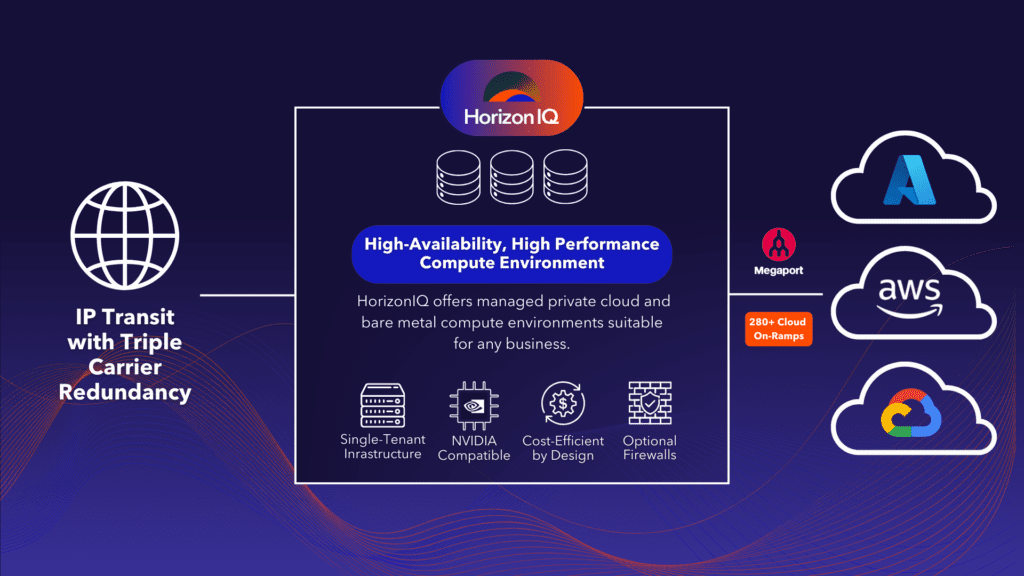
HorizonIQ Connect supports this approach by securely connecting private infrastructure with major public cloud providers while maintaining centralized management and predictable operations.
For organizations planning beyond today’s migration, hybrid flexibility may become one of the most valuable long-term outcomes.
What does a successful post-VMware strategy look like?
Organizations that emerge strongest from this transition typically share a few characteristics.
They focus on:
- Business outcomes before technology choices
- Operational simplicity alongside technical capability
- Predictable infrastructure costs
- Resilient disaster recovery practices
- Flexible workload placement
- Infrastructure that supports future AI, cloud, and growth initiatives
Most importantly, they view VMware’s disruption as an opportunity to modernize, rather than simply replace software.
That perspective creates room for stronger governance, improved resilience, and infrastructure decisions that continue delivering value long after the migration is complete.
Whether you’re evaluating managed private cloud, hybrid cloud, or alternative virtualization platforms, the objective remains the same: build an infrastructure strategy that supports where your business is going next, not where it has been.
Editor’s note: Summit is the parent company of HorizonIQ and specializes in VMware to Hyper-V migrations and managed Hyper-V private cloud solutions. We’ve included Summit resources throughout this article where they provide additional guidance for organizations evaluating their next steps.
Explore HorizonIQ's
Managed Private Cloud
LEARN MORE
Stay Connected
About Author

Running Agentic AI in Production: When Public Cloud, Private Cloud, and Hybrid Make Sense
Building an AI application and operating one are two very different infrastructure challenges.
Most organizations begin their Agentic AI journey in AWS, Microsoft Azure, or Google Cloud. Those platforms make it easy to access foundation models, provision GPUs, and experiment with managed AI services. For development teams, that’s often the right place to start.
As AI applications mature, infrastructure priorities begin to shift.
An AI agent serving thousands of customers every day has different requirements than one running in a development environment. Cost predictability, compliance, performance consistency, and operational control become increasingly important as AI moves into production.
Rather than replacing public cloud, many organizations expand their architecture by introducing private infrastructure or hybrid cloud to support long-term operations.
What is Agentic AI?
Agentic AI refers to AI systems that can plan, reason, make decisions, and complete multi-step tasks with minimal human intervention.
Unlike traditional AI applications that generate a single response, AI agents interact with external systems, retrieve information, execute workflows, and adapt based on changing conditions.
For example, a customer support agent might:
- Receive a customer question.
- Search internal documentation.
- Query a CRM.
- Check order history.
- Create a support ticket.
- Draft a personalized response.
- Escalate the issue if necessary.
Each action requires communication with other systems, making AI agents more similar to distributed applications than standalone chatbots.
Industry initiatives such as Anthropic’s Model Context Protocol (MCP) and Google’s Agent2Agent Protocol (A2A) are accelerating enterprise adoption by standardizing how AI agents securely connect with tools and services.
Why does Agentic AI change infrastructure requirements?
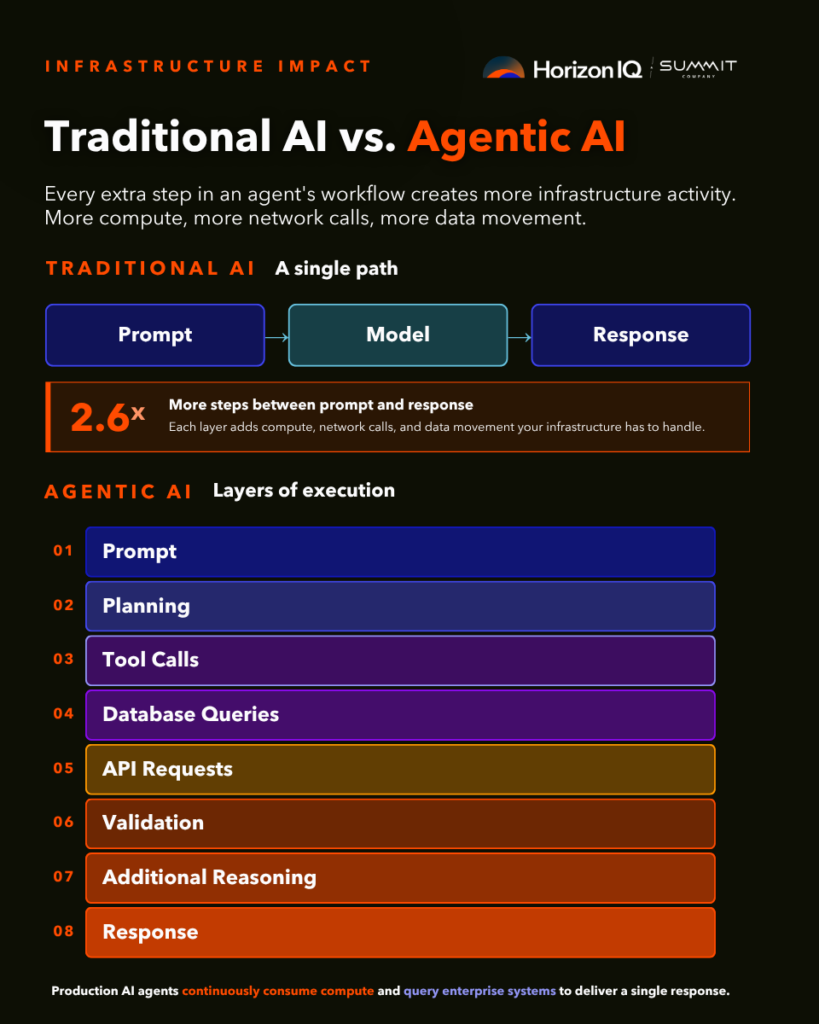
Traditional AI applications typically follow a simple path:
Prompt → Model → Response
Agentic AI introduces multiple layers of execution:
Prompt → Planning → Tool Calls → Database Queries → API Requests → Validation → Additional Reasoning → Response
Every additional step creates more infrastructure activity.
Production AI agents continuously consume compute resources, communicate across networks, access databases, authenticate with enterprise systems, and generate logs that must be monitored and secured.
As organizations deploy more AI agents across customer service, software development, finance, and operations, infrastructure becomes an increasingly important part of application performance.
AI agents spend much of their time interacting with business systems. Reliable infrastructure is essential to delivering a fast, consistent user experience.
What infrastructure challenges appear as AI applications mature?
Organizations moving from proof of concept to production typically encounter several operational challenges.
| Infrastructure Area | Early Development | Production Agentic AI |
| Compute | Small development workloads | Continuous inference serving production users |
| Storage | Model files | Vector databases, application data, logs, and backups |
| Networking | Limited API traffic | Constant communication across enterprise systems |
| Security | Developer access | User identities, agent permissions, audit trails, and compliance |
| Cost | Variable experimentation | Predictable monthly operating costs become increasingly important |
| Availability | Development uptime | Business-critical service availability |
These changes often occur gradually as AI usage expands across the organization.
When does it make sense to move Agentic AI to private infrastructure?
Public cloud remains an excellent choice for developing AI applications.
Managed AI services, flexible GPU availability, and rapid provisioning allow teams to iterate quickly while experimenting with new models and workflows.
Production introduces a different set of priorities.
As AI agents begin supporting customers, employees, or regulated business processes, organizations often evaluate whether portions of those workloads should run on dedicated infrastructure.
Common reasons include:
- Compliance and data residency requirements
- Predictable monthly infrastructure costs
- Reducing public cloud egress charges
- Consistent latency for production inference
- Dedicated GPU resources for steady workloads
- Greater operational visibility and control
This doesn’t require abandoning public cloud.
Many organizations continue building and testing new AI capabilities in hyperscale cloud environments while moving mature production workloads to private infrastructure.
Should every AI workload run in the same environment?
Usually, no. Many enterprise AI strategies are becoming hybrid by design.
| Workload | Public Cloud | Private Cloud | Hybrid Cloud |
| AI experimentation | Excellent | Limited benefit | Excellent |
| Model training | Excellent | Specialized use cases | Excellent |
| Production inference | Can become expensive at scale | Predictable performance and cost | Excellent |
| Regulated workloads | Shared responsibility | Greater operational control | Strong balance |
| Long-term cost optimization | Pay for flexibility | Pay for predictable utilization | Optimize each workload independently |
A common architecture might look like this:
- Train and experiment with new models in AWS, Azure, or Google Cloud.
- Deploy mature inference workloads on dedicated GPU infrastructure.
- Burst into public cloud when additional capacity is required.
This approach allows organizations to balance flexibility with operational efficiency.
Which Agentic AI workloads are good candidates for production infrastructure?
Many enterprise AI workloads eventually become stable, predictable services.
Examples include:
Customer support agents
Serve thousands of customer interactions every day while connecting to internal knowledge bases and CRMs.
Internal enterprise assistants
Provide employees with secure access to company documentation, policies, and operational data.
Computer vision
Continuously process video streams for manufacturing, logistics, or quality assurance.
Financial automation
Review transactions, detect anomalies, and assist with compliance workflows.
Healthcare applications
Support documentation, imaging analysis, and administrative processes while maintaining regulatory compliance.
Many of these workloads rely primarily on inference rather than large-scale model training, making them well suited for dedicated GPU infrastructure. HorizonIQ’s AI solution is optimized for production use cases including Small Language Models (SLMs), computer vision, anomaly detection, autonomous systems, and lightweight AI deployments.
Where does HorizonIQ fit into an Agentic AI strategy?
HorizonIQ isn’t designed to replace hyperscale cloud providers during AI experimentation.
Instead, HorizonIQ helps organizations optimize infrastructure as AI applications mature.
When production inference becomes a steady, business-critical workload, organizations often prioritize:
- Predictable infrastructure costs
- Dedicated GPU resources
- Compliance and data residency
- Consistent application performance
- Operational simplicity
- Expert infrastructure management
HorizonIQ’s Managed Private Cloud provides dedicated VMware or Proxmox environments with optional GPU configurations, while HorizonIQ’s bare metal GPU servers support inference-intensive applications requiring direct access to NVIDIA hardware. Teams can continue developing in public cloud while running mature production workloads on dedicated infrastructure, or combine both environments through hybrid cloud architectures. HorizonIQ manages the underlying infrastructure, monitoring, and ongoing operations so internal teams can focus on building AI applications rather than maintaining the platform.
What should organizations evaluate before moving Agentic AI into production?
Infrastructure planning becomes increasingly important as AI applications transition from prototypes to business-critical services.
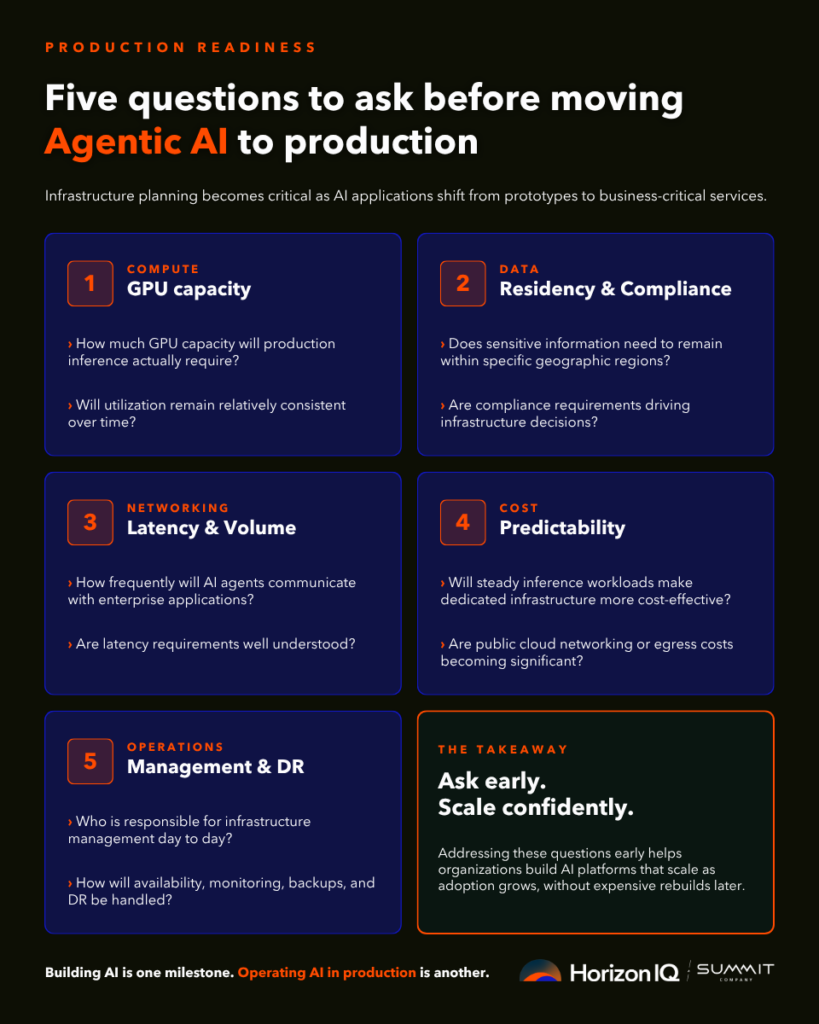
Before deploying production AI agents, consider the following questions:
Compute
- How much GPU capacity will production inference require?
- Will utilization remain relatively consistent over time?
Data
- Does sensitive information need to remain within specific geographic regions?
- Are compliance requirements driving infrastructure decisions?
Networking
- How frequently will AI agents communicate with enterprise applications?
- Are latency requirements well understood?
Cost
- Will steady inference workloads make dedicated infrastructure more cost-effective?
- Are public cloud networking or egress costs becoming significant?
Operations
- Who is responsible for infrastructure management?
- How will availability, monitoring, backups, and disaster recovery be handled?
Addressing these questions early helps organizations build AI platforms that can scale as adoption grows.
Building AI is one milestone. Operating AI is another.
Public cloud platforms have transformed how organizations build AI applications. They remain an excellent choice for experimentation, model development, and rapid innovation.
Production introduces a broader set of infrastructure considerations. As Agentic AI becomes embedded in customer experiences and business operations, organizations often seek greater cost predictability, stronger governance, and infrastructure optimized for long-running inference workloads.
For many enterprises, the goal isn’t choosing between public cloud and private cloud. It’s using each where it delivers the greatest value.
By combining the flexibility of hyperscale cloud with dedicated infrastructure for production workloads, organizations can build AI environments that scale with their business while maintaining performance, security, and operational control.
Explore HorizonIQ's
Managed Private Cloud
LEARN MORE
Stay Connected
About Author