
HorizonIQ is now a Summit company LEARN MORE.

Aug 25, 2026

Kubernetes on Private Cloud: When Does It Make Sense?

Tony Joy

Kubernetes gives teams a consistent way to deploy, scale, and manage containerized applications across infrastructure environments. Where that infrastructure runs can have a major impact on performance, cost, security, and operational complexity. 

For many organizations, public cloud Kubernetes is a logical starting point. It offers fast provisioning, elastic capacity, and integrations with cloud-native services. As workloads mature, the equation can change. Stable utilization, growing data volumes, compliance requirements, specialized hardware, and unpredictable cloud bills can make Kubernetes on private cloud worth evaluating. 

The useful question is whether dedicated infrastructure better fits the economics and operational requirements of the workloads Kubernetes is orchestrating. 

What is Kubernetes on private cloud? 

A Kubernetes private cloud deployment runs Kubernetes clusters on infrastructure reserved for a single organization. 

The underlying environment can take several forms: 

  • Kubernetes running in virtual machines on a private cloud 
  • Worker nodes running directly on bare metal servers 
  • Virtualized control-plane nodes combined with physical worker nodes 
  • Hybrid environments connecting private Kubernetes infrastructure with public cloud resources 

We previously explored both Kubernetes on Proxmox and Kubernetes deployed on bare metal. These architectures illustrate how Kubernetes can be deployed across different infrastructure models depending on the requirements of the workload. 

When does Kubernetes on private cloud make sense? 

Private cloud Kubernetes becomes particularly relevant once applications move beyond early experimentation and infrastructure requirements become easier to characterize.

When workloads have stable resource utilization

Public cloud is valuable when demand changes rapidly or remains uncertain. Once applications establish predictable baselines, continually paying metered compute, storage, and network costs deserves another look. 

Private infrastructure allows teams to size dedicated capacity around sustained demand and work from a more predictable cost base. That can be attractive for mature SaaS platforms, high-volume APIs, CI/CD environments, data processing systems, persistent services, and AI inference workloads.

When consistent performance matters

Kubernetes can reschedule workloads when nodes fail, but orchestration cannot eliminate every infrastructure bottleneck. 

Dedicated infrastructure provides greater control over CPU, memory, storage performance, networking, and hardware configuration. Teams can also incorporate GPU-enabled nodes, high-memory systems, fast local storage, or specific network configurations into the cluster architecture. 

For sustained, performance-sensitive workloads, that control can translate into more consistent application behavior.

When compliance or data control becomes more demanding

Regulated organizations may need tighter control over where data resides, who can access infrastructure, and how systems are isolated. 

Kubernetes controls such as RBAC, network policies, and secrets management remain essential. Single-tenant private infrastructure adds physical and operational isolation underneath the Kubernetes layer. 

That can be useful for healthcare, financial services, government, and other environments with strict compliance or data sovereignty requirements.

When network and egress costs become material

Kubernetes applications communicate with databases, storage, APIs, analytics systems, users, and other clusters. 

For data-intensive applications, public cloud network and egress charges can become a meaningful part of the infrastructure bill. Keeping frequently communicating services on dedicated infrastructure can make those costs easier to model. 

Key takeaway: Private cloud Kubernetes becomes more compelling as workloads become mature, sustained, data-intensive, compliance-sensitive, or dependent on specialized infrastructure. 

How does private cloud Kubernetes compare with public cloud Kubernetes? 

Consideration  Public Cloud Kubernetes  Private Cloud Kubernetes 
Initial deployment  Usually faster  Requires more planning 
Capacity  Highly elastic  Dedicated, planned capacity 
Costs  Usage-based and variable  More predictable 
Hardware  Provider-defined options  Greater configuration control 
Isolation  Logical isolation on provider infrastructure  Single-tenant options 
Data location  Available provider regions  Greater placement control 
Network costs  Egress and usage charges may apply  Easier to model for sustained traffic 
Operations  Provider manages some Kubernetes components  Self-managed or managed by infrastructure partner 
Strong fit  New or highly variable workloads  Mature, steady, regulated, specialized workloads 


A hybrid model can also make sense. Organizations can keep predictable production workloads on private infrastructure while using public cloud capacity for development, temporary demand, geographic expansion, or specialized services. 

Should Kubernetes run on private cloud VMs or bare metal? 

Both are technically viable, and the choice depends on the workload. 

Virtual machines are a strong fit for many production deployments because they simplify provisioning, resource allocation, backup, and infrastructure lifecycle management. Our Kubernetes on Proxmox guide examines how Kubernetes can be deployed on virtualized private cloud infrastructure. 

Bare metal Kubernetes becomes attractive when workloads need dedicated compute, high-throughput networking, specialized hardware, or highly predictable performance. Summit offers dedicated bare metal infrastructure for this deployment model, while our bare metal Kubernetes deployment guide covers the underlying architecture in more detail. 

Some environments use both, with virtualized control-plane nodes and bare-metal workers supporting applications with different infrastructure requirements. 

What does operating private cloud Kubernetes require? 

Moving Kubernetes to private infrastructure gives teams more control over the environment, but it also means someone needs to manage the cluster lifecycle. 

Production Kubernetes requires ongoing attention to high availability, networking, persistent storage, monitoring, backups, security patches, upgrades, scaling, and incident response. For lean infrastructure teams, those responsibilities can influence whether private cloud is operationally practical. 

Managed Kubernetes is one way to address that gap. Summit’s Managed Kubernetes runs on single-tenant infrastructure with dedicated worker nodes and supports private, public, and hybrid or multi-cloud deployments. Summit manages the control plane and infrastructure operations, including provisioning, patching, upgrades, scaling, monitoring, and security, while customers retain responsibility for their applications and deployments. 

This separation allows organizations to pursue dedicated Kubernetes infrastructure without requiring their internal team to own every layer of cluster operations. 

How can Kubernetes fit into a private or hybrid cloud strategy? 

Private infrastructure gives organizations several ways to place Kubernetes workloads based on their actual requirements. 

HorizonIQ’s Managed Private Cloud is built around single-tenant infrastructure, scalable compute and storage, redundant architecture, centralized management, and hands-on engineering support. Those capabilities align with organizations evaluating Kubernetes private infrastructure for performance, compliance, cost predictability, or greater infrastructure control. 

For organizations that still need hyperscaler services or elastic capacity, a hybrid strategy can keep predictable Kubernetes workloads on private infrastructure while using public cloud resources for temporary demand, geographic requirements, or specialized services. 

The result is greater flexibility to place workloads according to their performance, security, cost, and scaling requirements. 

How do you know when it is time to evaluate Kubernetes private cloud? 

Private cloud deserves serious consideration when several of these conditions are true: 

  1. Kubernetes utilization has become reasonably predictable. 
  2. Public cloud infrastructure or network costs are growing materially. 
  3. Applications require consistent performance or specialized hardware. 
  4. Compliance, data residency, or isolation requirements have increased. 
  5. Large volumes of data move between services. 
  6. The organization wants greater control over infrastructure architecture. 
  7. The internal team has a plan for managing Kubernetes operations, internally or through a managed provider. 

For early applications with uncertain demand, public cloud Kubernetes may remain the most practical option. 

As applications mature, Kubernetes on private cloud can provide a more deliberate foundation for predictable workloads. Dedicated infrastructure gives teams greater control over capacity, performance, security, and costs. 

The private cloud conversation becomes worth having when you understand the workload well enough to build the infrastructure around what it needs. 

Explore HorizonIQ's
Managed Private Cloud

LEARN MORE

Stay Connected

About Author

Tony Joy

Read More
Aug 12, 2026

What the Valve Data Breach Reveals About Infrastructure Risk 

Tony Joy

A cyberattack on CEVA Logistics, the company responsible for shipping Steam hardware in Europe, recently exposed Valve customer names, addresses, contact information, and order details. While Steam credentials and payment information were not compromised, Valve warned customers about potential phishing attempts. 

The impact also extends beyond Valve. The CEVA breach affected customers across multiple organizations and industries, demonstrating how quickly a compromise can spread across an interconnected business ecosystem. 

Organizations cannot eliminate every point of compromise. Infrastructure strategy can help determine what happens next by isolating workloads, restricting access, protecting critical data, and limiting how far a threat can move. 

Why are cyberattacks creating broader infrastructure risk? 

Modern organizations depend on interconnected applications, infrastructure, vendors, and service providers. Each dependency expands the environment security teams need to understand and protect. 

The trend is significant. Verizon’s 2026 Data Breach Investigations Report found third-party involvement in 48% of breaches analyzed, a 60% increase from the previous year. 

NIST similarly treats cybersecurity supply chain risk management as an organization-wide discipline. 

The CEVA incident is also an important reminder that third-party access to data is necessary in most cases. Some of the customer information provided to CEVA most likely was required for the company to fulfill its role as a logistics provider. Businesses cannot eliminate every third-party dependency or control how every partner responds to a threat. 

What they can do is understand their external threat footprint: what data vendors need, which systems they can access, and what protections are in place if one of those partners is compromised. Those conversations can help identify where exposure can be reduced and where infrastructure should be designed to contain the impact. 

A few principles can help: 

  • Know your external threat footprint. Understand which vendors process your data, what they need access to, and how that access connects to your broader environment. 
  • Limit unnecessary access. Users, vendors, and systems should have access only to the resources they need. 
  • Separate critical environments. Segmentation and workload isolation can help contain a compromise. 
  • Prepare for compromise. Assume an employee, application, vendor, or system may eventually be breached. 
  • Plan for recovery. Backups and disaster recovery should provide a path forward if critical systems become unavailable. 

The goal is to reduce the potential blast radius when one part of an environment is compromised. 

How can infrastructure design limit the impact of a cyberattack? 

No infrastructure provider can guarantee that an attack will never happen. Employees can be phished, credentials can be stolen, vulnerabilities can be exploited, and third parties can be breached. 

Infrastructure design can influence how far an attacker gets. 

Consider the difference between one compromised user and an attacker gaining access across an entire infrastructure environment. A resilient architecture should help prevent the first scenario from escalating into the second. 

Three areas are especially important: containment, protection, and recovery. 

Contain the threat 

Network segmentation, appropriate permission scoping, and workload isolation create boundaries between systems. If one environment is compromised, those boundaries can make lateral movement more difficult. 

Single-tenant infrastructure can provide additional isolation. Dedicated bare metal and private cloud give organizations greater control over how workloads and networks are architected. 

For gaming companies, HorizonIQ’s gaming infrastructure includes dedicated bare metal and single-tenant private cloud designed for workloads ranging from multiplayer hosting to content distribution and analytics. 

Protect critical infrastructure 

Access controls help limit which users, applications, APIs, and vendors can reach critical systems. Those permissions should be regularly reviewed as environments and business requirements change. 

Network-level protection also matters for internet-facing applications. HorizonIQ DDoS mitigation helps protect availability by detecting and blocking malicious traffic before it disrupts legitimate users. 

These controls are most effective when designed together rather than treated as separate security purchases. 

Prepare to recover 

Containment can reduce the impact of an attack, but organizations still need a plan for restoring critical systems when an incident succeeds. 

A recovery strategy should answer: 

  • How frequently is critical data backed up? 
  • Are recovery points isolated and protected? 
  • How quickly can critical workloads be restored? 
  • Which applications need to come back first? 
  • Has the recovery process been tested? 

Our friends at Summit offer Disaster Recovery as a Service (DRaaS) with continuous replication, automated failover and failback, immutable recovery points, and managed recovery planning and testing. 

Summit’s Managed Backup adds managed backup scheduling, monitoring, storage, and recovery with capabilities including encrypted backups and immutable storage options. 

Together, backup and DR give organizations a clearer path to recovery if prevention and containment controls are not enough. 

What should businesses evaluate in their infrastructure strategy? 

Security architecture should reflect the workloads, data, users, and operational requirements of the business. 

Area  What to evaluate  Why it matters 
Access  Who can reach sensitive systems and data?  Limits unnecessary exposure 
Isolation  How are workloads and networks separated?  Helps contain a compromise 
DDoS protection  How is malicious traffic mitigated?  Protects availability 
Backup  Where and how often is data backed up?  Provides recoverable copies 
Disaster recovery  How quickly can systems be restored?  Reduces disruption 
Monitoring  What infrastructure visibility is available?  Supports detection and investigation 
Third parties  What can outside providers access?  Helps manage supply-chain risk 

Compliance can provide another useful baseline when evaluating infrastructure partners. HorizonIQ’s compliance program supports standards and frameworks including SOC 2 Type II, ISO 27001, PCI DSS, HIPAA, and GDPR. 

How can businesses build more resilient infrastructure? 

Security decisions are interconnected. Workload isolation affects networking. Backup strategies depend on recovery objectives. Access controls need to reflect how users and applications interact with critical systems. 

That is why infrastructure security benefits from a consultative approach. 

HorizonIQ works with customers to understand their workloads, security requirements, availability needs, and growth plans before designing the supporting infrastructure. Where additional managed capabilities are required, Summit can extend that strategy with managed backup and DRaaS. 

The CEVA breach is another reminder to consider what happens after an attacker finds a way in. Can the threat move between environments? Can critical workloads remain operational? Is clean data available for recovery? How quickly can systems be restored? 

Strong infrastructure architecture cannot eliminate cyber risk, but it can help contain an incident, protect critical systems, and provide a clearer path to recovery. 

Explore HorizonIQ’s infrastructure solutions to build a comprehensive strategy around security, availability, and long-term resilience. 

Summit is HorizonIQ’s parent company and provides complementary managed IT services, including Disaster Recovery as a Service and Managed Backup. 


Explore HorizonIQ's
Managed Private Cloud

LEARN MORE

Stay Connected

About Author

Tony Joy

Read More
Aug 5, 2026

Proxmox Web UI: A Guided Tour for vCenter Admins

Tony Joy

The instinct after Broadcom’s VMware pricing shift is to ask which alternative most resembles vCenter. That’s the wrong place to start. The right question is whether the alternative’s day-two console does the unglamorous work of running an environment — cluster health, VM lifecycle, storage, HA, migration — without a separate management appliance to license, patch, and depend on.

The Proxmox Web UI does, and it has for years. What’s changed is that people searching for VMware alternatives are now looking at it seriously, and most of the tutorials and how-to guides they find were written for home-lab audiences. 

At HorizonIQ, we migrated our own hosted private cloud fleet from VMware to Proxmox. A footprint of ~300 VMs on just under 800 vCPU and 10 TB of RAM, backed by 90 TB of redundant Ceph and 225 TB of flash. Let’s take a tour of the Proxmox Web UI as it looks under enterprise load, framed against what a vCenter admin already knows.

What is the Proxmox Web UI, and how does it differ from vCenter?

The Proxmox Web UI is the browser-based management console built into every Proxmox VE node. There is no separate vCenter Server, no external appliance, no additional license SKU. Each node in a cluster serves the same GUI on port 8006, and each one can manage the entire cluster because Proxmox uses a distributed cluster file system (pmxcfs) to keep configuration state in sync.

In practical terms, you’re not paying for the console. You’re paying for the workload it runs.

That single design choice ripples through everything below. Failover doesn’t depend on a management appliance being reachable. There’s no “which node hosts vCenter today” question. Every node knows the whole cluster, and any node can drive it.

How do I access the Proxmox Web UI?

The Proxmox Web UI lives at https://<node-ip>:8006. That port – 8006 – is Proxmox’s reserved TCP port for the pveproxy service and needs to be open from wherever you administer the environment. 

In production, we sit a load balancer in front of the cluster so administrators hit a single hostname and get routed to whichever node is healthy. In a home lab, you’d just point your browser at any node directly.

First-time login uses the credentials you set during install, against the Linux PAM standard authentication realm (same account you’d use for SSH). The Proxmox VE authentication realm holds users defined inside Proxmox itself and is what most operational accounts should live in.
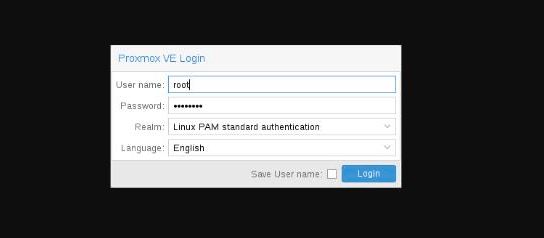
Proxmox VE log-in screen

The Proxmox VE login dialog. Realm defaults to Linux PAM; Proxmox VE realm holds users defined in Proxmox itself.

If the environment isn’t subscribed to Proxmox’s enterprise support, a subscription reminder appears on login. Production clusters at HorizonIQ are subscribed and don’t see it. In practice, it’s a one-click dismissal that is cosmetic, not blocking.

What are the four regions of the Proxmox VE interface?

The Proxmox VE user interface is organized into four regions, and every screen you’ll work in reflects that layout.

At the top is the header, with the version string, a global search, and the buttons for creating a VM or container. On the left is the resource tree — the equivalent of the vSphere inventory pane — with four switchable views (Server, Folder, Pool, Tag) for different ways of grouping the same underlying objects. The center is the content panel, which changes depending on what you’ve selected in the tree. And at the bottom is the log panel, which streams task history and cluster events across the whole environment.
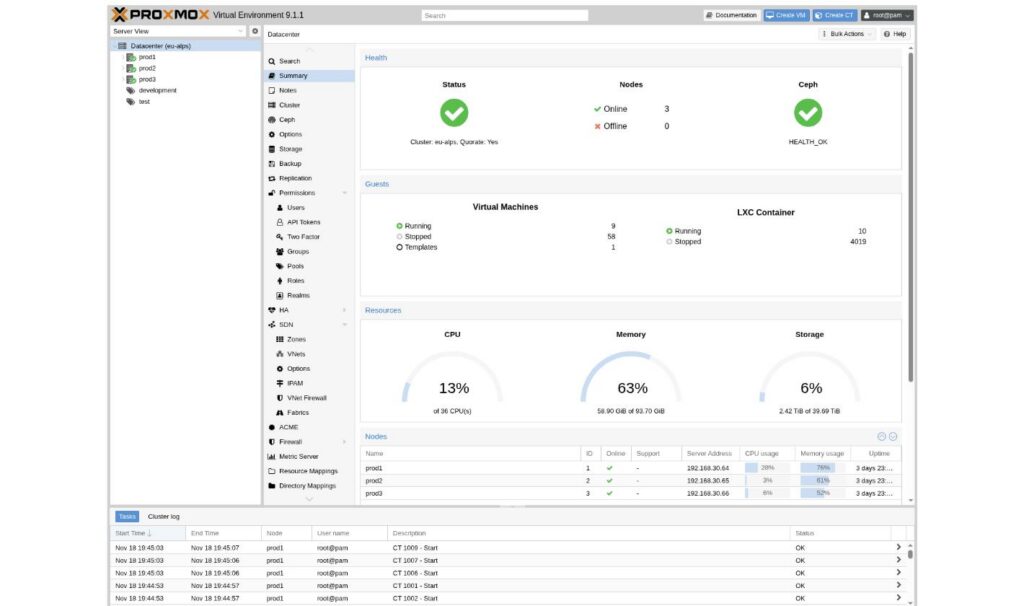
Proxmox Datecenter Summary screen showing health, guests, resources and nodes

The Datacenter Summary panel – health, guests, CPU/memory/storage gauges, and the node list. This is where most operators live during a triage.

Clicking the Datacenter object at the top of the tree is the equivalent of clicking the vCenter root. The Summary tab gives you the at-a-glance health data you’d expect: cluster quorum, node online/offline count, Ceph health, VM and container counts, and the CPU/memory/storage gauges.

What can I configure from the Datacenter level?

The Datacenter-level menu is where the cluster-wide configuration lives. Here’s a quick tour of the panels a VMware admin will care about:

Cluster and Ceph

Creating a cluster is a modal dialog — pick a name, optionally define a second Corosync link for redundancy — and adding a second and third node is done by generating a Join Information blob on the founder and pasting it into the joiner.
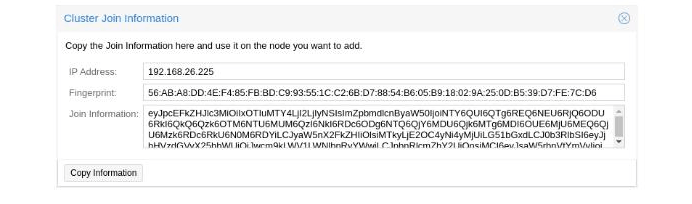
Screen showing the Proxmox join info box

The Cluster Join Information dialog. Copy the base64 blob on the founder, paste into the joining node.

Options

Global keyboard layout, HTTP proxy, HA defaults, tag registry. The sort of settings you’d expect to find scattered across half a dozen vCenter dialogs are here on a single sortable list.

Storage

Add and configure every storage backend the cluster can see, and gate what content type (VM images, ISOs, container templates, backups) each backend is allowed to hold. At HorizonIQ, we use the local Ceph cluster on the Proxmox nodes themselves and offer it up as RBD for VMs and CephFS for ISOs and object storage. NFS to a SAN appliance is also a solid alternative. We tend to discourage iSCSI. While Proxmox supports iSCSI, HorizonIQ generally favors Ceph or NFS.
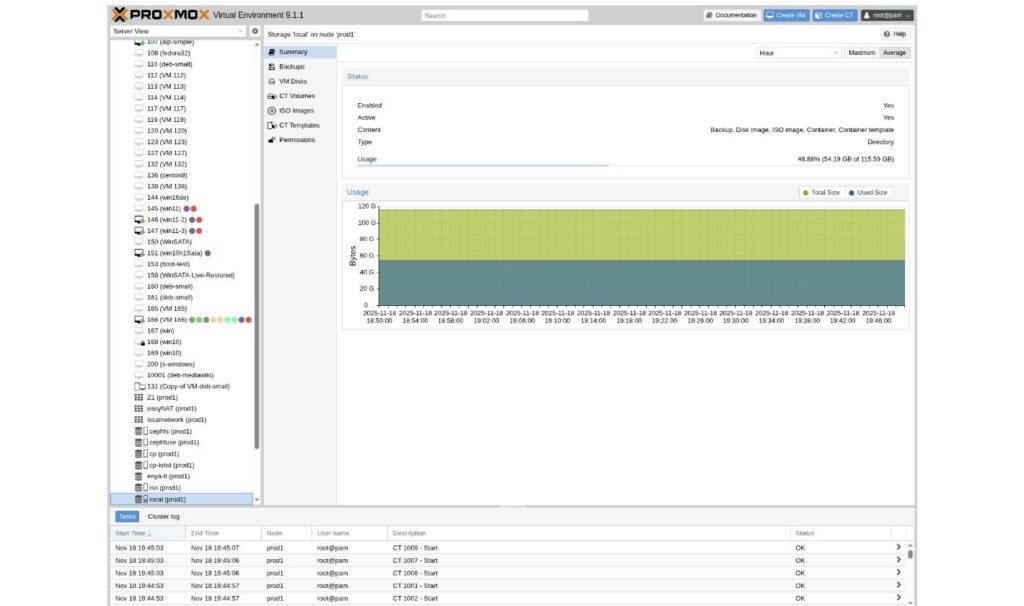
A screen showing the Proxmox storage summary

The Storage panel. Enabled/active status, content type gating, and a usage-over-time chart per backend.

HA

VMs aren’t protected by high availability by default. The HA section is where you nominate the ones that should restart on a surviving node if their host disappears. 

Two things to note here for a vCenter admin: Proxmox VE 9.0 added native HA Resource Affinity Rules. They can keep related HA resources together or deliberately place redundant instances on different nodes. With the introduction of Proxmox VE 9.2, a built-in Dynamic Load Balancer was introduced. It can automatically migrate HA-managed guests based on real-time resource utilization while respecting HA rules.

Before that, we used an add-on called ProxLB to get DRS-style load redistribution and the proper affinity behavior that vCenter spoils admins with. It slots into the same UI once installed.
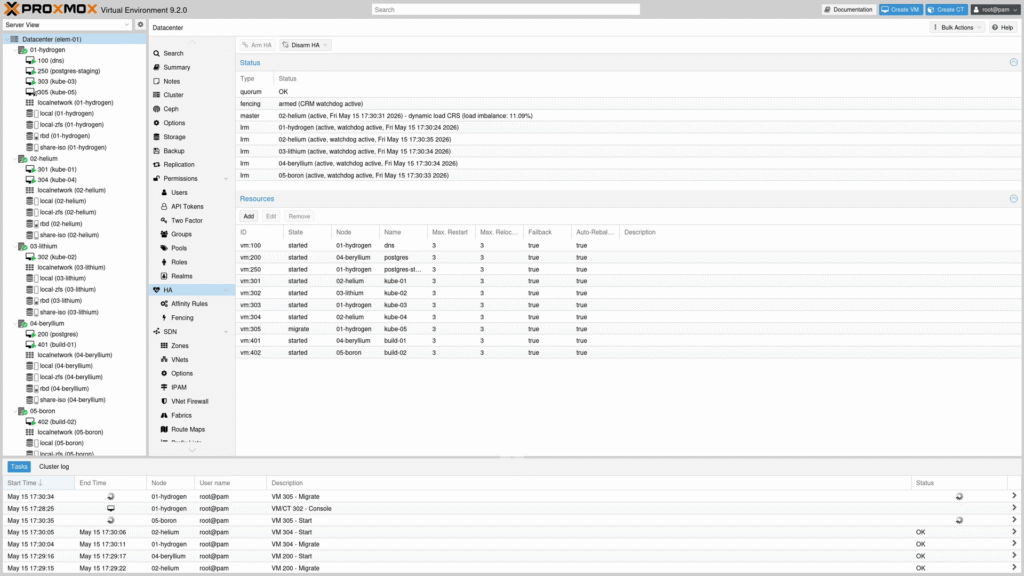
A screen showing the Promox High Availaibility status and resources

HA Manager Status. Quorum, master and LRM state per node, and the list of protected resources.

Permissions

Role-based, with LDAP and Active Directory realms configured under Permissions -> Realms. Two-factor authentication (TOTP and Yubikey) is supported out of the box.

SDN

Zones stand in for virtual distributed switches, VNets for port groups. Firewall rules can be applied at the VNet, node, or VM level. In a home lab, that’s a full-featured east-west security posture. In a data center, we use VLANs and dedicated firewall appliances for segmentation, so the built-in firewall stays out of our critical path.

How do I manage a node from the Proxmox Web UI?

Selecting a node in the tree pulls up the summary a VMware admin would expect on an ESXi host: real-time CPU/RAM/disk, historical charts, and every per-node knob (updates, firewall, certificates, Ceph, disk configuration, task history).
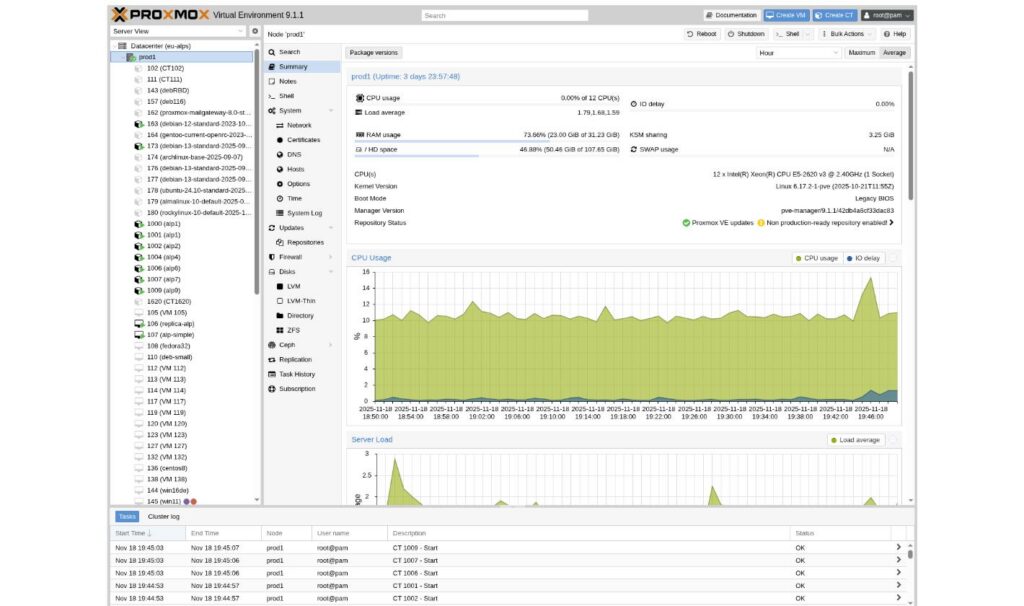
A sccreen showing the interface for the the Proxmox node summary

Node Summary. Real-time stats, historical CPU usage, and every per-node configuration menu on the left.

The one addition that has no vCenter analogue is a built-in shell. Every node exposes a full xterm.js terminal in the browser, no SSH client required. It’s the escape hatch for anything not yet in the GUI, and for out-of-hours triage, it’s genuinely faster than jump-hosting.

How do I manage VMs from the web interface?

The VM summary panel shows the data a vCenter admin already knows how to read: current host, resource allocation, live usage, guest OS, IP addresses (if the QEMU guest agent is installed), and a console button. The left-hand VM menu breaks out Hardware, Cloud-Init, Options, Snapshots, Backup, Replication, Firewall, and Permissions — each of which is a familiar concept under a slightly different label.
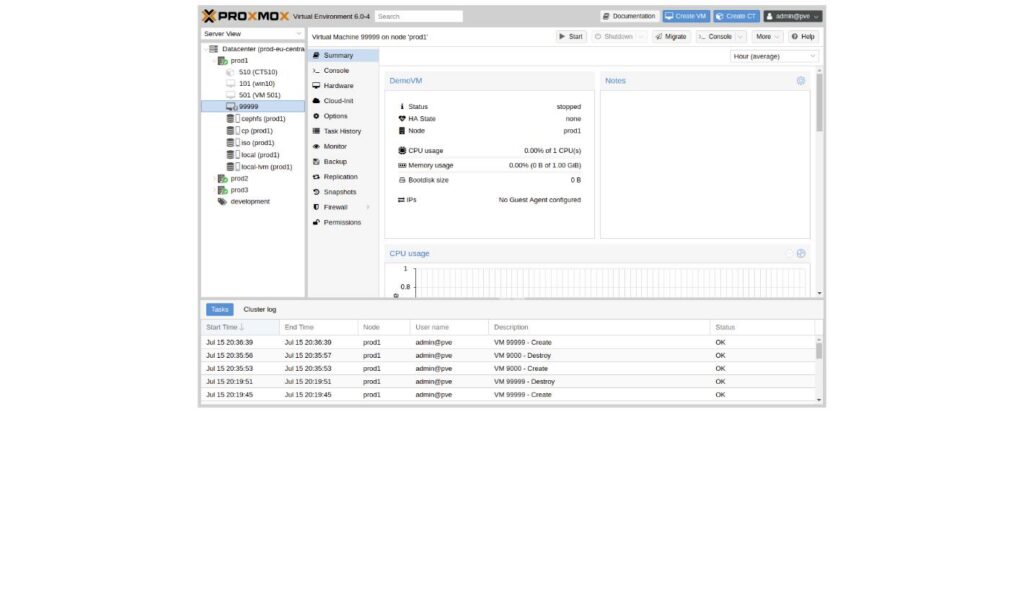
A screen showing the interface for the Proxmox Virtual Machine SummaryVM Summary. The left menu covers everything you would find under a vCenter VM inventory object.

The console is HTML5 by default and works well enough for initial ISO installs and out-of-band troubleshooting. SPICE is available for workloads that want a richer remote desktop experience. Hot-plug is supported for CPU and RAM but is finicky by guest OS. In practice, we reboot for hardware changes when it’s feasible.

The Create VM wizard walks the standard path — pick a node, a resource pool, tags, an ISO, then CPU/memory/disk. You can add multiple drives inside the wizard, but additional NICs or other hardware get attached after the initial create.

Migration 

The vMotion equivalent works from the same right-click menu as everywhere else. With shared storage (Ceph, NFS) it’s a live migration in the vSphere sense. Without shared storage, Proxmox can still perform a live migration by transferring the VM’s local disk data to storage on the target node.

How does the Proxmox Web UI compare to vCenter?

Concept

vCenter Proxmox Web UI

Management appliance

vCenter Server (separate) Every node serves the same GUI on port 8006

Inventory view

Hosts and Clusters Server View

Distributed switch

vDS SDN Zone

Port group

Port Group VNet

Datastore

Datastore Storage (RBD, CephFS, NFS, ZFS…)

Live migration

vMotion Migrate

Cluster HA

vSphere HA Datacenter -> HA

Load balancing

DRS Built-in Dynamic Load Balancer for HA-managed guests (PVE 9.2+)

Affinity / anti-affinity

DRS Rules HA Resource Affinity Rules, or ProxLB

Role-based access

Global permissions Permissions + Resource Pools

Console

Web Console / VMRC HTML5 (built-in) or SPICE


The tradeoff is real. Proxmox trades a polished DRS implementation and some vSphere-native niceties for the operational simplicity of not running a separate management stack. For most workloads, that trade is worth it. 

What organizational views does the Proxmox Web UI offer?

Four, all sourced from the same underlying inventory:

Server View 

The closest analogue to the vSphere Hosts and Clusters view — nodes with their VMs and containers nested underneath. It’s the default for a reason.

Folder View 

Groups the cluster by object type: all nodes together, all VMs together, all storage together. Useful when you’re looking for something by kind rather than by location.

Pool View 

Groups by resource pool. Resource pools are the closest Proxmox has to a vCenter folder. They exist both to group objects and to define permissions on those groups. If a team should only see their own workloads, a resource pool plus a role assignment is how you draw that line.
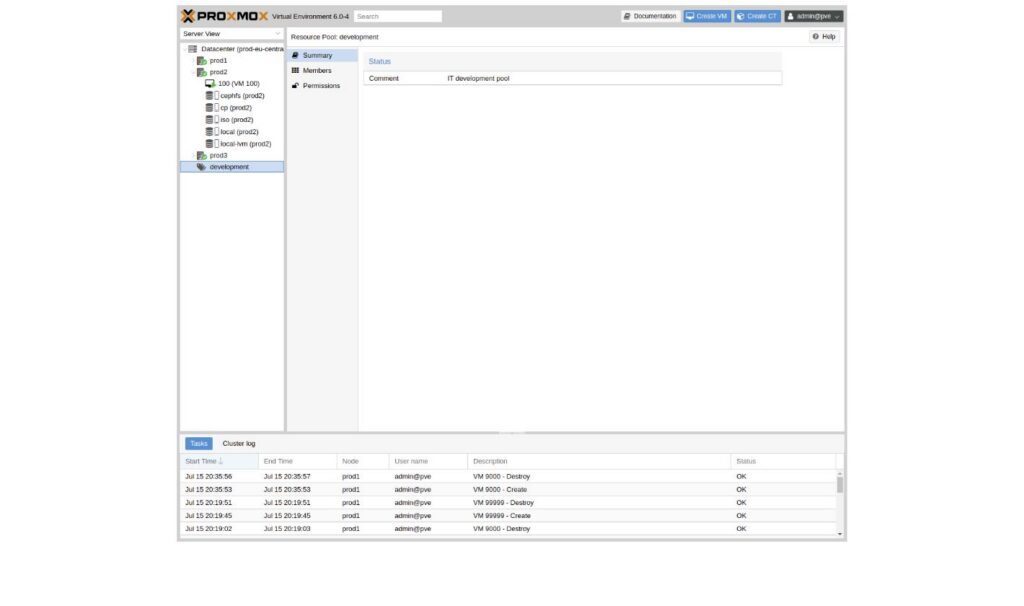
A screen showing the interface for the Proxmox resource pool summary

 Resource Pool summary. Group objects and scope permissions together.

Tags 

Every VM can carry any number of colored tags, and a dedicated tag view lets you filter across the whole environment. Tags are not designed to interact with user permissions – resource pools handle that – but you can restrict which tags a user is allowed to apply.


A screen showing the Proxmox inline tag editor on a VMInline tag editor on a VM. Tags overlay the tree for a second, orthogonal way to slice inventory.

Why can’t I access the Proxmox Web UI? Common troubleshooting

The three most common reasons the Proxmox Web UI is unreachable, in the order you should check them:

  1. Port 8006 is not open. The pveproxy service listens on TCP 8006 on every node. Confirm with `ss -ltnp | grep 8006` on the node, then check the network path from the browser.
  2. Check the status and logs for pveproxy and pve-cluster. Restart pveproxy if appropriate; investigate quorum and cluster state before restarting pve-cluster.
  3. Certificate warning is blocking the browser. The default certificate is self-signed. For production, wire up an ACME (Let’s Encrypt) certificate under Node -> System -> Certificates and the warning goes away for good.

The practical takeaway

The Proxmox Web UI gets dismissed as a nice-to-have, usually by teams who still equate polished tooling with vendor tax. In practice, it does the unglamorous work of daily operations well, and it does it without a separate management appliance to license and depend on.

For a vCenter admin, the vocabulary shifts and a handful of features move from built-in to add-on, but the operating model is familiar enough that most of the learning curve is naming, not concept. Everything you needed vCenter to do at the fleet level lives at https://<any-node>:8006 – on any node, from any browser, with no additional server to keep alive.

At HorizonIQ, our Proxmox Managed Private Cloud adds the engineering, monitoring, support, and operational expertise needed to run Proxmox reliably at scale.

If a picture is worth a thousand words, HorizonIQ’s six-minute walkthrough of the Proxmox Web UI is worth the rest of this article. 

Watch the tour, and contact us with the questions your migration actually raises.

Explore HorizonIQ's
Managed Private Cloud

LEARN MORE

Stay Connected

About Author

Tony Joy

Read More